Monitor a Broadcaster Feed
If you have access to a ZEN Master, you can add the Broadcaster to a manual Cluster and monitor the input through a Monitor Only Source on the ZEN Master.
Adding the Broadcaster to a Manual Cluster
In ZEN Master, download an SSH key by selecting an existing SSH key or creating a new one - See - Configuring SSH Keys. Store the SSH key, as you will need to upload it to your Broadcaster.
In ZEN Master, configure the Broadcaster on a Manual Cluster - See - Adding a Broadcaster to a Manual Cluster. In the SSH Key field select the SSH key that you have used or created in step 1.
Connect your Broadcaster to the Cluster by following these steps - Connecting the Zixi Broadcaster (Zixi Broadcaster UI – For Manual)
Create a Monitor Only Source
In a web browser, navigate to https://.zen.zixi.com
When you sign in, you should see the Zixi ZEN Master dashboard.
In the left navigation, select Sources.
Select +Add.
Select Monitor Only.
The Name will come from the Broadcaster Input ID.
Enter the following information:
- Tags – Add Tags to control access to this Source
- Broadcaster – Select your Broadcaster
- Broadcaster Inputs – Select the Broadcaster Input associated with the On Air Pro app
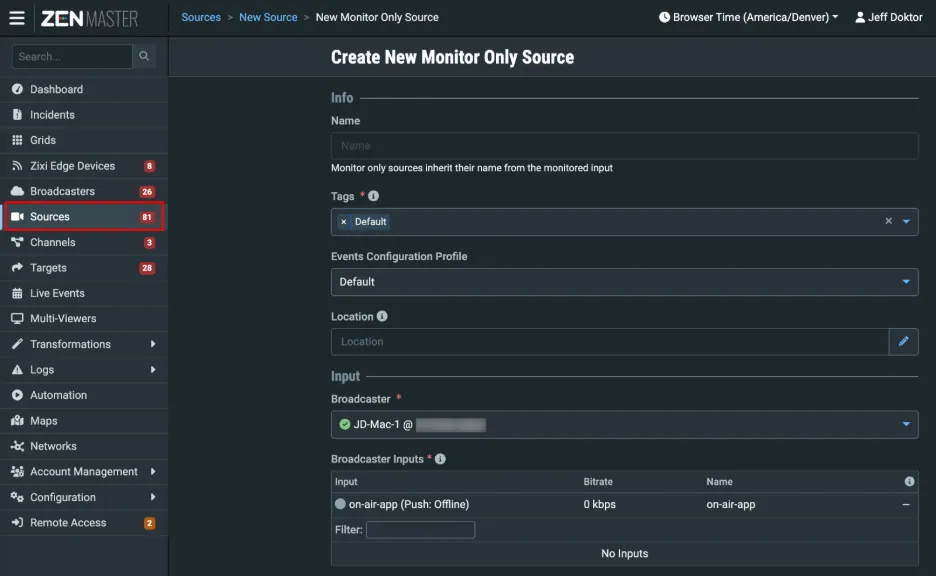
For information about the other fields for this Source, see the Adding a Source – Monitor Only document.
Select Save to create the Source.
With the Monitor-only Source, ZEN Master shows stream information details, including some historical data.