OBS Studio Configuration
2 min
Once installation is complete, there will be new Zixi Service available as a stream destination in OBS Studio. To configure OBS Studio to send a Zixi stream, click on Settings:
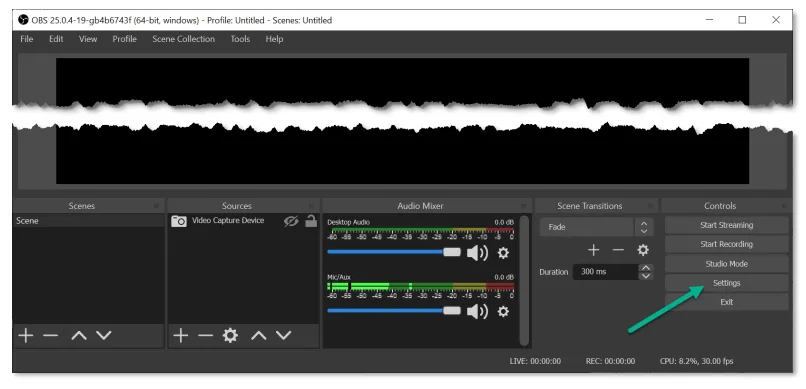
OBS Menu
- Under the Stream menu on the left, select Zixi Broadcaster as the Service. You should see a form pop up below. (If you do not see the form, select a different Service and then select Zixi Broadcaster again to refresh the page.)
- Configure the Zixi Broadcaster URL with the Broadcaster IP address, Ports, & Stream ID from the Broadcaster or ZEN Master configuration as show below.
Port is only necessary if it is not the default 2088. zixi://{hostname}/{streamID}:{port}
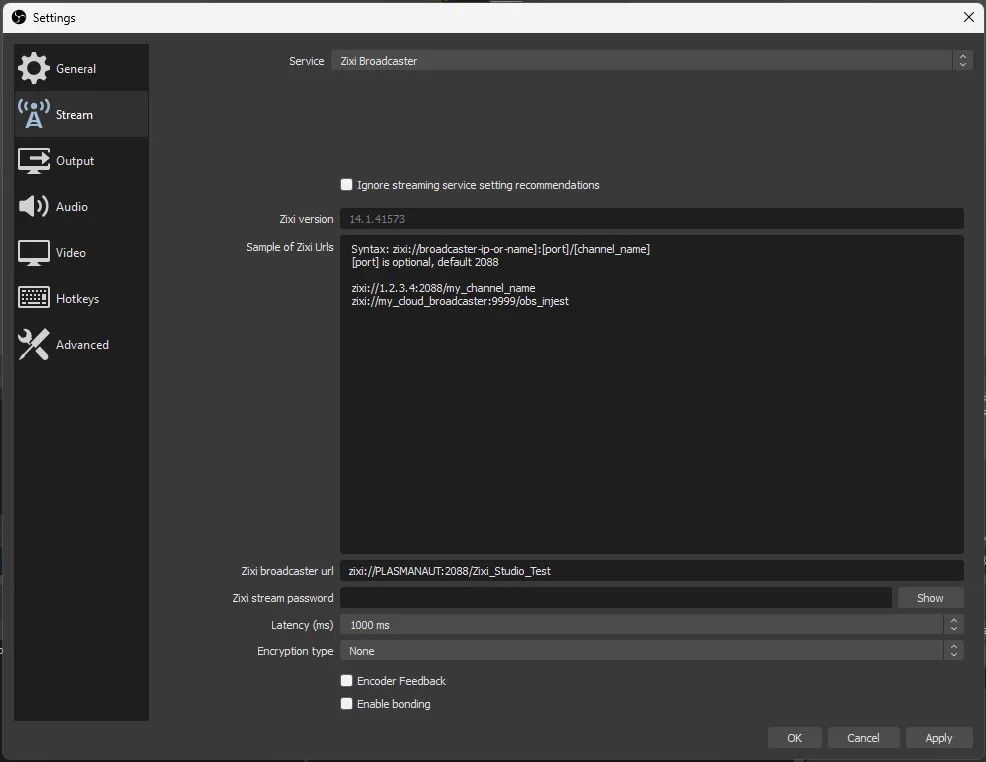
- Set the desired latency buffer and enable encoder feedback and bonding if desired. Encoder feedback will dynamically reduce the bitrate of the encoded stream based on upstream congestion measured during transmission of the Zixi protocol.
- Bonding will send the Zixi stream spread out as evenly as possible across all available NICs. As long a one network connection to the Broadcaster remains with sufficient bandwidth for the stream, there will be no disruption in delivery.