Zixi Latency Negotiation
Overview
Video latency refers to the time elapsed between the source capture and the player's rendering. Zixi’s software platform provides a flexible approach to latency management across origin, Broadcaster, and destination components.
When setting latency values, consider the tradeoffs between low delay, error recovery, and network delivery.
Platform latency
The following describes latency negotiation between client and server (Zixi Broadcaster).
Push mode
In push mode, the sender actively pushes a video stream to a destination.
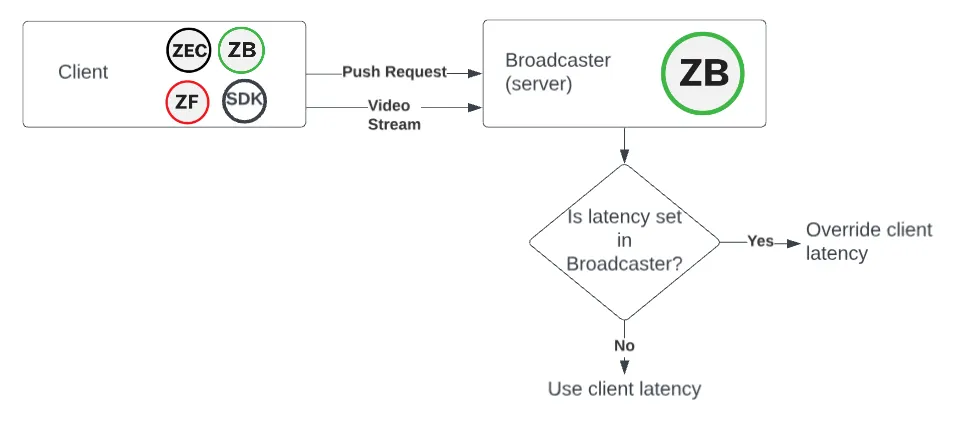
Diagram:
- The client can be associated with:
- Feeder
- ZEC as feeder
- Broadcaster as feeder
- Embedded feeder SDK
- Latency is required for the client PUSH output.
- Latency is optional for the Broadcaster (server).
- Broadcaster negotiation:
- If latency is not set in the Broadcaster, use the client latency.
- If latency is set in the Broadcaster, override the client latency.
Pull mode
In Pull mode, the receiver initiates the connection and requests the stream from the Broadcaster.
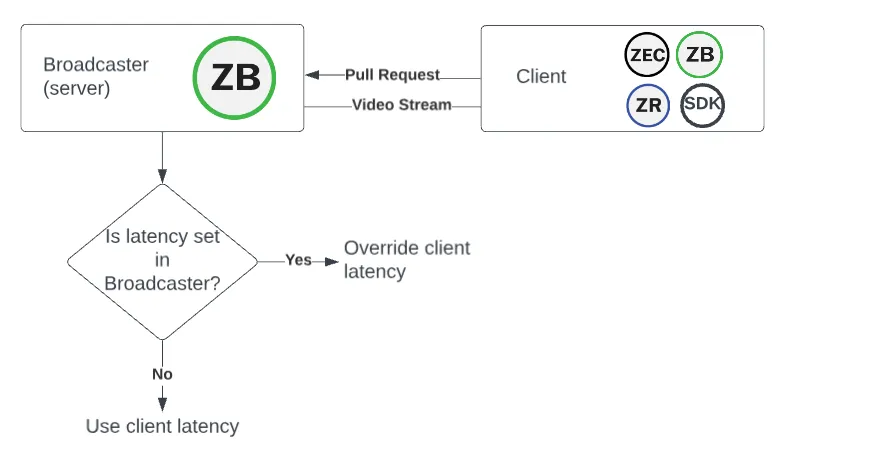
Diagram:
- The client can be associated with:
- Receiver
- ZEC as receiver
- Broadcaster as receiver
- Embedded receiver SDK
- Latency is required for the client PULL input.
- Latency is optional for the Broadcaster (server).
- Broadcaster negotiation:
- If latency is not set in the Broadcaster, use the client latency.
- If latency is set in the Broadcaster, override the client latency.
Platform latency precedence
For the PUSH and PULL mode scenarios above, the latency precedence can be summarized as follows:
- Broadcaster latency, if set
- Client latency
ZEN Master Cluster Redirection Rules
In addition to the platform latency negotiation discussed above, Zixi provides a ZEN Master-only feature called Cluster Redirection Rules. This allows you to manage Inter-Cluster Sources, Auto-Pulls, and latency overrides.
Pull mode
Cluster Redirection Rules only apply to Pull mode.
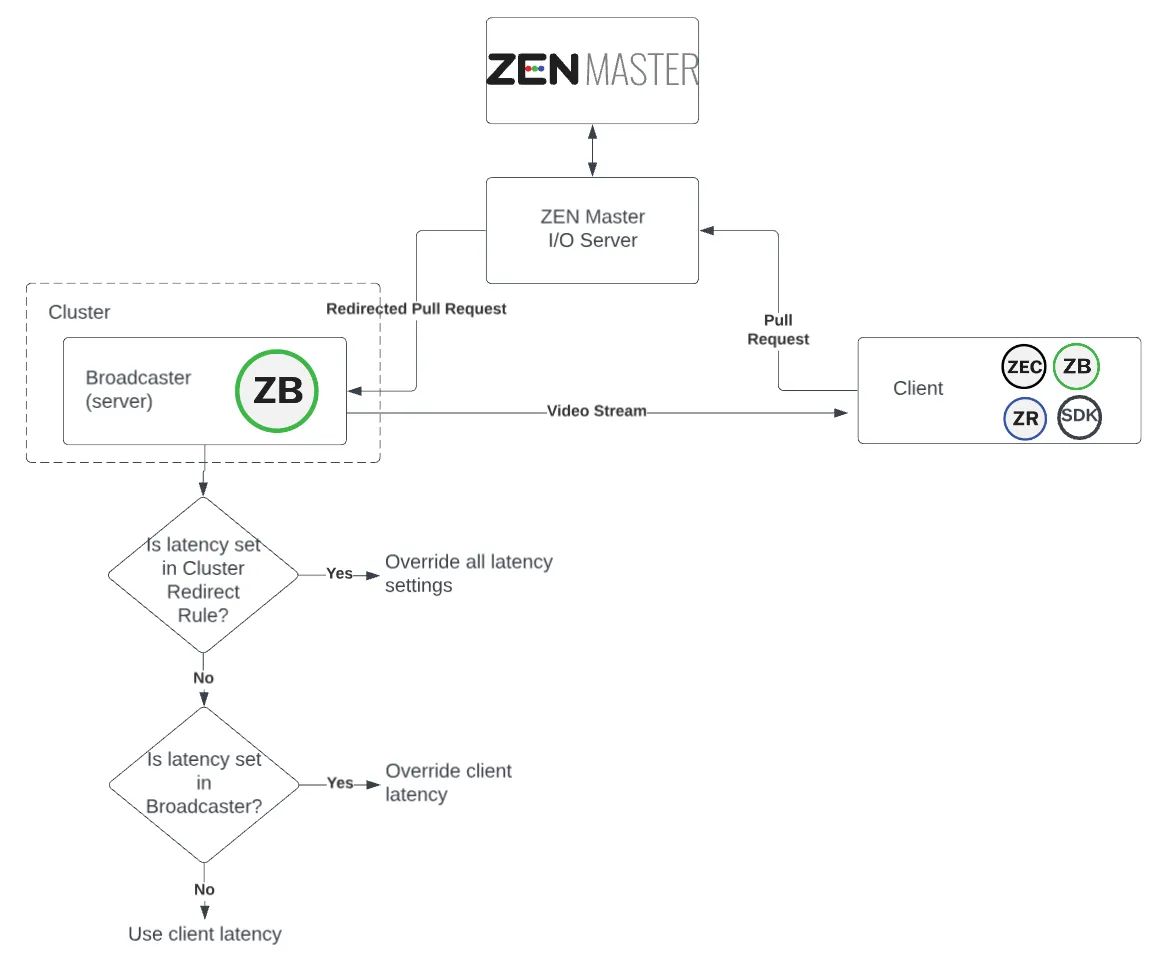
Diagram:
- The client can be associated with:
- Receiver
- ZEC as receiver
- Broadcaster as receiver
- Embedded receiver SDK
- Latency is required for the client PULL input.
- Latency is optional for Cluster Redirection Rules.
- Latency is optional for the Broadcaster (server).
- ZEN Master negotiation:
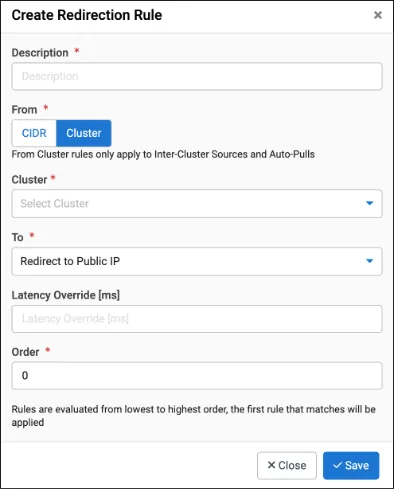
- If latency is set for Cluster Redirection Rules, then override all other values.
- Broadcaster negotiation:
- If latency is not set in the Broadcaster, use the client latency.
- If latency is set in the Broadcaster, override the client latency.
Setting Cluster Redirection Rules
To apply redirection rules to a Broadcaster Cluster, do the following:
In the left navigation, select Broadcasters.
From the Broadcaster Clusters list, select a Cluster.
Select Redirection Rules and then +Add Rule.
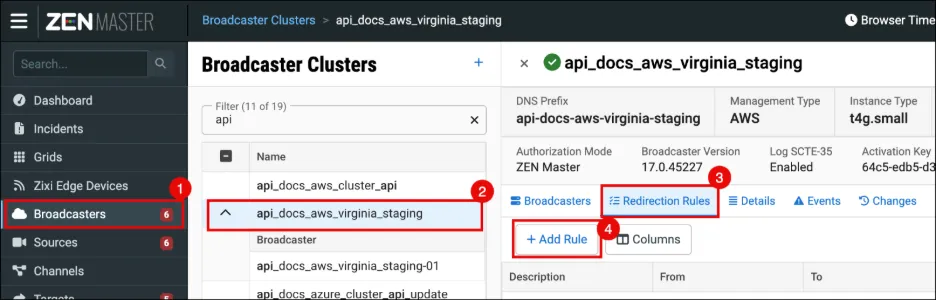
Complete the form and select Save.
ZEN Master latency precedence
With ZEN Master, latency has an additional consideration:
- Cluster Redirection Rules, if set
- Broadcaster latency, if set
- Client latency
Dynamic latency
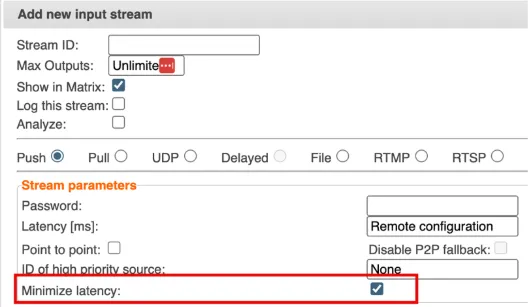
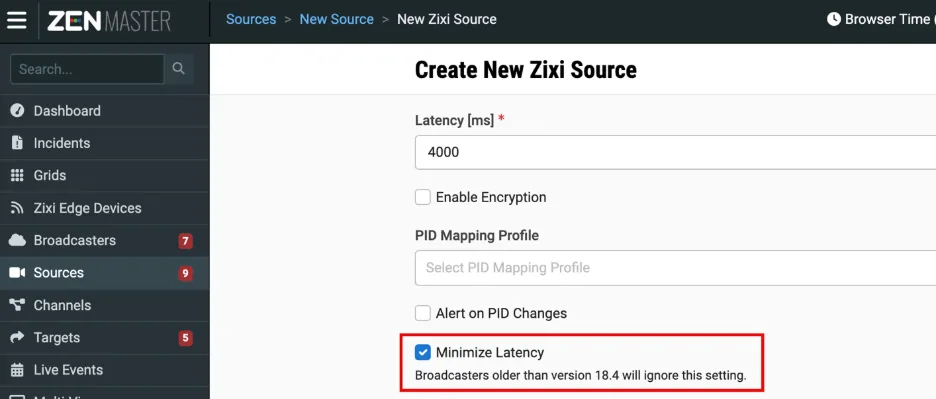
In addition to setting latency values, you can also enable Zixi’s Dynamic Latency, which adjusts latency dynamically in response to changing network conditions. The latency values that you set become the upper bounds for dynamic adjustment.
Note that Zixi limits the latency change rate to make clock frequency drift within specs of mpeg-ts.
To enable Dynamic latency, do one of the following:
- In the Broadcaster input settings, select Minimize Latency.
- In ZEN Master, when creating/updating a Source, select Minimize Latency.
For details about Dynamic Latency, see the Latency ConsiderationsLatency Considerations document.
Trade-offs
Zixi offers a three-way trade-off between:
- Latency
- Resiliency (error recovery)
- Overhead (FEC/ARQ)
Lower latency reduces recovery robustness. Higher latency improves resiliency.
Summary
Latency can impact event success. Zixi provides a comprehensive solution that masters network dynamics to guarantee low-latency, reliable delivery at any scale.
Notes
Here are some additional notes:
- For sufficient error recovery, Zixi recommends setting the latency to at least 3 to 5 times larger than the [RTT + Jitter]. You may need to adjust latency depending on the ISP network, as conditions can change due to network overload, a new network path, or additional hops.
- Zixi telemetry displays actual latency, not just configured values.