Single PUSH Transmission to Redundant Targets (Warm Redundancy)
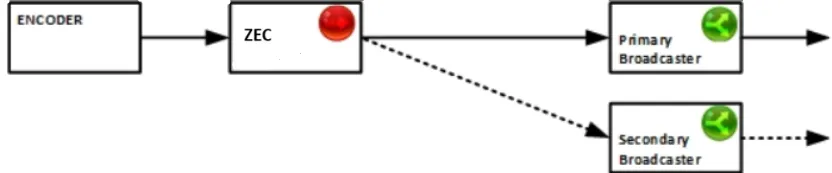
A Zixi PUSH output can be configured with multiple, ordered, fail-over targets. The topology includes a source node (in this case a ZEC) pushing a stream to a primary target (in this example the Primary Broadcaster). In the event that the primary target is not available, due to connection loss or hardware/software failure, the source node automatically switches to the secondary target. Additional targets can be configured with the same fail-over mechanism. The source node will attempt to connect to the primary again only in the event that the secondary connection is lost.
Source Configuration
The following procedure describes how to configure the ZEC to push a single stream to a primary host and an option to push the same stream to alternative hosts in the event that the primary host is unavailable. The procedure does not cover instructions on how to configure the Input into the ZEC.
To configure the source node (e.g. ZEC):
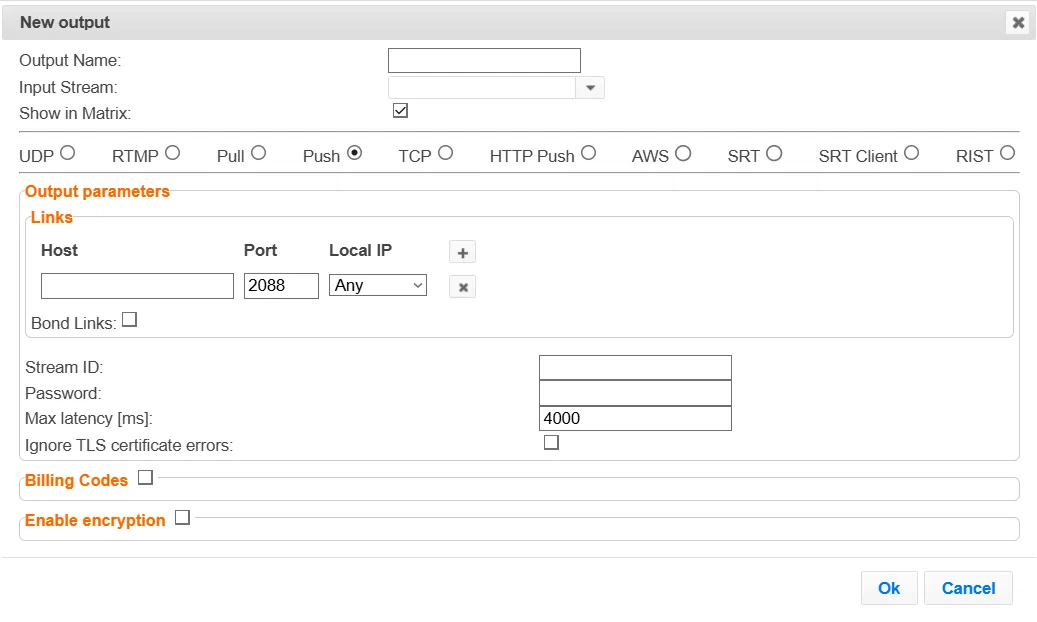
- On the Outputs page of ZEC, click the New Output button, located in the upper- right end corner of the screen.
- In the Name field, type a new name for the output.
- Select the Push radio button.
- In the Input Stream field, select the relevant input stream.
- In the Output Name field, enter a stream ID (alphanumeric) . The same Stream ID will be also configured in the target nodes (Push Inputs).
- Optional - in the Password field, specify a string to be used at the destination to authenticate that the pushing Broadcaster is allowed to push this stream.
- In the Max Latency field, specify the buffer size that Zixi Broadcaster will keep for error correction. For example, 6000 milliseconds would ensure that the stream is protected for six seconds of errors in the network. Default: 6000.
- In the Host field, enter the host name or IP of the primary target.
- In the Port field, specify the destination port to listen on for the Push stream (default: 2088).
- In the Local IP field, select from the drop-down menu, the IP address of the NIC (Network Interface Card) in the Source through which the stream will be pushed.
- Click the "+" button to add another (secondary) target. Another line is added with the properties of the secondary destination.
- Fill out the secondary destination parameters.
- To add additional destination(s), click the "+" and fill out the destination parameters.
- Click OK.
Target Configuration
The following procedures describe how to configure the two or more target Zixi Broadcasters in a warm redundancy configuration. These targets must use the same Stream ID that was used to configure the Source in the ZEC.
To configure the primary target node (e.g. Zixi Broadcaster):
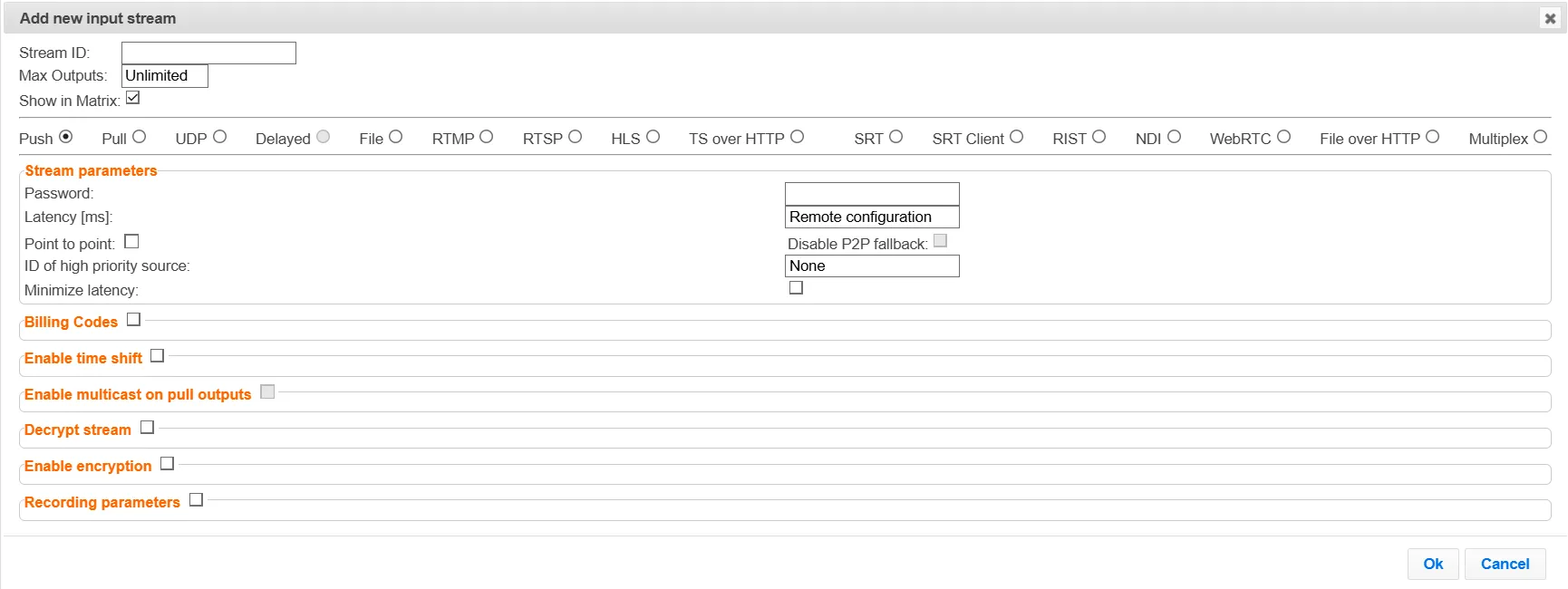
- Click the Inputs tab at the top of the primary Zixi Broadcaster administrative screen
- Click New Input on the upper right hand side of the screen.
- In the Stream ID field, enter the same “Stream ID” as the source output.
- Select the Push radio button option.
- In the Password field, if you have configured a password in the source (ZEC output), enter the same password.
- Configure additional parameters as required.
- Click OK.
To configure the secondary target node(s) (e.g. Zixi Broadcaster):
- Click the Inputs tab at the top of the secondary Zixi Broadcaster administrative screen
- Click New Input on the upper right hand side of the screen.
- In the Stream ID field, enter the same “Stream ID” as the source output. This is the same Stream ID that was also entered in the primary target.
- Select the Push option.
- Configure additional parameters as required.
- Click OK.
- Repeat the steps above to configure additional target nodes as necessary. Each target node needs to be configures in the Zixi Feeder (source) output.
Cost Considerations
This topology duplicates the target side Zixi node software and hardware components. However, it does not require doubling the up-link bandwidth, as the backup connection stream will be only active in the event that the primary stream fails.
Latency Considerations
For detailed recovery time details, please contact your Zixi representative.