Dual PUSH Transmission to Redundant Targets (Full Cross Over)
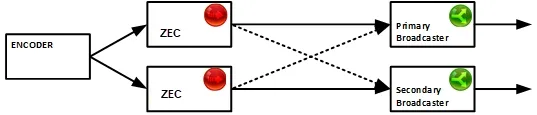
This topology includes source and target redundancy with additional cross-over redundancy capabilities. The topology includes two simultaneous streams delivered in parallel from two separate source nodes to a corresponding pair of redundant targets. If the latency of the outputs is identical, the streams will be frame synced, providing the video is synced on entry. In addition, in the unlikely event that a second loss occurs at the opposing connected end-point, the automated cross-over mechanism uses the resources of the opposite path, providing a stream with minimal disruption.
Source Configuration
The following procedure describes how to configure two ZECs to push a single stream to two target hosts (parallel streams), while adding an alternative target host to each source for additional redundancy. The procedure does not cover instructions on how to configure the Input into the ZECs.
To configure the primary source node (e.g. ZEC):
- On the Outputs page of ZEC, click the New Output button, located in the upper- right end corner of the screen.
- In the Name field, type a new name for the output.
- In the Type field select Push .
- In the Input Stream field select the relevant the input stream.
- In the Host field, enter the host name or IP of the primary target (e.g., the Primary Broadcaster).
- In the Port field, specify the destination port to listen on for the Push stream (default: 2088).
- In the IP field, select from the drop-down menu, the IP address of the NIC (Network Interface Card) in the Source through which the stream will be pushed.
- Click the "+" button to add another (secondary) target. Another line is added with the properties of the secondary destination.
- Fill out the secondary destination parameters (e.g., Secondary Broadcaster).
- In the Stream ID field, enter a stream ID (alphanumeric). The same Stream ID will be also configured in the target node (Push Input).
- Optional - in the Password field, specify a string to be used at the destination to authenticate that the pushing Broadcaster is allowed to push this stream.
- In the Max Latency field, specify the buffer size that Zixi Broadcaster will keep for error correction. For example, 6000 milliseconds would ensure that the stream is protected for six seconds of errors in the network. Default: 6000.
- Click OK. The output is added to the Outputs list.
To configure the secondary source node (e.g. ZEC):
- Repeat the steps above to configure the second source node, however in the Host field enter the host name or IP of the Secondary Broadcaster.
- The stream in the second source must have the same Stream ID as the first source.
- Make sure the latency is the same as on both ZECs.
- Click the "+" button to add the first target (Primary Broadcaster). Another line is added with the properties of the first target. Fill in the details of the Primary Broadcaster.
- Click OK.
Target Configuration
The following procedures describe how to configure the two target Zixi Broadcasters to accept the feed from their corresponding sources as well as a backup feed from the alternative source. The target is configured with two inputs. If this input is unavailable the secondary input will be received. The input must use the same Stream ID that was used to configure the primary and secondary Source ZECs.
To configure the primary target node (e.g. Zixi Broadcaster):
- Click the Inputs tab at the top of the Zixi Broadcaster administrative screen
- Click New Input on the upper right hand side of the screen.
- Select the Push option.
- Create an input, while ensuring the “Stream ID” matches that of the primary and the secondary sources output.
- Configure additional parameters as required.
- Click OK.
To configure the secondary target node (e.g. Zixi Broadcaster):
- Repeat the steps used to configure the primary target node.
Cost Considerations
This topology duplicates the hardware and software components of both the source and the target. The configuration also requires using double the up-link bandwidth. Allocation of twice the expected maximum bitrate with head room is advised.
Latency Considerations
For detailed recovery time details, please contact your Zixi representative.