ZEC Adding TAMS Outputs
The TAMS output allows you to send streams to a TAMS cloud repository. For more information about TAMS and why you might want to use it, see TAMS and Zixi.
The input for a TAMS Output must be an Adaptive Group that generates HLS - you can produce Zixi and/or CMAF as well, but only HLS will be sent to TAMS.
To Create a TAMS Output
In the ZEC Outputs page, click + New Output.
The New output window is displayed.
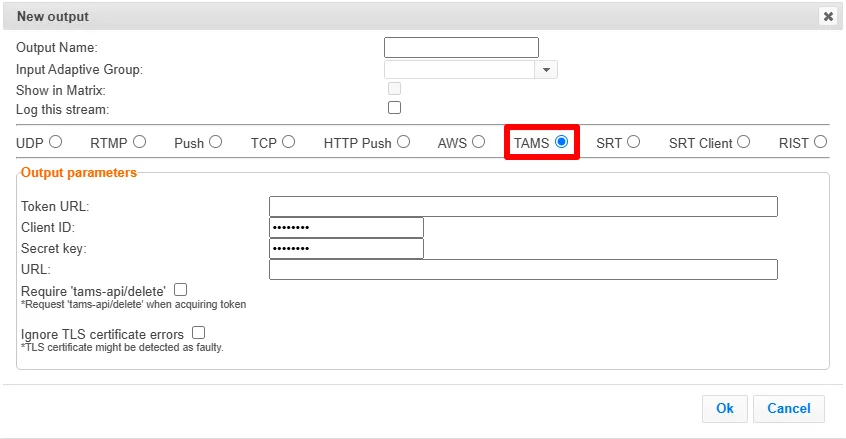
Select the TAMS option (radio button).
Type in the unique identifier for this output in the Output Name.
Select an Adaptive Group to be made available on this output from the drop-down list.
Note that the Adaptive Group must include UUIDs for the video and audio flows. See ZEC Creating New Adaptive Groups.
Select the Show in Matrix check box to display this stream in the Matrix (see ZEC Using the Matrix). Default: Selected.
Select the Log this stream checkbox if you would like to generate event logs for this output.
Currently, only OAuth is supported for authentication. Enter the following required information for your TAMS instance:
- Token URL (for OAuth)
- Client ID (for OAuth)
- Secret key (for OAuth)
- URL (Base API URL of the TAMS deployment)
If your OAuth credentials are scoped for Delete permissions, select Require 'tams-api/delete' (read/write permissions are always requested).
Select Ignore TLS certificate errors to prevent the connection from failing because the TLS certificate is found to be faulty.
Click OK.
Output Stream Parameters Table
Parameter | Description |
|---|---|
Output Name | A unique name for the output |
Input Adaptive Group | The input for a TAMS output must be an Adaptive Group that outputs HLS, and the UUIDs for the TAMS video and audio flows must be entered in the Adaptive Group configuration |
Latency Offset | See the Latency Offset subsection below this table |
Output Parameters | |
Token URL | The server address Broadcaster calls to obtain and refresh access tokens. Required |
Client ID | The OAuth client id used to get access tokens for your TAMS system. Required |
Secret key | The OAuth secret key (sometimes called client secret) used to get access tokens for your TAMS system. Required |
URL | URL for your TAMS system Required |
Require 'tams-api/delete' | Select this checkbox if your OAuth credentials are scoped for Delete permissions (read/write permissions are always requested). |
Ignore TLS certificate errors | Select this option when streaming to a trusted server that may not have a valid certificate. When this option is selected, Zixi Broadcaster will ignore the TLS certificate errors and transmit the stream to its destination. |
Advanced Settings
The fields discussed below are optional and available only in Advanced Mode.
To enter Advanced Mode add the URL parameter ?advanced=1 to the Zixi Broadcaster URL in your browser and press Enter/Return to reload the page:

Note the Advanced Mode settings are generally intended for advanced users and special cases. If you do not understand the settings, you should probably accept the default values.
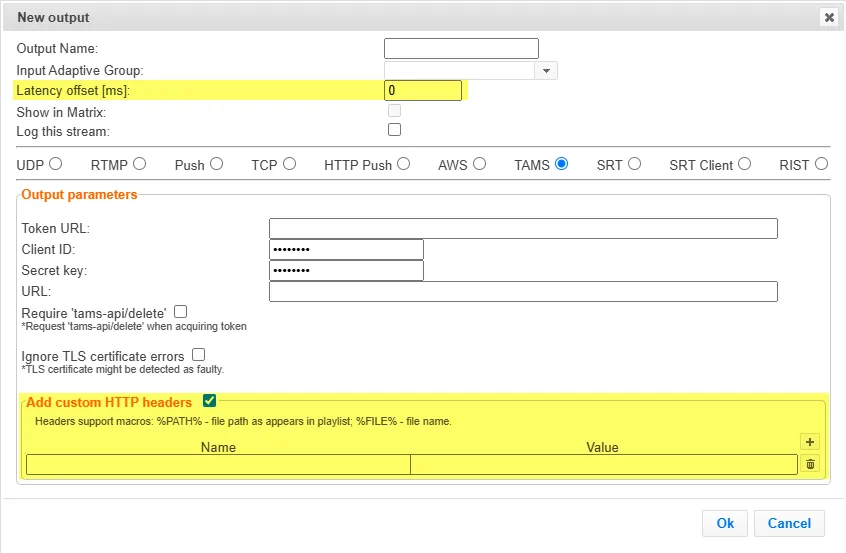
General
- Latency offset [ms] - Specify the additional buffering time in milliseconds. Increasing this value can improve stream stability in unstable network conditions, but will increase end-to-end delay. Default: 0 ms
Add Custom HTTP Headers
- Name - The name of the HTTP header to include in the request (e.g., Authorization)
- Value - The value to send for the selected header. (e.g., Bearer eyJhbGciOi...)