ZEC Adding SRT Outputs
The SRT output can be pulled to/from an SRT-enabled device and is configured via Zen Master or Zixi API only. SRT stands for ‘Secure Reliable Transport’ and is an open-source video transport protocol and technology stack. SRT uses secure streams and easy firewall traversal to optimize streaming performance and deliver high-quality video over even the most unreliable networks.
Reference: Broadcaster versions and their associated SRT Library
- Version 19 - SRT Library 1.5.5
- Version 18 - SRT Library 1.5.4
- Version 17 - SRT Library 1.5.3
- Version 16 - SRT Library 1.4.4
See the steps below to override the default SRT library with an older version for compatibility with a downstream system.
To Create an SRT Output:
In the ZEC Outputs page, click + New Output.
The New output window is displayed.
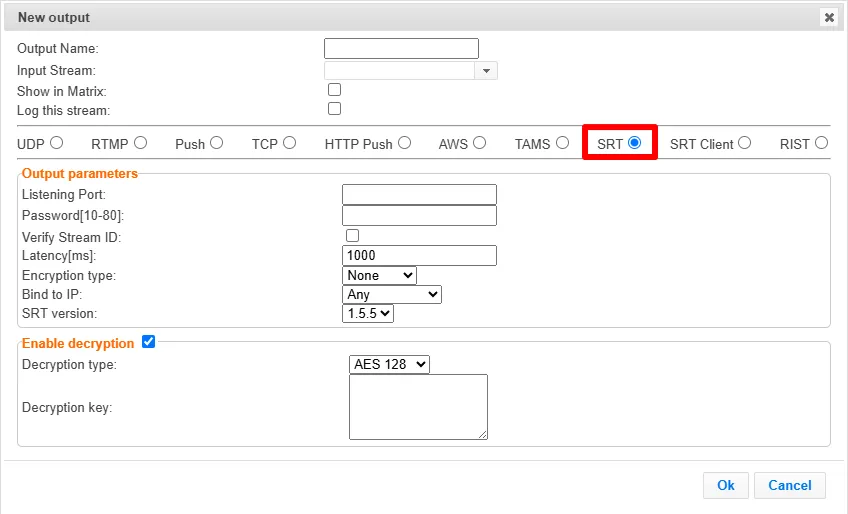
Type in the unique identifier for this output in the Output Name.
Select an Input Stream to be made available on this output from the drop-down list.
Select the Show in Matrix check box to display this stream in the Matrix (see ZEC Using the Matrix). Default: Selected.
Select the Log this stream checkbox if you would like to generate event logs for this output.
Select SRT.
Specify the Output parameters (see Output Stream Parameters TableOutput Stream Parameters Table below).
You can decrypt an encrypted stream as it enters the ZEC. To decrypt a stream, select the Decrypt Stream checkbox and fill in the parameters as described in the Output Stream Parameters Table below. For more information, see Decrypting an Output Stream in ZEC.
Click OK.
The new SRT Output with its settings is created and now appears on the screen.
Output Stream Parameters Table
Parameter | Description |
|---|---|
Output Parameters |
|
Listening Port | Specify the port to listen on. This port must be open on all firewalls between the ZEC and other devices it is communicating with. |
Password [10-80] | If you want the output stream to be encrypted, set a Password. The value should be between 10 to 80 characters. The password value serves as a passphrase and is used to generate a hash of the password. The passphrase serves both authentication and encryption purposes. It is is not the AES key itself, but an input to a key derivation process that generates a 128, 192, or 256-bit key length. See ZEC Encrypting an SRT Output for more details. |
Verify Stream ID | Enable this option to use a single port for multiple SRT outputs. The system will identify the stream by verifying its Stream ID. |
Latency [ms] | Specify a latency for the stream in milliseconds. To learn more about latency, see Latency Considerations. |
Encryption type | Select the encryption type that will be used. The final AES key length is established by combining the sender’s and the receiver’s key lengths during handshake. See ZEC Encrypting an SRT Output for more details. |
Bind to IP | Select from the drop-down list the local IP address to be used for this Output, OR select Any to enable any IP to be used. |
SRT version | Select the SRT library for compatibility with downstream systems.
|
Enable Decryption | Select this checkbox to decrypt an encrypted stream. |
Decryption type | If the stream has been encrypted, you can decrypt it through the output by selecting this checkbox and specifying the type of encryption that was used. Select Automatic to decrypt a stream that has been encrypted using Automatic encryption. Only if the stream has not been encrypted, leave the Enable Decryption checkbox unselected (default). Important Notice: If the stream has been encrypted, you must decrypt it in the output. |
Decryption key | If the decryption type includes a key, enter the key to decrypt the stream during output. |
Advanced Mode
The fields discussed below are optional and available only in Advanced Mode.
To enter Advanced Mode add the URL parameter ?advanced=1 to the ZEC URL in your browser and press Enter/Return to reload the page:

Note the Advanced Mode settings are generally intended for advanced users and special cases. If you do not understand the settings, you should probably accept the default values.
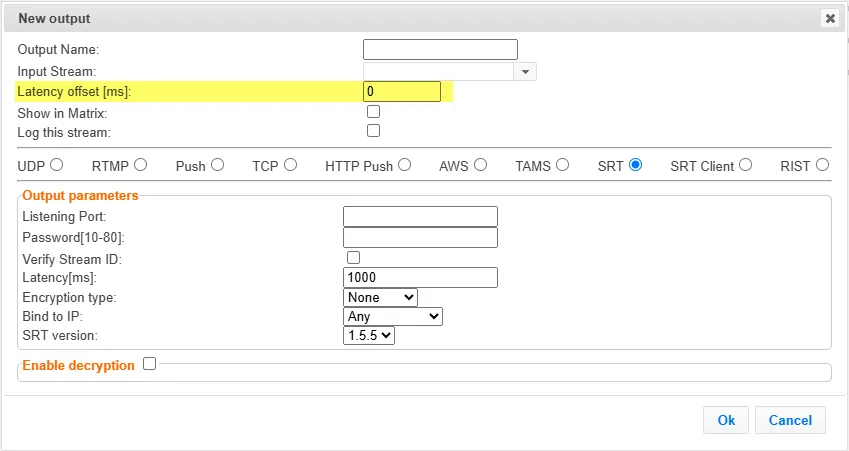
General
- Latency offset [ms] - Specify the additional buffering time in milliseconds. Increasing this value can improve stream stability in unstable network conditions, but will increase end-to-end delay. Default: 0 ms