ZEN Master 17 Feb 2026 Release
The following updates were included in the ZEN Master release for Feb 17th, 2026.
Features
The following new features were implemented in this release:
SCTE-35 modification
Related docs:
- Note: This feature is a module addition, please speak to your account rep for more information.
- ZEN Master introduces the SCTE modification suite allowing users to insert, remove, or manipulate existing SCTE35 markers.
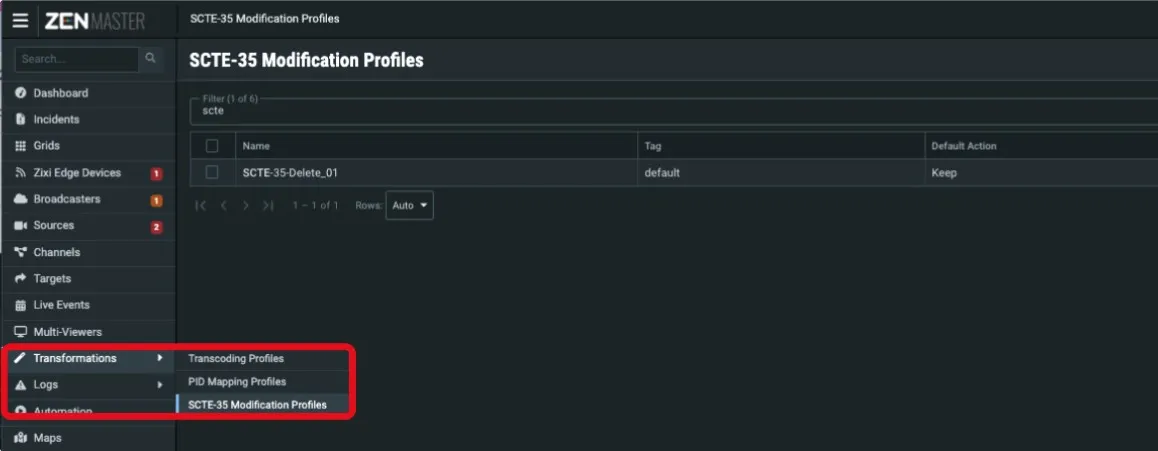
- When enabled, SCTE-35 Modification Profiles appear under the ‘Transformations’ menu.
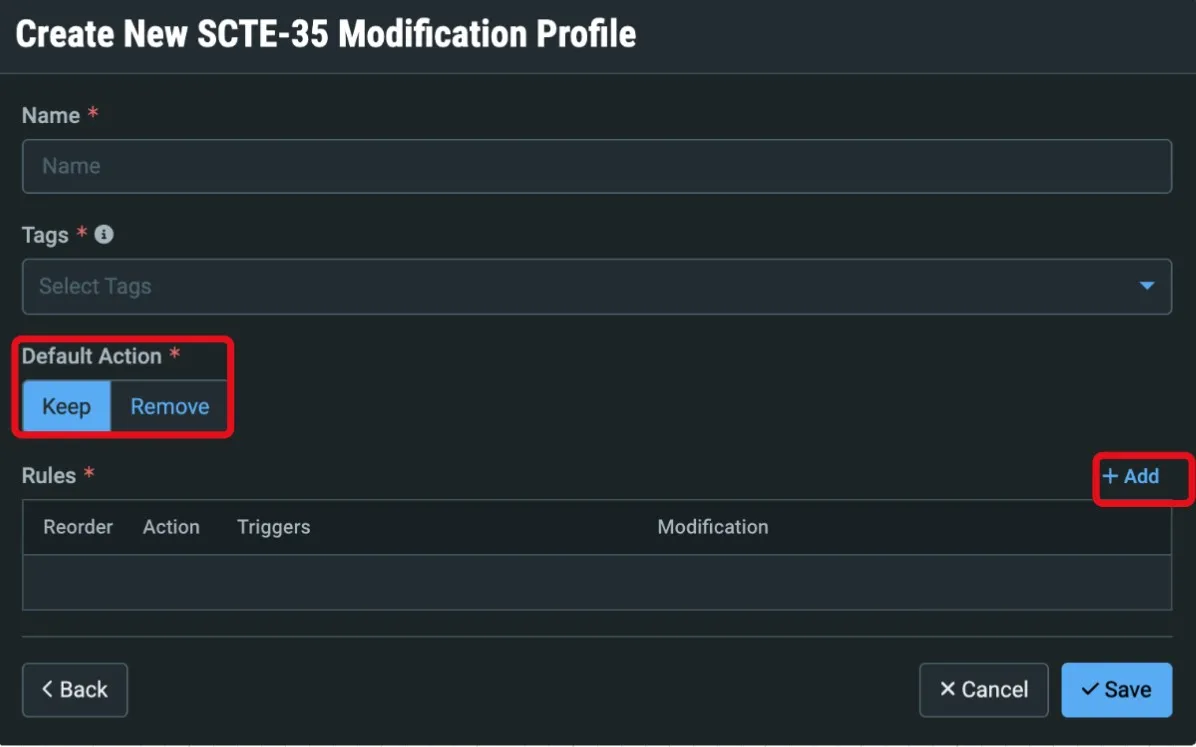
Begin by naming and tagging the profile, and defining the default action for SCTE-35 messages that do not match your rules.
Once a new Rules is named and a default action set, specific matching triggers can be set up along with associated action:
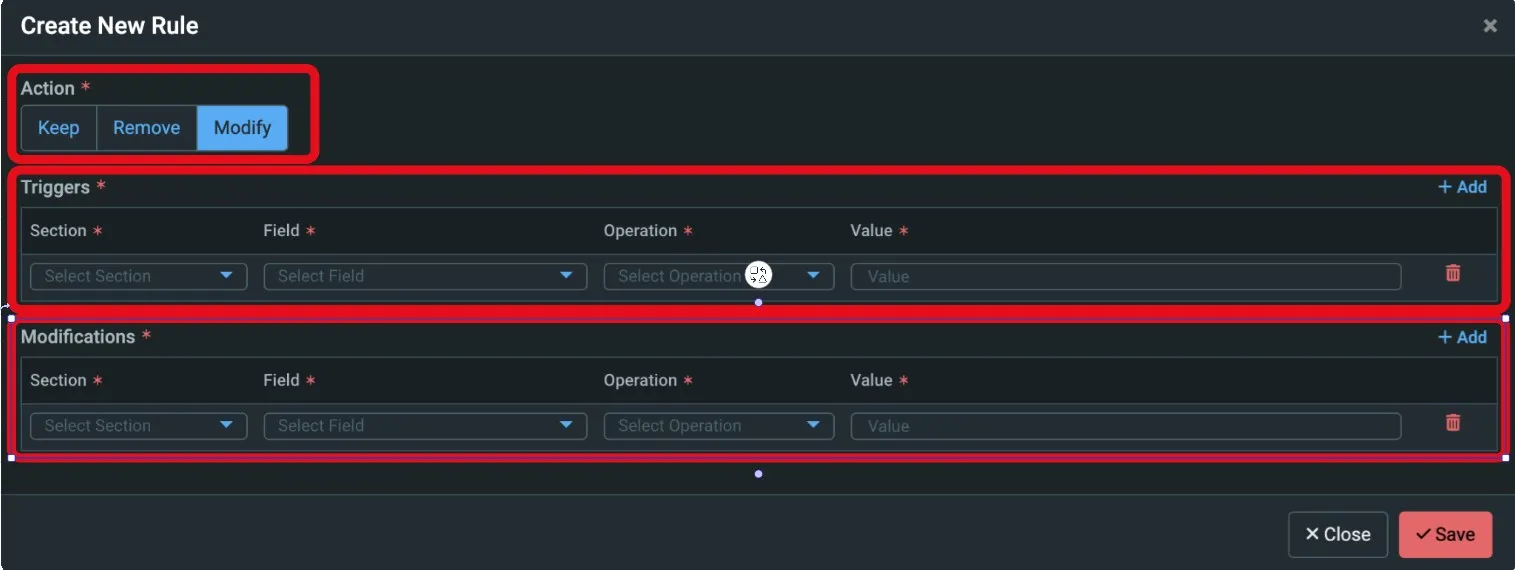
Each Rule is configured to Keep, Remove, or Modify a SCTE-35 message based on a matching trigger and in the case of a modification the subsequent replacement message:
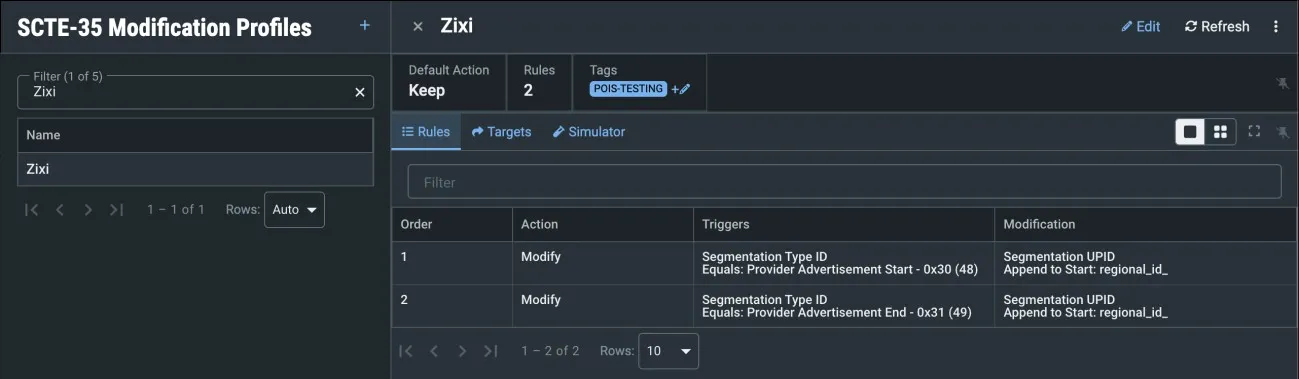
All SCTE-35 messages on a target with the profile are evaluated against rules within the profile. If a SCTE-35 payload parameter matches the User defined triggering parameter value, then that SCTE-35 message will be kept, removed, or modified as per any outlined modification parameters. If there are multiple triggers, the SCTE-35 message should match ALL criteria in order to action the rule.
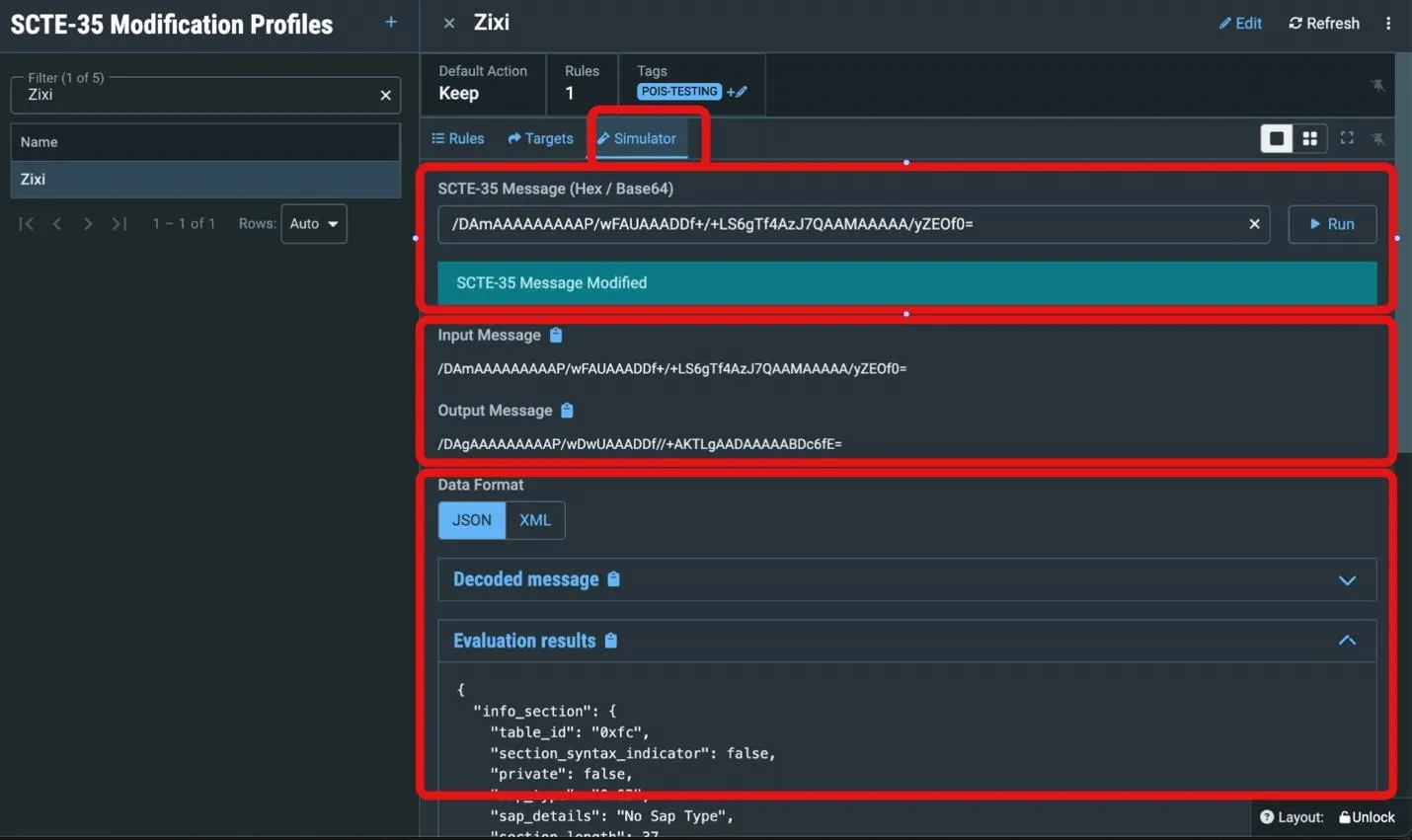
SCTE-35 Modification Rule Simulator.
Once created, SCTE-35 modification rules can be tested directly within the ZEN Master interface.
- After choosing the Simulator tab, an example message can be entered in the input field and Users can ‘Run’ the input against the Rule.
- The rules and associated priorities of actions will be matched in turn and applied against the example input.
- The decoded message and modification result is made available in JSON or XML format.
Rule Application.
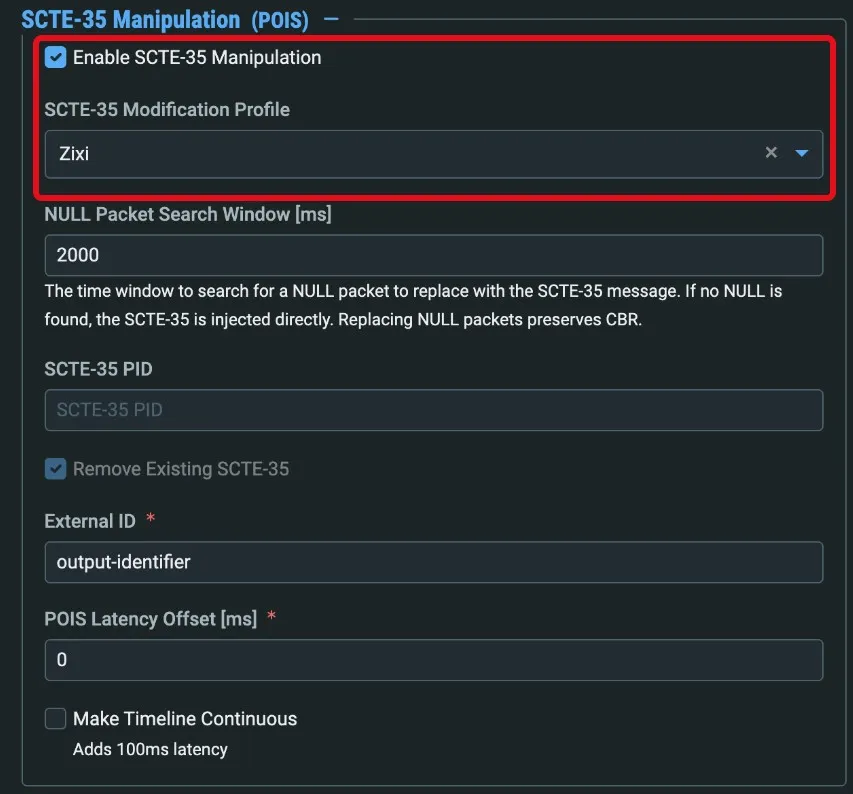
- Once Created, SCTE-35 Modification Profiles can be applied to Targets in the advanced SCTE-35 Manipulation section of the New/Edit Target Dialog:
AWS SSM integration
Related docs:
- ZEN Master now provides the facility to run AWS SSM commands directly within the ZEN Master User Interface.
- Whilst multifunctional, this feature is primarily provided in support of Infosec teams with system update and patching requirements.
- The AWS SSM Tool can be launched from the selected Broadcaster details page:
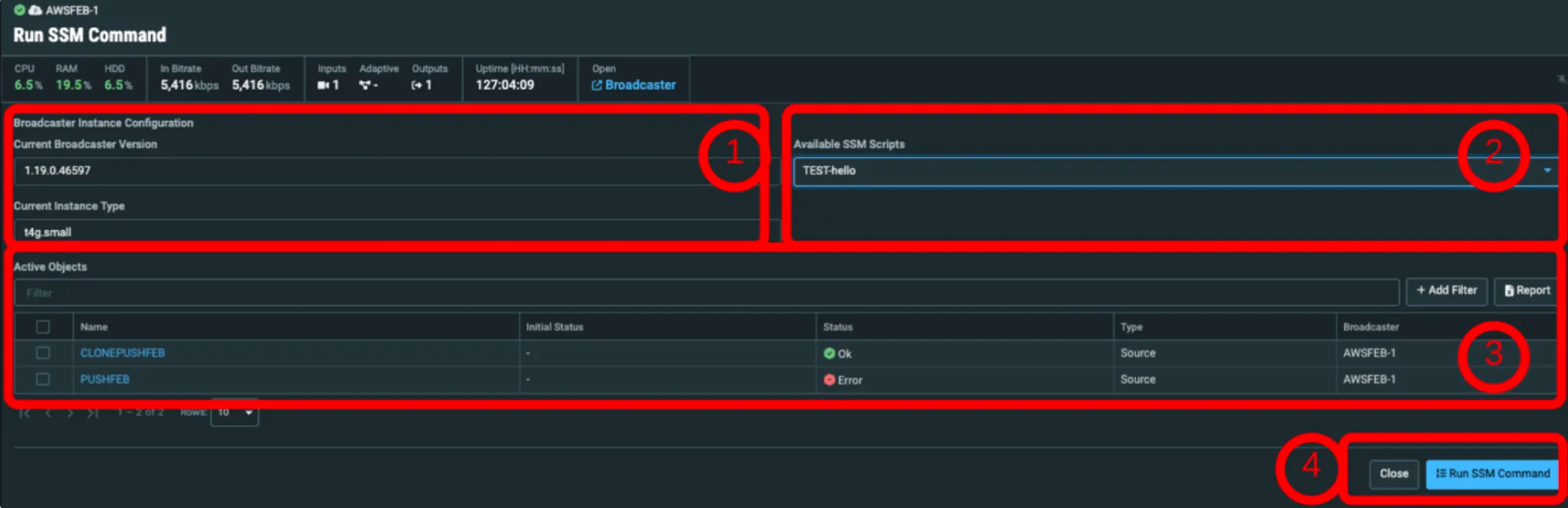
When opened, the “Run SSM Command” dialog opens to display:
- Current Broadcaster details (un-editable).
- A dropdown list of SSM Commands (e.g. ‘yum update’) available to ZEN Master.
- The Broadcaster Active Objects table.
- The Close / Run SSM Command action buttons.
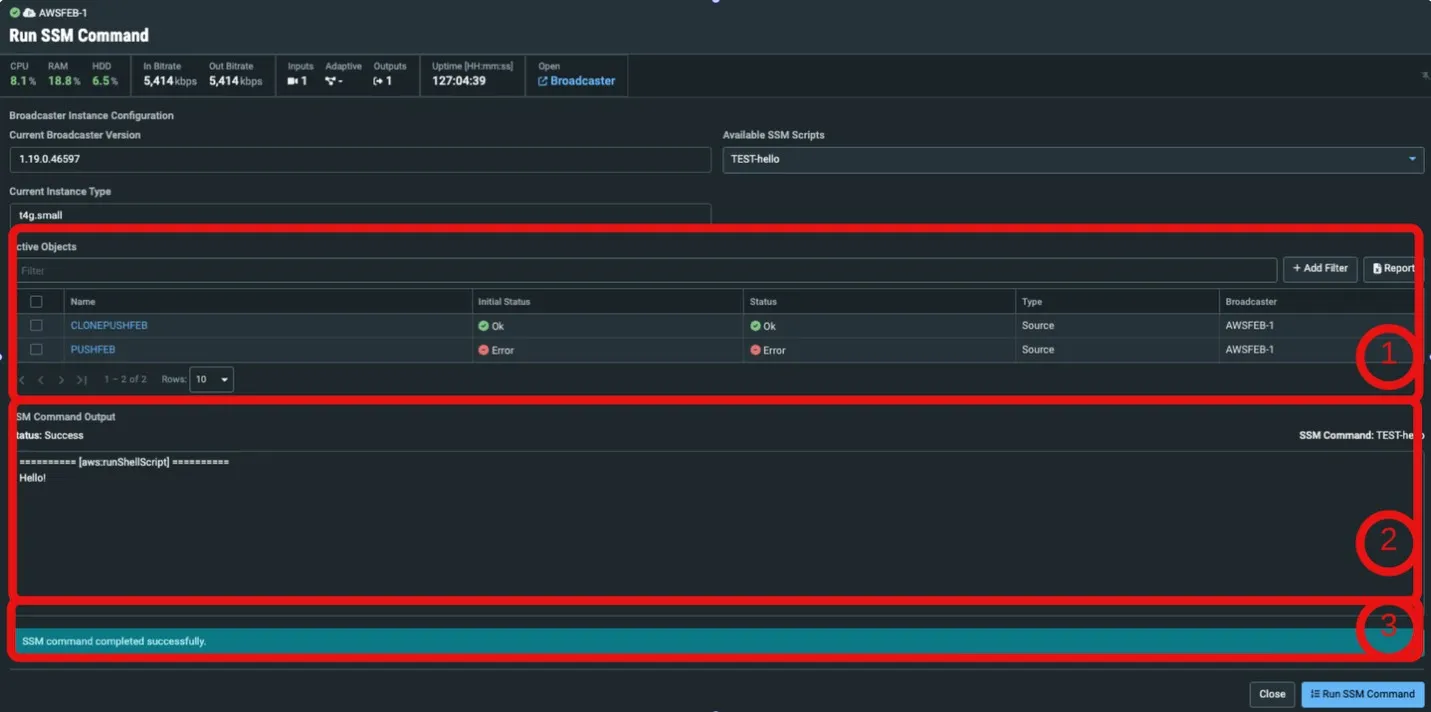
When running a command, ZEN Master:
- Updates the active object status with the initial and current status of all objects.
- Monitors the SSM status and displays the tail end of the command output in SSM.
- Upon successful completion, notifies the User.
- Should the script fail, the User can use the error status and output notes to facilitate further investigation.
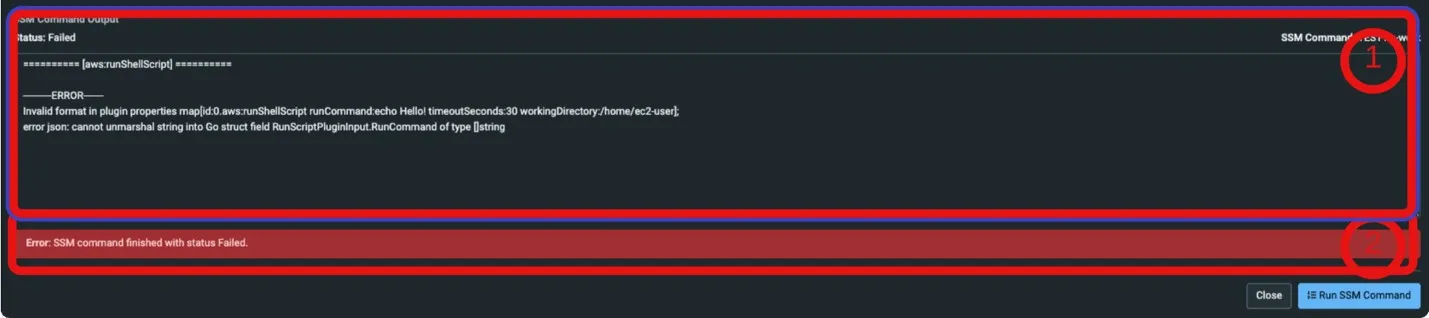
Instance Refresh
Related Docs:
AWS Instance Refresh
- ZEN Master provides the facility to refresh an AWS Instance.
- This feature allows Users to ‘swap’ out the existing instance for a fresh instance, useful for OS patching, instance re-sizing, OS Updates etc.
- The new instance will re-connect to ZEN Master “in-place” of the existing instance.
- The Instance Refresh Tool can be launched from the selected Broadcaster details page:
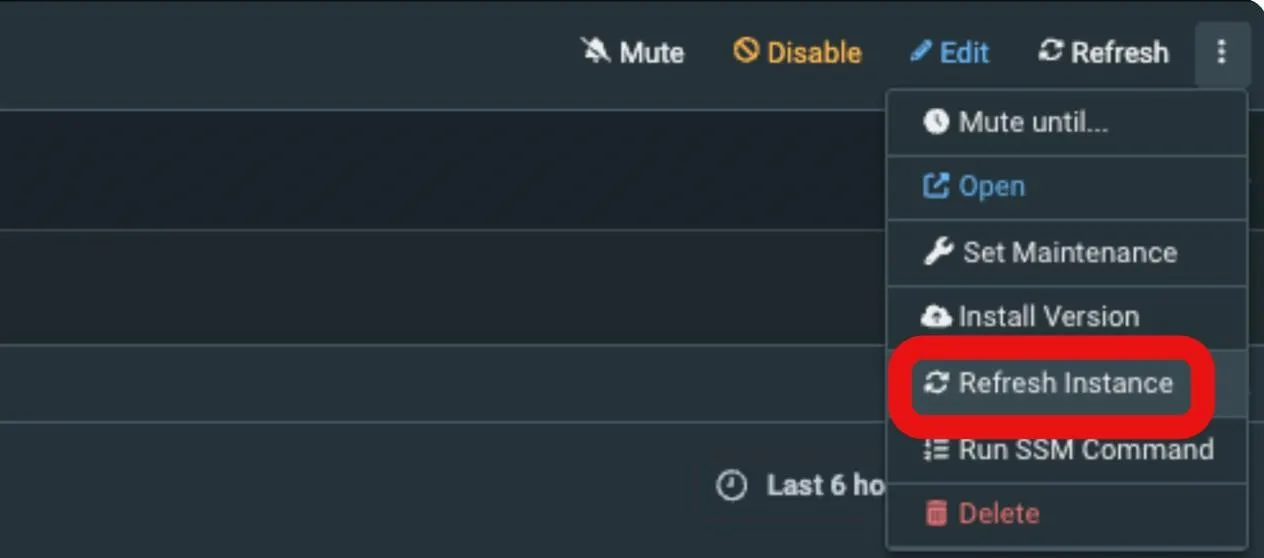
- When opened, the “Refresh Instance” dialog opens to display:
- Current Broadcaster details (un-editable).
- The Broadcaster Active Objects table.
- The Close / Refresh Instance action buttons.
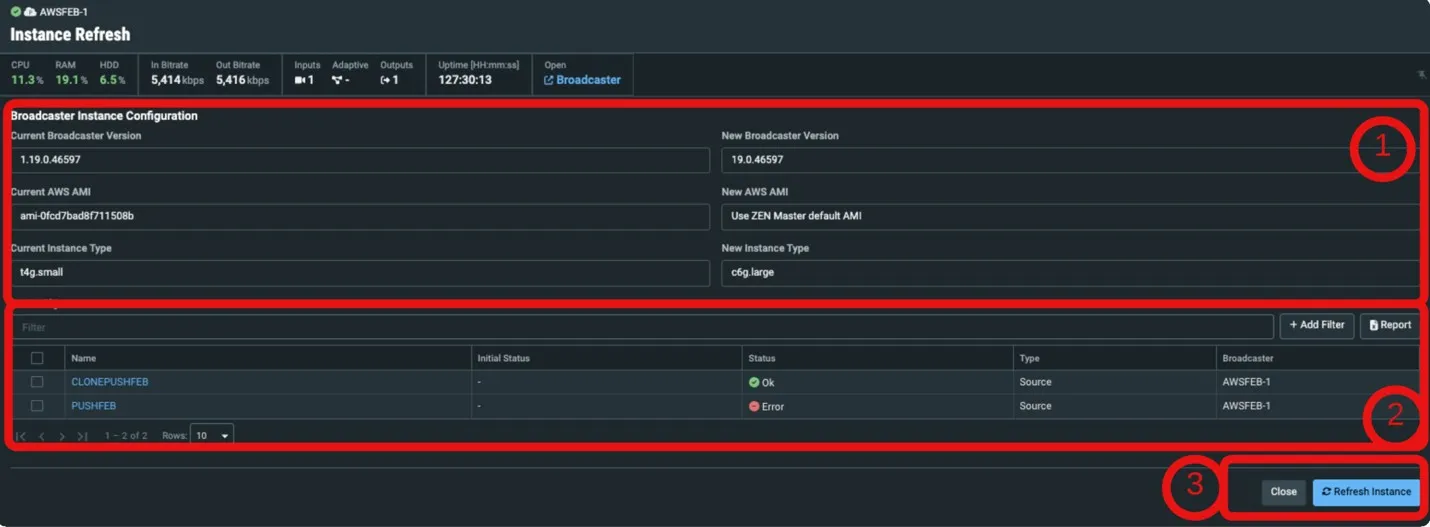
When Refreshing an Instance, ZEN Master will:
- Update the active object status with the initial and current status of all objects.
- Monitor the Broadcaster status.
- Notify the User on completion success.
Note: to make changes to the instance details, customer AMI Used, instance type etc., edit the Cluster settings before running the Refresh Instance Tool.
TAMS Support
Related Docs:
TAMS Support
ZEN Master adds coverage of the Zixi Broadcaster integration to Time Addressable Media Store (TAMS) format.
- Requires Zixi Broadcaster v19.
Channel Configuration:
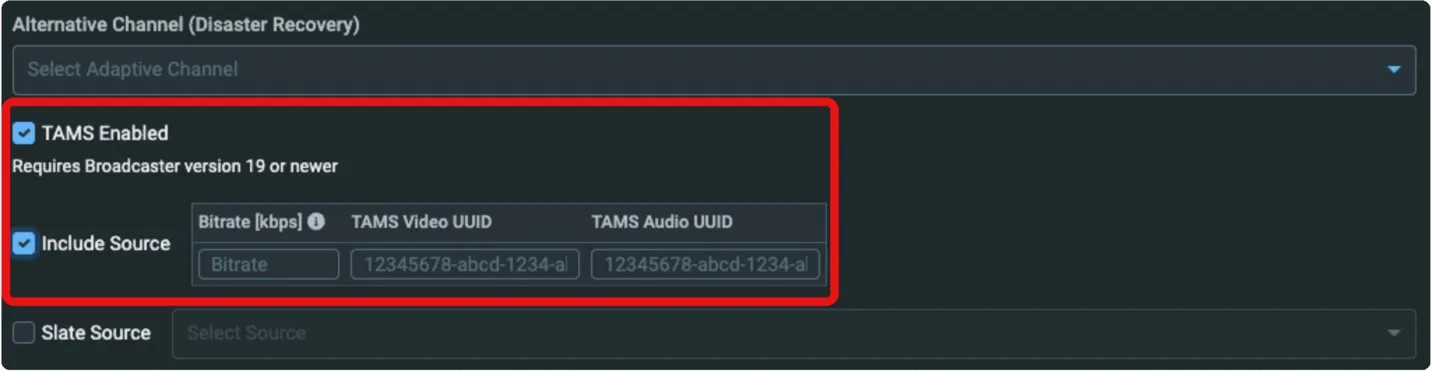
- the ‘TAMS Enabled’ in the Transcoded or Adaptive Channel in the New/Edit Channel dialog.
- This will allow for the configuration of the addition video and audio UUID’s required by the TAMS format.
- For Transcoded Channels, this will include the optional source pass through.
- All other renditions will also provide a UUID entry field.
- The presence of a value in the UUID field will result in the generation of an associated TAMS variant.
Target Configuration:
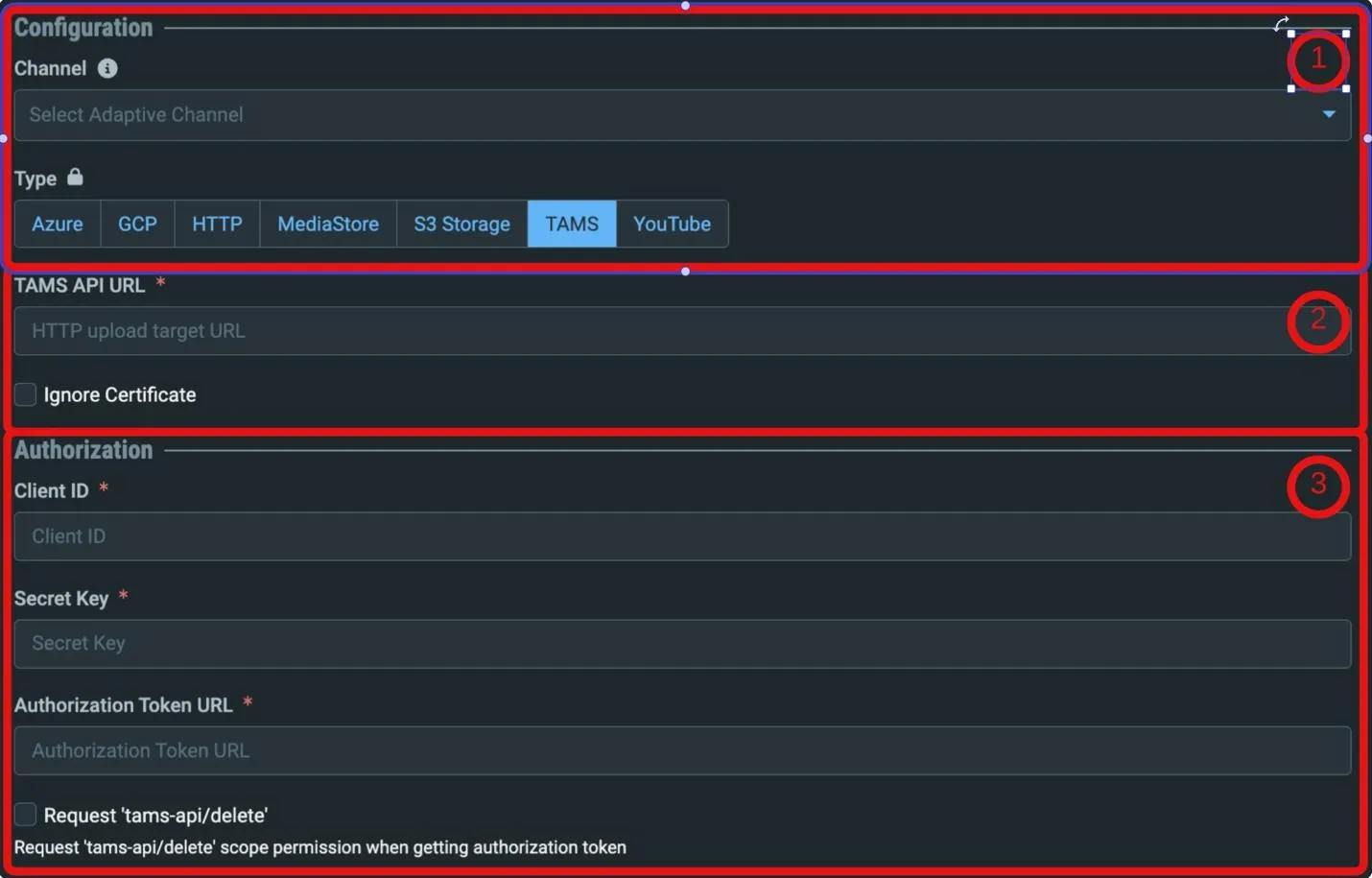
- A TAMS Target Type can now be created via the New “HTTP” Target menu.

- Here the User is presented with:
- The option to set a TAMS target sub-type.
- The URL of the intended TAMS Server endpoint.
- Credentials, Auth Token URL, and deletion Scope options.
Improvements and Changes
The following additional improvements and changes were implemented in this release:
- Backwards compatibility for NULL Packet Search Window field in SCTE-35 manipulation.
- Splice Inserts SCTE-35 messages are now tracked separately in the graph based on into/out of network flag. o Updated decoded SCTE-35 display to use ‘threefive’ compatible format and added standard XML option.
- Date/Time selectors now use User-selected Date/Time format.
- Added UI status to Failover Sources when locked.
- Go to Alt. Path Targets now prioritize switching to a Primary Source when an option.
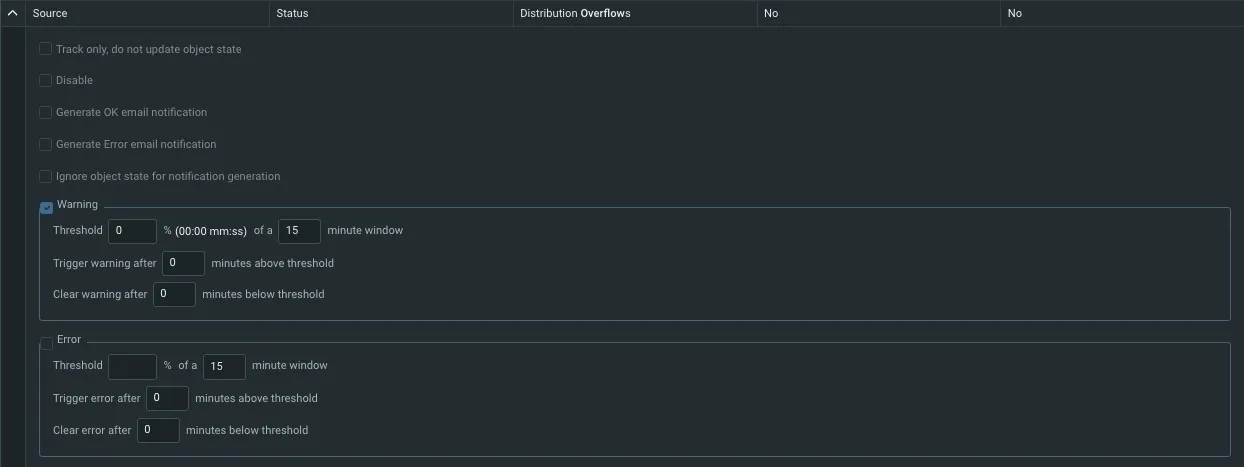
- Optimized Failover Source locking to improve API response times. o Added an alert for Broadcaster Distribution Overflows that can affect Sources.
- Added per-NIC bandwidth graphs to Broadcasters.
- Added unassociated PIDs to Source Stream Info panel.
- Added a multi-select action to clear existing alerts of objects.
- Added a Now button to Date/Time selection dialogs.
- “Ignored” PIDs are now marked as such on details and graph panels.
- Targets with PID Mapping display the PID mapped Stream Information instead of original.
- Added a new alert for Targets connected to an incorrect Broadcaster input.
- Will trigger an Offline – Other alert.
- Diagram Improvements – Additional actions and detail added to Source, Channel, and Target Diagrams:
- Enable/Disable/Mute/Unmute actions.
- URL File Source names.
- Better naming of exported diagram files.
- Updated API Keys table with columns for new properties:
- Optimized Source listing from backend to improve performance in multiple forms.
- Updated Share source to allow for 90 day shares. o Added option to ignore TLS certificate validation on Zixi Pull Sources.
- Current AMI is now tracked/displayed for AWS Broadcasters:
- Applies to AMIs launched from the release date.
ESNI & ESAM
The following updates were implemented for ESNI and ESAM:
ESNI
- Improvements to ESNI UI Schedule Simulations.
- Implemented Signal Tolerance support.
- Added option to automatically remove expired Medias.
- Improved internal logging to allow debugging bad 224 payloads.
- Re-applying an active policy at a new priority will now update its priority.
- Fixed a race condition that can happen when identical SCTE messages arrive at the same time on Sources with the same external ID.
API Additions and Changes
ZEN Master API documentation updates for the following sections:
Technical Reference:
For detailed field change technical reference see the accompanying document:
- ZEN-Master-API-Updates-Reference_Feb_2026.csv.zip in the Zixi Customer Portal
New API Endpoints:
Channels:
NEW: GET /channels
List all Channels in your account.
Clusters:
NEW: POST, PUT /clusters/linode
Create/update a Linode Cluster.
SCTE-35:
NEW: GET /scte35_modification_profiles
List SCTE-35 modification profiles.
API Field Additions:
Channels, Targets:
Time-Addressable Media Store (TAMS).
New fields added to support TAMS.
Clusters:
Added object_link
System-generated field to all responses.
Targets:
SCTE-35 Modification Profiles.
Added scte35_modification_profile_id
Supported Targets: RIST, RTMP, SRT, UDP/RTP, Zixi Pull/Push.
Targets:
Target protections.
Added termination_protection