ZEC Adding HTTP Push Outputs
The HTTP Push output stream can be encapsulated in HLS or DASH. The source of the output stream is a predefined adaptive group that has been configured in the ZEC Adaptive Groups screen. The configuration of the stream includes the option to delete outdated stream fragments on the server. SCTE-35 markers in the source input will be preserved and used to segment the stream for both HLS and DASH encapsulation. Output streams can be pushed to one ZEC or multiple ZECs.
The path to the destination can be formed in one of the following ways:
- Full path – in this option, the path would be constructed as follows: <base url>/<path>/<file>?< additional params may be also with path and file>
- Path in parameters - in this option, the path would be constructed as follows: <base url>?< additional params may be also with path and file>
- Flat path - in this option, the path would be constructed as follows: <base url>/<path>_<file>?< additional params may be also with path and file>. Any "/" in path should be replaced with "_"
Low Latency HLS - ZEC supports low latency HLS delivery using chunked transfer encoding, which starts sending an HTTP response as chunks of data when they are ready before the complete response is available. Chunked transfer encoding can be used with transport stream (TS) segments and with fragmented MP4 (fMP4). For low latency HLS and DASH, ZEC must be used as an origin server. To enable low latency HLS and DASH, select Enable HLS Fast playback on the Settings > Live Protocols screen.
To create an HTTP Push Output:
In the ZEC Outputs page, click + New Output.
The New output window is displayed.
Select the HTTP Push option (radio button).
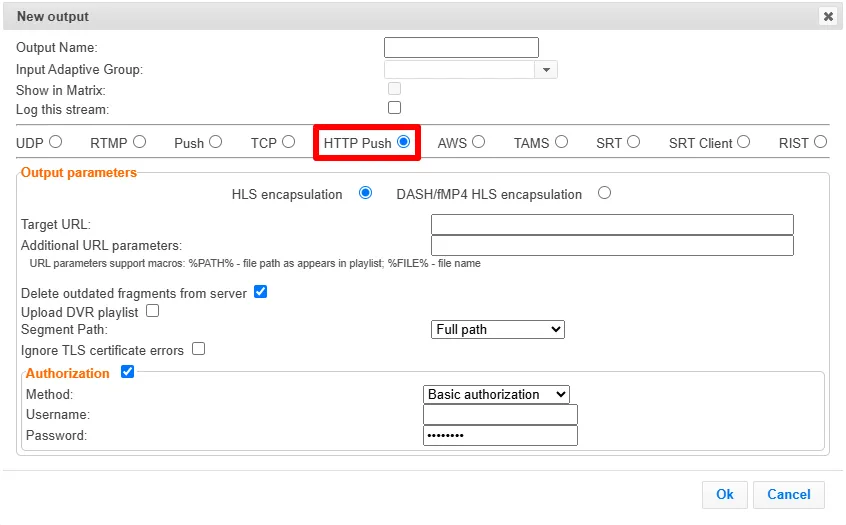
Type in the unique identifier for this output in the Output Name.
Select an Input Adaptive Group to be made available on this output from the adjacent drop-down list. To create an Adaptive Group, see ZEC Adaptive Groups.
Select the Show in Matrix check box to display this stream in the Matrix (see ZEC Using the Matrix). Default: Selected.
Select the Log this stream checkbox if you would like to generate event logs for this output.
Specify the Output parameters (see Output Stream Parameters Table below).
If your destination server requires authorization credentials to connect, select the Authorization checkbox.
Click OK.
The new HTTP Push Output with its settings is created and now appears on the screen.
Output Stream Parameters Table
Parameter | Description |
|---|---|
Output Parameters | |
Encapsulation Options |
|
Target URL | Depending on the selection in the Segment Path field below, this field should include the following:
|
Additional URL parameters | Depending on the selection in the Segment Path field below, this field should include the following:
URL parameters support macros as follows:
|
Delete outdated stream fragments from server | Select this checkbox to delete any outdated stream fragments from the server. |
Upload DVR playlist | Select this checkbox if you are streaming a recorded/VOD stream and you want to upload a DVR playlist in addition to the live playlist. |
Segment Path | Select one of the following path segmentation types:
|
Ignore TLS certificate errors | Select this option when streaming to a trusted server that does not have a valid certificate. When this option is selected, ZEC will ignore the TLS certificate errors and transmit the stream to its destination. |
Authorization | Select this checkbox if your destination server requires authorization credentials to connect. |
Method | Select one of the following authorization methods:
|
Username | Type the username |
Password | Type the password |
Advanced Mode
The fields discussed below are optional and available only in Advanced Mode.
To enter Advanced Mode add the URL parameter ?advanced=1 to the ZEC URL in your browser and press Enter/Return to reload the page:

Note the Advanced Mode settings are generally intended for advanced users and special cases. If you do not understand the settings, you should probably accept the default values.
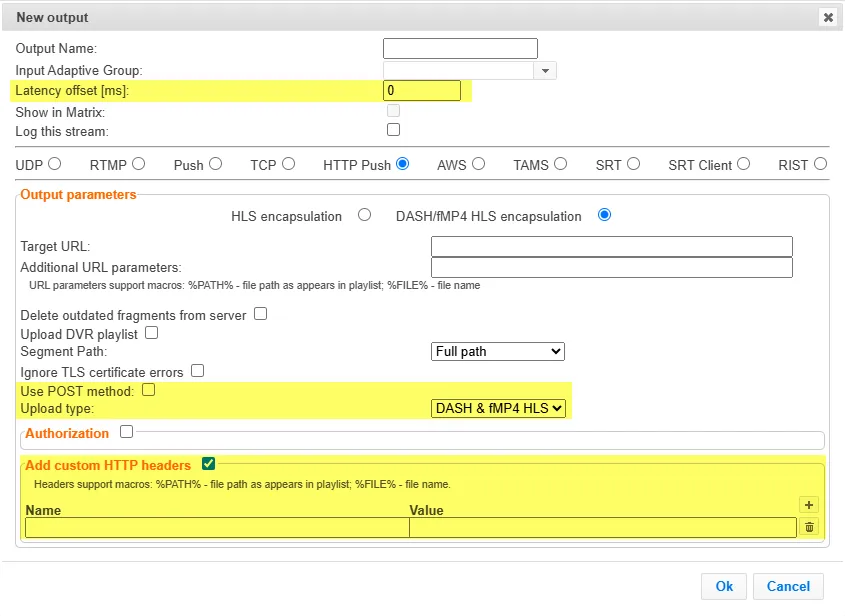
General
- Latency offset [ms] - Specify the additional buffering time in milliseconds. Increasing this value can improve stream stability in unstable network conditions, but will increase end-to-end delay. Default: 0 ms
Output Parameters
- Use POST method - Select this option to upload segments/playlists to the origin/CDN using HTTP POST. Applicable when your origin/CDN doesn't accept PUT and requires POST. When disabled - uploads with HTTP PUT, which is the standard WebDAV-style file upload and works with most origins/CDNs.
- Upload type -
Add Custom HTTP Headers
- Name - The name of the HTTP header to include in the request (e.g., Authorization)
- Value - The value to send for the selected header. (e.g., Bearer eyJhbGciOi...)