Transcoding an Input Stream
Zixi Broadcaster offers live transcoding, enabling users to create multiple bitrate streams from a single input stream.
For a comparison of transcoders - codecs and color support - see Comparison of Transcoders: Video Codec and Color Support.
Supported Video and Audio formats include:
- Video Decoding – MPEG2, H.264/AVC, H.265/HEVC
- Video Encoding – MPEG2, H.264/AVC, H.265/HEVC
- Audio Decoding – AAC, MPEG-1 Audio Layer I / II / III, MPEG-2 Audio Layer I / II / III, AC-3 (Dolby Digital)]
For AC-3, which can contain up to six discrete channels of sound, the transcoder only supports the left and right channels and will ignore the other channels.
- Audio Encoding – AAC, AAC-HE (High Efficiency) and AAC-HEv2; Pass through (no encoding) – any audio codec (MPEG1/2 / AAC / AC-3, E-AC-3 (Dolby Digital Plus).
The transcoder comes with pre-set common video profiles: 1080i60 / 1080i59.94, 1080p30 / 1080p25, 720p60, 720p50 / 720p30, 576i60 / 576p25, 480i60 / 480p29.97
In order to transcode an input stream from the Inputs screen, you must first configure the transcoding profiles in the Transcoder screen. For more information, see the Broadcaster Transcoder section.
To Transcode an Input Stream:
In the Zixi Broadcaster Inputs page, click the desired input stream that you want to transcode
Click the ⚙️ icon on the right end of the selected row and then Transcode. The Transcode <input stream name> window with the settings of the selected input stream is displayed.
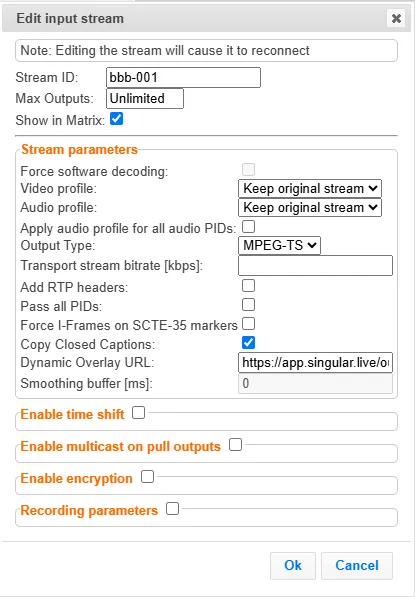
Enter the unique Stream I.D. for the new transcoded input stream.
Select the maximum concurrent connections to this stream from the Max. Outputs drop-down list. Default: Unlimited.
Select the Show in Matrix check box to display this stream in the Matrix (see Using the Matrix). Default: Selected.
Select the Log this stream checkbox if you would like to generate event logs for this input.
Select the Analyze checkbox if you would like to enable stream analysis for the input.
Under Stream Parameters, in the Video profile and Audio profile fields, do one of the following:
- Select the desired Video Profile and/or Audio Profile that you have configured.
- Select Keep original stream - if you have not configured a video or audio profile or do not want it transcoded or you want to set specific transcoding parameters for the specific stream. In this case, the video or audio input will not be transcoded.
- Select Remove stream – you can use the transcoder to remove the video or audio track from the stream.
Fill in additional fields (see table below for additional parameters).
Click OK.
The transcoded input stream is created and appears in an embedded window labeled Transcoded sources under the original input stream from which it was created.
Stream Parameters
Parameter | Description |
|---|---|
Advanced Options |
|
Force software decoding | If the input video source comes in a 4:2:2 format, which is not supported by the Nvidia GPU decoder, select this option so the decoding will be performed on the CPU (software decoding) and the encoding will be performed on the Nvidia GPU. |
Video Profile | Select an existing profile, select Keep original stream if you do not wish to transcode the video stream, or select Remove stream if you want to remove the video track. |
Audio Profile | Select an existing profile, select Keep original stream if you do not wish to transcode the audio stream, or select Remove stream if you want to remove the audio track. |
Apply audio profile for all audio PIDs | Select this checkbox to apply the selected audio profile for all PIDs. |
Output Type | Select one of the following output types. The outputs are configured as part of the transcoding process, so there is no need to create the Output from the Zixi Broadcaster Outputs screen:
|
Transport Stream Bitrate (Kbps) | Specify the bitrate of the MPEG transport stream (TS). This parameter is optional. If you do not specify a TS Bitrate, the transport stream will be variable bitrate (VBR) with no additional null packets added. If you specify a bitrate, the transport stream will be a constant bitrate (CBR) where null packets are added as necessary to achieve the specified bitrate. CBR transport streams are typically required when sending a stream to a satellite head-end or to a professional integrated receiver-decoder (IRD). The overhead of MPEG TS is about 7%. To determine the bitrate setting, sum the max video bitrate and audio bitrate from the encoding profile and then add the other PIDs (if choosing to pass all PIDs) and add 7%. If the bitrate needed for the transport stream exceeds the value specified, the Broadcaster will give a “bitrate too low” error message. VBR transport streams are typically used for HLS, DASH, RTMP, and other similar live streaming workflows. |
Pass all PIDs | Select this checkbox to pass-through all non-transcoded PIDs. |
Add RTP Headers | Select this checkbox to add RTP headers to the stream. RTP adds a 12-byte header, which includes a sequence number and a timestamp that can be used to detect dropped packets. The sequence number in the RTP headers can be used to do automatic reordering, and the timestamps can help overcome inter-packet gaps, also known as IAT (Inter Arrival Time). However, plain RTP does not feature error recovery or error protection. By default, the RTP headers (which include the timestamps and sequences) are used on the input side, but then they are stripped off, and they no longer propagate to outputs. |
Force I-Frames on SCTE-35 markers | Select this checkbox to force an I-frame on the frame with the PTS mentioned in the SCTE35 message or on the first frame after that PTS, if it doesn’t exist in the stream. |
Copy Closed Captions | Select this checkbox to copy CC (if exist on the original stream) to the transcoded stream. Applicable to HEVC/H264 sources and profiles only. |
Crop Parameters | Select this checkbox to set the cropping parameters. |
Cropping Mode | Set the units used for defining the crop. Options are: Pixels or Percentages. Note: Depending on the type of content, in some cases, using different crop values for low-resolution outputs might be appropriate. For example, if the content includes both video content and textual content, the text would not be readable at lower resolutions and thus might be better to exclude. Another use case for using different crop values for each output would be to slice a 360 or VR input video. |
Left, Top | Specify the left and top positions for the crop. |
Width x Height | Specify the width and height values for the crop. |
Dynamic Overlay URL | The URL of the HTML overlay feed. This field will be displayed only if the CEF software was installed. The HTML overlay feature overlays a dynamic HTML page on the video stream during the transcoding process. As part of this process, the images from the HTML page are “burned” into the video. The process uses Chromium Embedded Framework (CEF) to render the HTML page, and then the image is passed on to the transcoder to overlay on top of the raw video frame, which is then encoded. For more information, see HTML Overlay Installation Guide. |
Smoothing Buffer (ms) | Specify how much of the transcoded stream (in milliseconds) to store before transmitting it back to the server in order to prevent bursts. If the Transport stream bitrate [kbps] field is empty, the smoothing buffer is disabled. If the Transport stream bitrate [kbps] field is NOT empty, it is recommended to enter around 200ms, which should be enough to prevent bursts. |
Billing Codes | Billing codes are used to identify and differentiate traffic on a Zixi Broadcaster for billing purposes. When a billing code is added to a Source or Target, Zixi can track the traffic on that Broadcaster input or output separately from other inputs and outputs on the same Broadcaster. Billing codes are created by Zixi personnel on the Zixi Customer Portal for a particular organization. |
Billing Code | Enter the billing code that corresponds to this stream. The relevant billing can be obtained from the organization that received the billing code from Zixi. |
Billing password | Enter the password that corresponds to this billing code. |
Enable time shift | Select this checkbox to record the stream content and broadcast it after a specified delay. To deploy an input stream that uses the current stream's time shift, you need to configure a "Delayed" input stream, see Adding Delayed Streams. |
Maximum delay [hh:mm:ss] | Specify the time of the delayed transmission of this stream. Maximum: 24 hours. |
Transmit as multicast | Selecting this checkbox enables the transmission of this stream’s outputs as multicast. A Zixi receiver that will pull the stream will receive it in multicast. By default, Zixi Broadcaster is configured to allow transparent fallback to unicast if it is out of the LAN. Requires enabling Multicast Pull in the Settings. This setting requires enabling Multicast Pool (Settings > Multicast Pool). |
Multicast Only | Selecting this checkbox will force the transmission of this stream only in multicast. |
Enable Encryption | Select this checkbox to encrypt the Input stream. For more information, see Encrypting an Input Stream in Zixi Broadcaster |
Encryption type (for Encryption enabled) | Specify the type of Encryption (AES 128/192/256). |
Encryption key (for encryption enabled) | Click Generate to generate an encryption key. The generated encryption key must be sent to the end-user to decipher the received encoded stream. |
Recording parameters | Select this checkbox to customize the recording parameters. |
Destination Type | Select the radio button for the desired storage type and then fill in the relevant parameters.
|
Record to Disk Parameters | |
File Name Template | Specify the file name pattern that Zixi will use to generate when saving the recorded content. A separate file will be generated for each recording up to the time specified in the Max recorded file duration parameter (see above). After this duration, a new file will be generated. The file name pattern can include any string and up to five variables listed below. Only the %T=HH.MM.SS creation time is mandatory. You can change the order of these variables and add text as long as you maintain the legitimate structure of the file in Linux and Windows:
For example, the following pattern %Y_recording%T.ts will generate the following file name 2017_recording15:32:35.ts. |
Max recorded file duration [hours] | Specify the maximum time allotted for recording a video stream. Default: 2 hours |
Keep recorded files for [hours] | Specify the maximum time for storing the recording. Default: 0 hours |
Custom Path | Optionally specify a storage location for the recorded files that is relative to the root folder. This location bypasses the location specified as the root folder in the Settings > General screen. |
Record to S3 Parameters | |
File Name Template | Specify the file name pattern that Zixi will use to generate when saving the recorded content. A separate file will be generated for each recording up to the time specified in the Max recorded file duration parameter (see above). After this duration, a new file will be generated. The file name pattern can include any string and up to five variables listed below. Only the %T=HH.MM.SS creation time is mandatory. You can change the order of these variables and add text as long as you maintain the legitimate structure of the file in Linux and Windows:
For example, the following pattern %Y_recording%T.ts will generate the following file name 2017_recording15:32:35.ts. |
Max recorded file duration [hours] | Specify the maximum time allotted for recording a video stream. Default: 2 hours |
URL | Specify the URL of the S3 bucket. |
Ignore TLS certificate errors | TLS certificate for S3 bucket might be detected as faulty if bucket name contains dot[s]. When this option is selected, Zixi Broadcaster will ignore the TLS certificate errors and transmit the stream to its destination. |
Access Key | The access key that is used for accessing the S3 bucket. |
Secret Key | The secret key that is used for accessing the S3 bucket. |