Change the UI Port for Broadcaster
1 min
If for any reason you require the Broadcaster User Interface to be changed from port 4444 there is a few ways to make this adjustment.
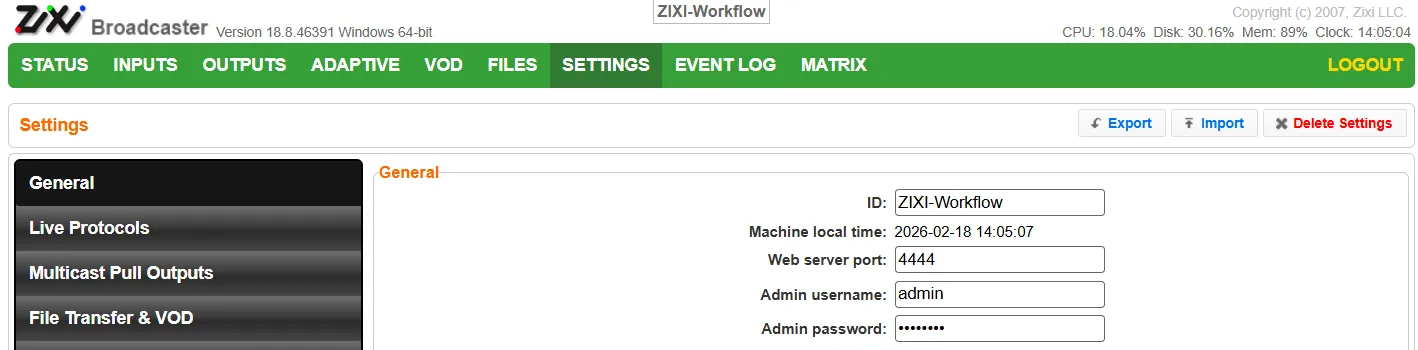
- Within the User Interface directly
Go to the Settings Tab and in "Web Server Port" enter the new port number.
Hit Apply
Restart the broadcaster
- Using sed or Linux commands
After installing the Broadcaster, use sed or similar Linux command to update the port in the broadcaster-config.xml file.
Stop the Broadcaster process
Run the sed command:
sed -i 's/4444/5555/g' /zixi/zixi-broadcaster_linux64/broadcaster-config.xml
Or Update in the config file:
Change <WEBSERVER> <PORT>4444</PORT> </WEBSERVER> to <WEBSERVER> <PORT>5555</PORT> </WEBSERVER> for example.
Restart the Broadcaster process.
- Using API commands
Install the Broadcaster
Make an API call on the local machine like the following: curl -i --user "admin:1234" http://127.0.0.1:4444/apply_settings.json?gui_web_port=5555