ZEC Adding UDP Outputs
This enables the ZEC to send a UDP stream. The UDP stream is not protected by the Zixi protocol. The UDP streams can be one of the following types:
- UDP – plain UDP
- RTP – Real-Time Transport Protocol
- RTP + SMPTE 2022 FEC - SMPTE 2022 standard with Forward Error Correction
To Create a UDP Output:
In the ZEC Outputs page, click + New Output.
The New output window is displayed.
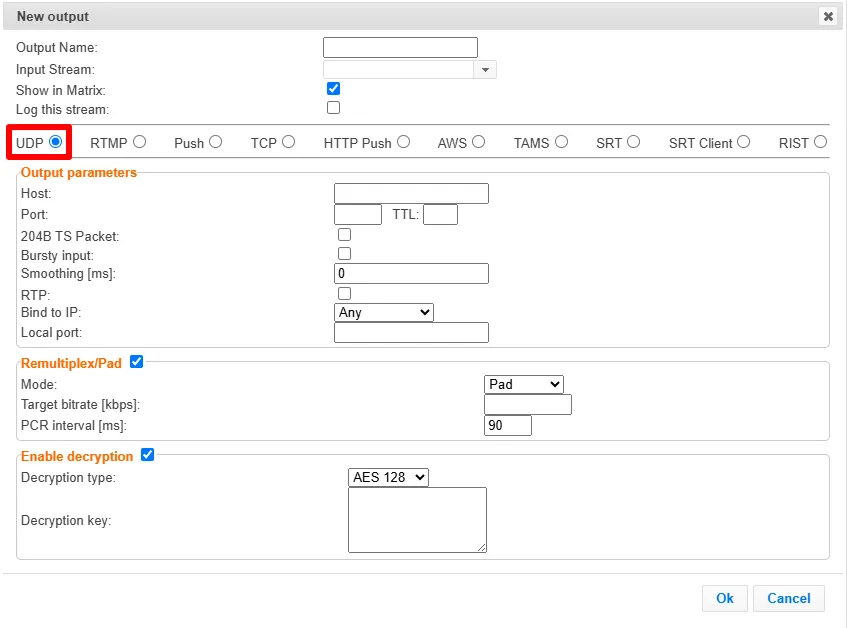
Type in the unique identifier for this output in the Output Name.
Select an Input Stream to be made available on this output from the drop-down list.
Select the Show in Matrix check box to display this stream in the Matrix (see ZEC Using the Matrix). Default: Selected.
Select the Log this stream checkbox if you would like to generate event logs for this output.
Select UDP.
Specify the Output parameters (see Output Stream Parameters TableOutput Stream Parameters Table below).
If you want to remux the stream to CBR (used for professional IRDs) in order to avoid bandwidth waste or add NULL packets and adjust the stream clock (PCR) in order to make the stream CBR, select Remultiplex/Pad and configure the respective parameters (see Output Stream Parameters Table).
You can decrypt an encrypted stream as it enters the ZEC. To decrypt a stream, select the Enable decryption checkbox and fill in the parameters as described in the Output Stream Parameters Table below. For more information, see Decrypting an Output Stream in ZEC.
Click OK.
The new UDP Output with its settings is created and now appears on the Outputs screen.
Output Stream Parameters Table
Parameter | Description |
|---|---|
Output Parameters | |
Host | Specify the destination IP address or URL. |
Port | Specify the target UDP port. |
TTL | Specify the time-to-live (TTL). Used mainly to limit the range (or “scope”) of a multicast transmission. Leaving it as blank uses the default value specified by the operating system. |
204B TS Packet | Enable this option if the stream has an MPEG-TS that uses 204 bytes packets. This will allow the UDP packets to be aligned with MPEG-TS packets. |
Bursty Input | |
Smoothing [ms] | Enables transmission of the output at the correct rate. Required when the receiving device is sensitive and can’t lock onto the stream (in such a case, the recommended latency is 100 - 1000 ms). |
RTP | Enables the use of the Real-time Transport Protocol. |
SSRC (for RTP selected) | Enter an SSRC identifier for the RTP session. The SSRC identifier is a randomly chosen value meant to be globally unique within a particular RTP session. |
SMPTE 2022 FEC (for RTP selected) | Disables the FEC or specifies the type of FEC matrix to D1/ D2. Note: This setting can be modified without interrupting an existing stream. In the SMPTE-2022 FEC standard, 1-D and 2-D parity codes are systematic FEC codes of decent complexity that provide protection against bursty or random losses. To enable SMPTE-2022 FEC (Forward Error Correction), select one of the following parity options from the drop-down menu:
|
Bind to IP | Select from the drop-down list the local IP address to be used for this Output, OR select Any to enable any IP to be used. |
Local Port | Specify from which local port to source the stream, if desired (instead of randomly chosen by the operating system). |
Remultiplex/Pad | Select this checkbox to enable remuxing from VBR MPEG-TS to MPEG-TS CBR (used for professional IRDs) or padding with null packets. |
Mode | Select one of the following:
|
Target bitrate [kbps] | Specify the CBR bitrate to target for a remuxed stream. |
PCR interval [ms] | Specify the frequency at which Program Clock Reference is inserted into the outputs Transport stream in milliseconds (default - 90). |
Buffer size [ms] (for Remultiplex) | Specify the size of the buffer that will be used for the remuxing. A larger buffer increases the quality, but also increases latency. |
No NULL packets (for Remultiplex) | Select this option to re-multiplex the stream to CBR but remove the NULL packets in order to maintain a low bitrate. |
Enable Decryption | Select this checkbox to decrypt an encrypted stream. |
Decryption type | If the stream has been encrypted, you can decrypt it through the output by selecting this checkbox and specifying the type of encryption that was used. Select Automatic to decrypt a stream that has been encrypted using Automatic encryption. Only if the stream has not been encrypted, leave the Enable Decryption checkbox unselected (default). Important Notice: if the stream has been encrypted, you must decrypt it in the output. |
Decryption key | If the decryption type includes a key, enter the key to decrypt the stream during output. |
Advanced Mode
The fields discussed below are optional and available only in Advanced Mode.
To enter Advanced Mode add the URL parameter ?advanced=1 to the ZEC URL in your browser and press Enter/Return to reload the page:

Note the Advanced Mode settings are generally intended for advanced users and special cases. If you do not understand the settings, you should probably accept the default values.
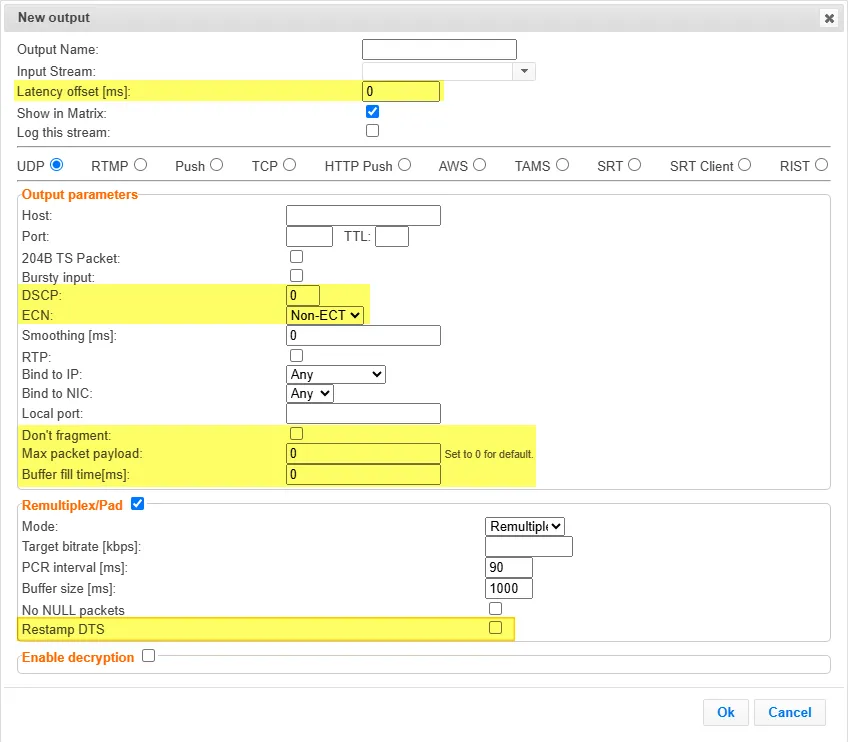
General
- Latency offset [ms] - Specify the additional buffering time in milliseconds. Increasing this value can improve stream stability in unstable network conditions, but will increase end-to-end delay. Default: 0 ms
Output Parameters
- DSCP - Specify the Differentiated Services Code Point (DSCP) value for the stream. This 6-bit value (ranging from 0 to 63) is embedded within the IP header of the network packets to classify the traffic type and define its priority level across the network routing infrastructure.
- ECN - Explicit Congestion Notification (ECN) lets a congested router mark a packet to signal congestion rather than dropping it. The sender declares "I understand ECN" by marking its packets as ECN-capable; a congested router along the path can then flip the bits to signal congestion without packet loss. Note that this is only a request that depends on all devices downstream being ECN-capable. In most cases, enabling ARQ and FEC is a more reliable way of ensuring video delivery on congested networks. Options are:
- Non-ECT - ECN is disabled. If the network gets congested, the router will drop packets.
- ECT0 - Indicates to network routers that the sending and receiving devices support ECN. If congestion occurs, routers will mark the packets rather than drop them.
- ECT1 - Functions identically to ECT0. It is an alternative code indicating the same ECN-capable status to the network routers.
- Don't fragment - Sets the IP "Don't Fragment" bit on outgoing packets, preventing routers from fragmenting them in transit. Packets exceeding the path MTU are dropped rather than fragmented. This is useful to guarantee packet integrity on networks where fragmentation causes issues.
- Max packet payload - Maximum UDP payload size in bytes. When set (>0), the ZEC aggregates multiple TS packets into a single UDP datagram up to this size, reducing packet rate/overhead. Set to 0 for default behavior (no aggregation). Note: enabling this also implies Don't Fragment.
- Buffer fill time [ms] - Only relevant when Max packet payload is set. The maximum time to wait for a packet to fill up before sending it partially full. Caps the latency added by packet aggregation (default 5 ms for push outputs).
Remultiplex/Pad
- Restamp DTS -