Understanding Licensing
Licensing Portability, Evaluation and Expiry
Zixi broadcaster and ZEC licenses govern what connection modes a device can use, how the license validates itself over time, and how that license behaves when hardware changes. This article covers the areas that prompts the most questions: license portability during hardware migration, license expiry and validation behavior, and connection mode limits by license tier.
License Types: Metered vs Perpetual
Every Broadcaster or ZEC license is issued as one of two types, and the type determines how the license validates itself while the device is running.
Perpetual license: issued for the life of the hardware or a defined term, with no recurring validation requirement against Zixi's licensing servers.
Metered license: requires the device to check in with Zixi's licensing servers on a recurring basis to remain valid.
72 Hour License Server Check-in Requirement
A metered license must successfully check in at least once every 72 hours. If the device cannot reach the licensing server (due to network outage, firewall change, DNS failure) within that window, the license enters a failed validation state and will de-activate. The connections relying on that license will be rejected, even though the license itself is still good and the portal-listed expiry date is unaffected. The device will require the license to be re-activated to restart connections.
License Portability & New Machine Detection
Licenses are tied to a hardware fingerprint (host ID), not just a license key. Certain hardware changes are treated as a new machine and require re-activation.
What triggers a new machine detection
• A NIC change on the host, since the primary network interface is part of the fingerprint used for activation.
• An IP address change alone does not typically trigger new machine detection on its own, but is often accompanied by a NIC change during migrations which does trigger one.
• Moving the license to genuinely new hardware (new VM, new physical host, cloned image with a new interface).
How license activation works
Each license has a fixed number of activation availability slots. Activating on a new machine consumes one slot. Decommissioning the old server does not automatically return its slot to the pool. Slot recovery after decommissioning, and re-activation on replacement hardware, both require Zixi to release and reissue an activation.
Your sales team or solutions engineer can assist you with additional activation slots for Broadcaster. For ZEC you can issue additional activation slots yourself within the Zixi portal.
Migrating a license to new infrastructure
1. Confirm the license type and current activation count: In the license portal before starting the migration.
2. Provision the new hardware: and retrieve its host fingerprint (host ID) from the Broadcaster or ZEC installer.
3. Submit the new host ID to Zixi: along with the license key and a request to release the old activation slot, if the old server is being decommissioned.
4. Apply a new activation slot: to the new machine once Zixi confirms the activation slot has been added to your account.
5. Decommission the old server: once you confirm the new machine is up and active.
Steps 1, 2, and 4 are self-service. Step 3, releasing or reassigning an activation slot, requires Zixi involvement and is not available directly in the Zixi portal. Prepare ahead when scheduling your migration.
Connection Modes by License Feature
License features determine which input and output connection modes a Broadcaster or how ZEC is permitted to run, independent of whether the physical hardware can support them. All of these may have specific limits.
Push input: the license permits the device to receive a stream initiated by the sending encoder.
Listener input: the license permits the device to open a port and wait for a third-party encoder to connect to it.
Push output: the license permits the device to initiate an outbound connection to a receiver.
Listener output: the license permits the device to wait for a downstream receiver to connect.
Third-party encoders vary in which mode they support. When integrating a third-party device, confirm both that the Broadcaster/ZEC license permits the required mode and that the third-party encoder itself supports initiating or listening for a connection accordingly. Mismatches here are a common source of connections that appear licensed at the device level but fail to establish.
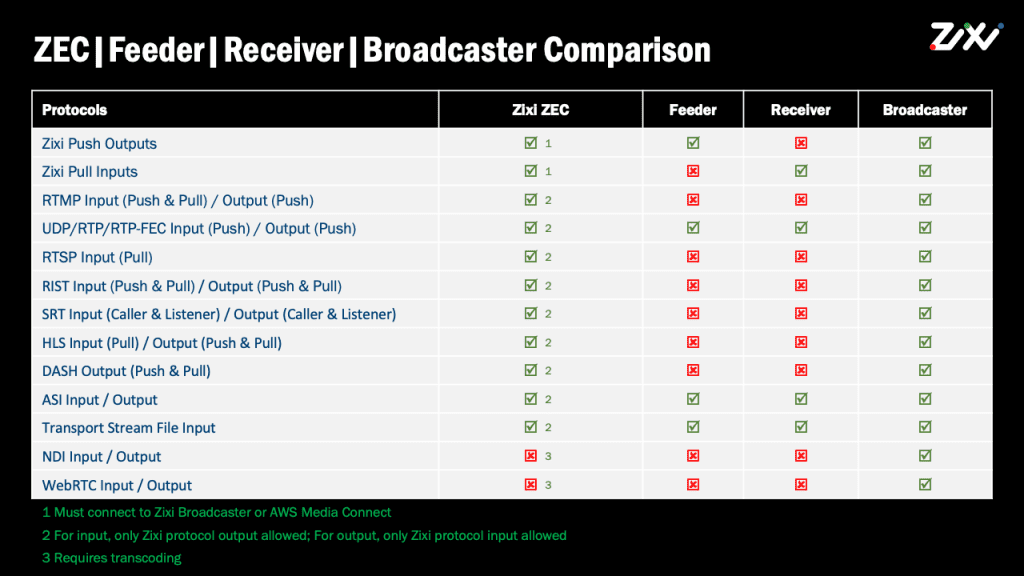
ZEC has specific limitation which requires using Zixi protocol as either the Input or an Output for each stream.
Troubleshooting: License failed before expiry
A license failed error appearing before the portal-listed expiry date is not an expiry issue. It typically points to one of two causes.
- Check-in failure on a metered license (see the 72-hour requirement above)
- Server-side recognition failure following a license push or update
In the second case, a corrected or reissued license push from Zixi resolves the failure. This can affect both the Zixi Broadcaster and third-party licensed devices connected to it, so a license failure on a downstream third-party device does not rule out a licensing issue on the upstream Broadcaster.
Immediate remediation steps
1. Confirm the expiry date listed in the Zixi portal: to rule out an actual license expiration.
2. Check network connectivity: from the device to Zixi's licensing servers if the license is metered. See the Network Port Settings
3. Contact Zixi support: with the license key, the affected device's host ID, and the timestamp the failure began.