Adding UDP Streams
This enables the Broadcaster to receive a UDP stream. The UDP stream is not protected by the Zixi protocol.
The UDP streams can be one of the following types:
- UDP – the input stream is plain UDP.
- RTP – the input stream uses the RTP protocol, which adds RTP headers to the UDP stream. RTP adds a 12-byte header, which includes a sequence number and a timestamp that can be used to detect dropped packets. The sequence number in the RTP headers can be used to do automatic reordering and the timestamps can help overcome inter-packet gaps, also known as IAT (Inter Arrival Time). However, plain RTP does not feature error recovery or error protection. By default, the RTP headers (which include the timestamps and sequences) are being used on the input side, but then they are stripped off and they no longer propagate to outputs.
- RTP + SMPTE 2022 FEC – the input stream includes forward error correction, which enables error recovery or error protection.
If the stream is an MPTS stream and you want to demux it into separate SPTS input streams, create the stream by following the instructions below, and then follow the instructions in the Demuxing an MPTS Stream section.
To Add a UDP Stream:
In the Zixi Broadcaster Navigation menu, click the Inputs tab.
In the Menu bar, click New Input and select the UDP type. The Add a new input stream window is displayed.

Enter the unique Stream I.D. for the Broadcaster.
Note this must be identical (case sensitive) to the stream name configured in ZEC.
Select the maximum concurrent connections to this stream from the Max. Outputs drop-down list. Default: Unlimited.
This setting can be modified without interrupting an existing stream.
Select the Show in Matrix check box to display this stream in the Matrix (see Using the Matrix ). Default: Selected.
Select the Log this stream checkbox if you would like to generate event logs for this input.
Select the Analyze checkbox if you would like to enable stream analysis for the input.
Specify the Stream Parameters (see Input Streams Parameters Table below).
If you want to specify Billing Codes to identify and differentiate traffic on a Zixi Broadcaster for billing purposes, select this checkbox (see Input Stream Parameter Table below).
If you want to Enable time shift, select this checkbox (see Input Streams Parameters Table).
If you want to Enable multicast on pull outputs, select this checkbox (see Input Streams Parameters Table).
If you want to Enable encryption, select this checkbox (see Input Streams Parameters Table). For more information, see Encrypting an Input Stream in Zixi Broadcaster.
If you want to configure the Recording Parameters, specify them in the respective fields (see Input Streams Parameters Table).
Click OK.
The “Input added” message appears on the top of the screen. The UDP Stream from the ZEC is added to the Zixi Broadcaster and now appears in the list of streams available in the Zixi Broadcaster inputs UI.
Input Stream Parameters Table
Parameter | Description |
|---|---|
Stream parameters |
|
Port | Specify the port to listen on. This port must be open on all firewalls between the Zixi Broadcaster and other devices it is communicating with. |
Multicast IP | If multicast, type the Multicast IP address (or leave blank in the case of Unicast). |
SSM Source IP | Specify the source IP for a source-specific multicast. |
Type | Select the appropriate protocol type from the drop-down list:
|
204 bytes TS packet | Enable this option if the stream has an MPEG-TS that uses 204 bytes packets. This will allow the UDP packets to be aligned with MPEG-TS packets. |
Bind to IP | Select from the drop-down list the local IP address to be used for this Input, OR select Any to enable any IP to be used. |
Max. bitrate [kbps] | Specify the maximum expected bitrate for memory allocation. Recommended: 2X the actual bitrate, which will prevent buffer overruns (especially with VBR streams). Default: 8000. Note – Overflows will typically occur when the Max Bitrate isn’t sufficient. |
Dejitter Buffer [ms] | A buffer size used to de-jitter RTP and UDP inputs. For RTP, packet timing is fixed according to packet arrival times and RTP timestamps. For UDP, dejittering is only based on arrival times. Default: 0. Assuming that the timestamps in the RTP are accurate, this feature is helpful when the encoder generates an accurate timestamp on the stream, but the arrival is jittery/bursty. In case of jitter, specify a higher value than the RTP input jitter. To view the Jitter level of the input stream, create the input and select it on the Inputs screen; the Jitter metric will be displayed in the Stats pane at the bottom of the screen. |
Keep RTP Headers | Selecting this checkbox will keep the RTP headers of the input. Keeping the input's RTP headers will propagate RTP headers to later processing steps, including failover groups and outputs (relevant for RTP inputs only). When used together with a failover group – enabling this option enables using SMPTE 2022-2 FEC and 2022-7 hitless failover together. The failover group will use 2022-7 and will merge streams based on sequence in the RTP header, and not on content with DNA matching. When creating the Failover Group, select the Keep RTP Headers again (in the failover group screen) to keep the RTP headers after the merge. If it is not selected, Zixi will merge based on the headers (using SMTE 2022-7), but then drop the headers thereafter. Combining Keep RTP Headers with Outputs:
|
Billing Codes | Billing codes are used to identify and differentiate traffic on a Zixi Broadcaster for billing purposes. When a billing code is added to a Source or Target, Zixi can track the traffic on that Broadcaster input or output separately from other inputs and outputs on the same Broadcaster. Billing codes are created by Zixi personnel on the Zixi Customer Portal for a particular organization. |
Billing Code | Enter the billing code that corresponds to this stream. The relevant billing can be obtained from the organization that received the billing code from Zixi. |
Billing Password | Enter the password that corresponds to this billing code. |
Enable time shift | Select this checkbox to record the stream content and broadcast it after a specified delay. To deploy an input stream that uses the current stream's time shift, you need to configure a "Delayed" input stream. (See Adding Delayed Streams). |
Maximum delay [hh:mm:ss] (for Time Shift enabled) | Specify the maximum time delay of this input. |
Enable multicast on pull outputs | Select this checkbox to enable the transmission of this stream’s outputs as multicast. A Zixi receiver that will pull the stream will receive it in multicast. By default, Zixi Broadcaster is configured to allow transparent fallback to unicast if it is out of the LAN. Requires enabling Multicast Pull in the Settings. |
Multicast-Only (for multicast enabled) | Selecting this checkbox will force the transmission of this stream only in multicast. |
Enable Encryption | Select this checkbox to encrypt the Input stream. The stream encryption prevents any further processing, such as analysis, transcoding, etc. The encryption works in the following way:
For more information, see Encrypting an Input Stream in Zixi Broadcaster. |
Encryption type (for Encryption enabled) | Specify the type of Encryption (AES 128/192/256). |
Encryption key (for Encryption enabled) | Click Generate to generate an encryption key. The generated encryption key must be sent to the end-user to decipher the received encoded stream. |
Recording parameters | Select this checkbox to customize the recording parameters. |
Destination Type | Select the radio button for the desired storage type and then fill in the relevant parameters.
|
Record to Disk Parameters | |
File Name Template | Specify the file name pattern that Zixi will use to generate when saving the recorded content. A separate file will be generated for each recording up to the time specified in the Max recorded file duration parameter (see above). After this duration, a new file will be generated. The file name pattern can include any string and up to five variables listed below. Only the %T=HH.MM.SS creation time is mandatory. You can change the order of these variables and add text as long as you maintain the legitimate structure of the file in Linux and Windows:
For example, the following pattern %Y_recording%T.ts will generate the following file name 2017_recording15:32:35.ts. |
Max recorded file duration [hours] | Specify the maximum time allotted for recording a video stream. Default: 2 hours |
Keep recorded files for [hours] | Specify the maximum time for storing the recording. Default: 0 hours |
Custom Path | Optionally specify a storage location for the recorded files that is relative to the root folder. This location bypasses the location specified as the root folder in the Settings > General screen. |
Record to S3 Parameters | |
File Name Template | Specify the file name pattern that Zixi will use to generate when saving the recorded content. A separate file will be generated for each recording up to the time specified in the Max recorded file duration parameter (see above). After this duration, a new file will be generated. The file name pattern can include any string and up to five variables listed below. Only the %T=HH.MM.SS creation time is mandatory. You can change the order of these variables and add text as long as you maintain the legitimate structure of the file in Linux and Windows:
For example, the following pattern %Y_recording%T.ts will generate the following file name 2017_recording15:32:35.ts. |
Max recorded file duration [hours] | Specify the maximum time allotted for recording a video stream. Default: 2 hours |
URL | Specify the URL of the S3 bucket. |
Ignore TLS certificate errors | TLS certificate for S3 bucket might be detected as faulty if bucket name contains dot[s]. When this option is selected, Zixi Broadcaster will ignore the TLS certificate errors and transmit the stream to its destination. |
Access Key | The access key that is used for accessing the S3 bucket. |
Secret Key | The secret key that is used for accessing the S3 bucket. |
Advanced Mode
The fields discussed below are optional and available only in Advanced Mode.
To enter Advanced Mode add the URL parameter ?advanced=1 to the Zixi Broadcaster URL in your browser and press Enter/Return to reload the page:

Note the Advanced Mode settings are generally intended for advanced users and special cases. If you do not understand the settings, you should probably accept the default values.
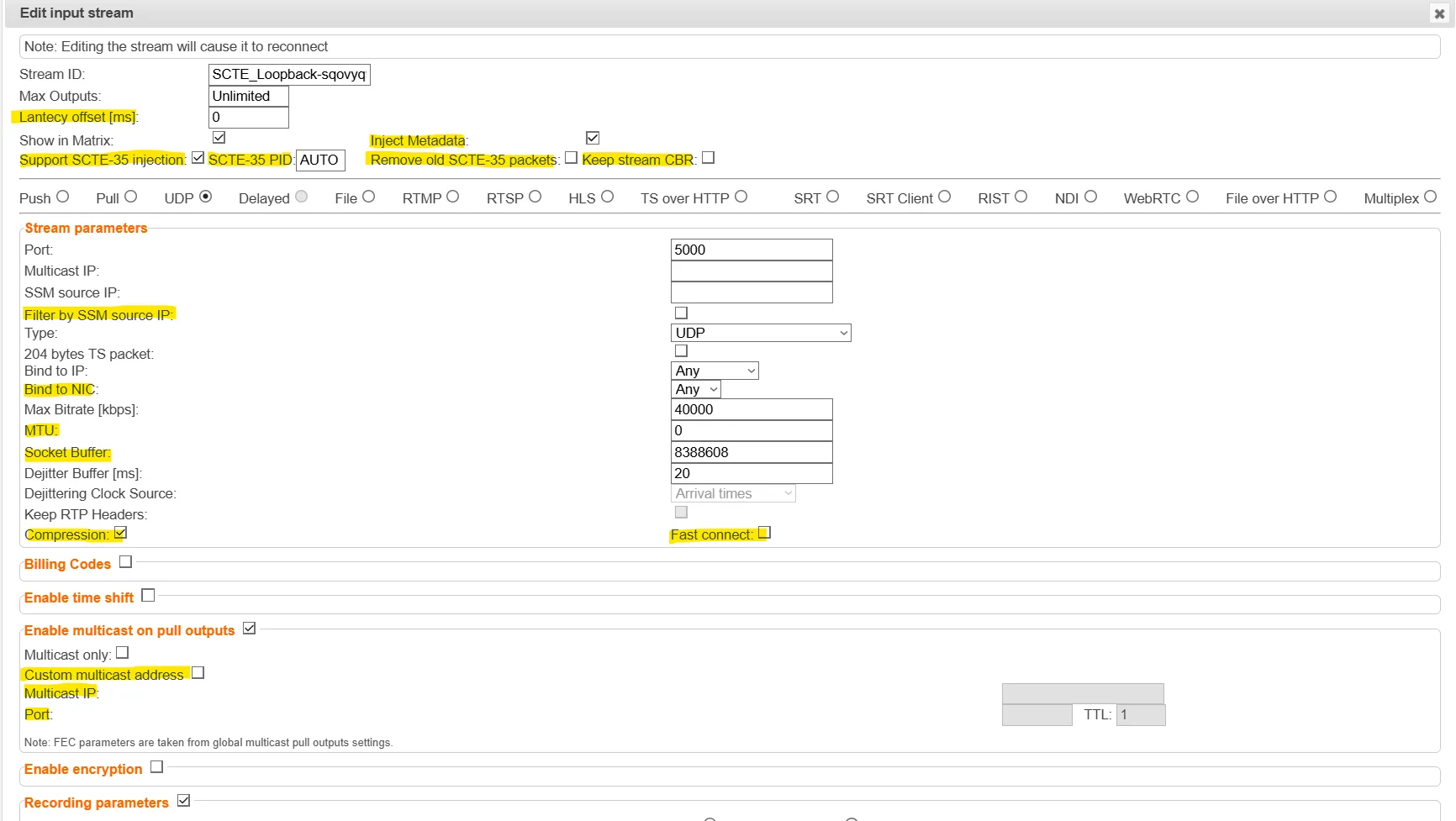
General
- Latency Offset [ms] - Specify the additional buffering time in milliseconds. Increasing this value can improve stream stability in unstable network conditions, but will increase end-to-end delay. Default: 0 ms
- Support SCTE-35 injection - Select this checkbox if you would like the stream to support SCTE-35 insertion.
- SCTE-35 PID - Enter a PID number for SCTE-35 injection. You can enter a value manually or use the Up/Down arrows that appear when clicking the field. (or leave as Auto to match existing SCTE-35 PID)
- Inject Metadata - allows Zixi create a PID that carries information about what hops a feed has travelled through on the way to its destination, it includes things like CC errors and IAT at each hop. The information is useful for debugging issues with streams.
- Remove old SCTE-35 packets - If SCTE-35 injection is supported, select this checkbox to clear out existing packets.
- Timeout for CBR - Time in MS to wait for a NULL packet to inject SCTE-35 into.
Stream Parameters
- Filter by SSM Source IP - Select this checkbox if you would like the Broadcaster to accept multicast packets only from the IP specified in the SSM Source IP field, even if the OS delivers packets from multiple sources for the same multicast group.
- Bind to NIC - Select from the drop-down list the CIDR that represents the IP range where the desired NIC is accessed.
- MTU - If you would like to configure the Maximum Transmission Unit (the largest data packet that a network-connected device will accept) for pulling the stream, enter the MTU in bytes in the MTU field.
- Socket Buffer - Specify the Socket Buffer value in bytes.
- Compression - Enables bandwidth optimization by replacing NULL packets with signaling information embedded in packet headers. This reduces the overall bitrate without affecting content integrity. Since not all receivers support this compression method, it is optional. The system can receive compressed streams, but will only transmit compressed data when this option is explicitly enabled.
- Fast Connect - Enables faster session establishment by reducing the time required to initiate the RIST connection. This is useful in environments where rapid recovery or quick stream startup is required. Support for this feature may vary depending on the receiving endpoint.
Enable Multicast on pull outputs
- Custom multicast address - Select this checkbox to manually define a specific multicast IP address and port for the output stream, overriding the system's global Multicast Pool settings.
- Multicast IP - Enter the Multicast IP address.
- Port - Specify the port to listen on. This port must be open on all firewalls between the Zixi Broadcaster and other devices it is communicating with.