Adding TAMS Outputs
The TAMS output allows you to send streams to a TAMS cloud repository. For more information about TAMS and why you might want to use it, see TAMS and Zixi.
The input for a TAMS Output must be an Adaptive Group that generates HLS - you can produce Zixi and/or CMAF as well, but only HLS will be sent to TAMS.
To Create a TAMS Output
In the Zixi Broadcaster Outputs page, click + New Output.
The New output window is displayed.

Select the TAMS option (radio button).
Type in the unique identifier for this output in the Output Name.
Select an Adaptive Group to be made available on this output from the drop-down list.
Notes:
- The the Adaptive Group must include UUIDs for the video and audio flows. See Creating New Adaptive Groups.
- The Adaptive Group must have Send distinct audio/video elementary streams enabled.
Select the Log this stream checkbox if you would like to generate event logs for this output.
Currently, only OAuth is supported for authentication. Enter the following required information for your TAMS instance:
- Token URL (for OAuth)
- Client ID (for OAuth)
- Secret key (for OAuth)
- URL (Base API URL of the TAMS deployment)
If your OAuth credentials are scoped for Delete permissions, select Require 'tams-api/delete' (read/write permissions are always requested).
Select Ignore TLS certificate errors to prevent the connection from failing because the TLS certificate is found to be faulty.
Select a Billing Code if needed, and provide the password.
Click OK.
Output Stream Parameters Table
Parameter | Description |
|---|---|
Output Name | A unique name for the output |
Input Adaptive Group | The input for a TAMS output must be an Adaptive Group that outputs HLS, and the UUIDs for the TAMS video and audio flows must be entered in the Adaptive Group configuration |
Latency Offset | See the Latency Offset subsection below this table |
TAMS Authentication | |
Token URL | The server address Broadcaster calls to obtain and refresh access tokens. Required |
Client ID | The OAuth client id used to get access tokens for your TAMS system. Required |
Secret Key | The OAuth secret key (sometimes called client secret) used to get access tokens for your TAMS system. Required |
URL | URL for your TAMS system Required |
Require 'tams-api/delete' | Select this checkbox if your OAuth credentials are scoped for Delete permissions (read/write permissions are always requested). |
Ignore TLS certificate errors | Select this option when streaming to a trusted server that may not have a valid certificate. When this option is selected, Zixi Broadcaster will ignore the TLS certificate errors and transmit the stream to its destination. |
Billing Codes | Billing codes are used to identify and differentiate traffic on a Zixi Broadcaster for billing purposes. When a billing code is added to a Source or Target, Zixi can track the traffic on that Broadcaster input or output separately from other inputs and outputs on the same Broadcaster. Billing codes are created by Zixi personnel on the Zixi Customer Portal for a particular organization. |
Billing Code | Enter the billing code that corresponds to this stream. The relevant billing can be obtained from the organization that received the billing code from Zixi. |
Billing password | Enter the password that corresponds to this billing code. |
Advanced Settings
The fields discussed below are optional and available only in Advanced Mode.
To enter Advanced Mode add the URL parameter ?advanced=1 to the Zixi Broadcaster URL in your browser and press Enter/Return to reload the page:

Note the Advanced Mode settings are generally intended for advanced users and special cases. If you do not understand the settings, you should probably accept the default values.
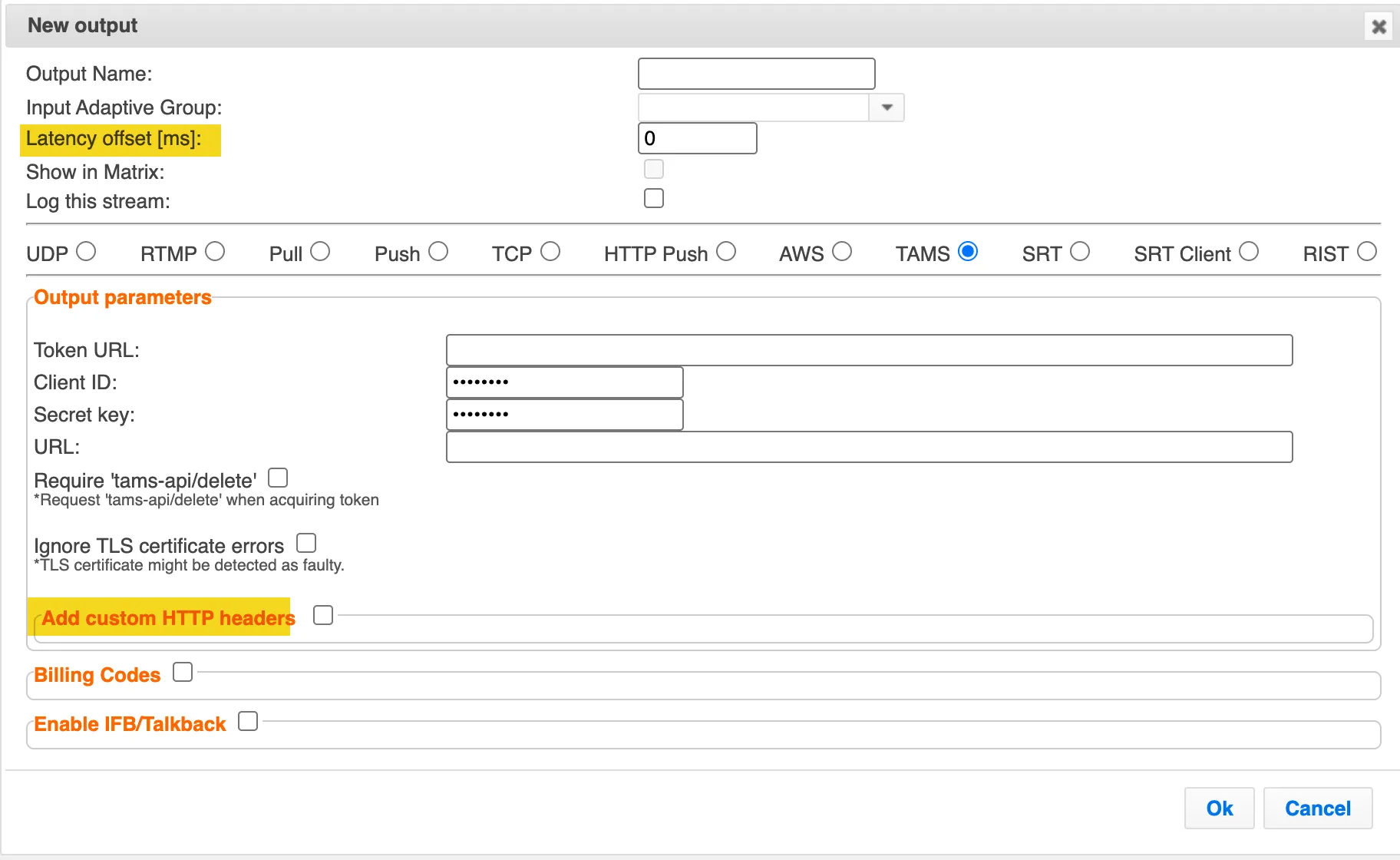
In advanced mode, you have some additional options:
- Set Latency Offset - (see below)
- Add custom HTTP headers to the API requests that send the segments to TAMS (if your TAMS implementation requires that)
- Enable IFP/Talkback - Enables a return audio channel from the Broadcaster to the source, allowing operators, producers, or remote staff to communicate with the contributor during a live transmission.
Latency Offset
Latency offset is a configuration parameter that delays the processing of a transport stream by a defined amount of time (in milliseconds). This delay is not arbitrary—it serves specific operational goals:
- SCTE-35 Cue Injection and Pre-roll Support In broadcast workflows, SCTE-35 markers signal ad breaks or content insertion points. By applying a latency offset, the system can inject SCTE-35 packets ahead of playback, ensuring accurate timing for ad insertion or blackout triggers. This is critical for compliance and monetization workflows. Example: Zixi Broadcaster introduced latency offset to enable SCTE-35 insertion after the offset for pre-roll scenarios.
- Stream Normalization and Timeline Alignment HLS inputs often arrive with irregular timestamps (PCR, PTS, DTS) or discontinuities. Adding a latency offset gives the system time to buffer and normalize segments, repair timeline irregularities, and remultiplex into a stable MPEG-TS output. This prevents audio drift and switching errors downstream.
- Smooth Buffering for Burst Handling When upstream encoders send data in bursts, latency offset combined with buffering helps maintain a steady flow into the broadcaster. This avoids jitter and packet timing issues that could disrupt adaptive bitrate workflows.