Adding RIST Streams
This enables the Broadcaster to receive a RIST stream. RIST seeks to provide reliable, high-performance media transport by using UDP at the transport layer to avoid the inefficiencies of TCP, then layering on top Forward Error Correction and Retransmits to add the reliability inherently absent from UDP. Zixi Broadcaster supports RIST streams from any compliant RIST device.
Zixi supports the following RIST profiles:
- Simple Profile - The RIST Simple Profile provides best-in-class packet protection, as well as support for multi-link bonding and seamless switching.
- Main Profile – The RIST Main Profile builds upon the features of the Simple Profile to provide backwards compatibility, while opening the door for additional features, including the use of industry-standard DTLS with a variety of available cyphers to ensure the most up-to-date protection, while being flexible to accommodate local legal regulations. Support for pre-shared keys is also included, which makes RIST Main Profile compatible with one-to-many environments such as satellite or multicast distribution.
Contact your Zixi representative to learn more about interoperability testing between Zixi Broadcaster and 3rd party devices. More details about RIST can be found at www.rist.tv.
To Add a RIST Stream:
In the Zixi Broadcaster Navigation menu, click the Inputs tab.
In the Menu bar, click New Input. The Add a new input stream window is displayed.
Enter the unique Stream I.D.
Note this must be identical (case sensitive) to the stream name configured in ZEC.
Enter the maximum concurrent connections to this stream from the Max. Outputs drop-down list. Default: Unlimited.
Select the Show in Matrix check box to display this stream in the Matrix (see Using the Matrix). Default: Selected.
Select the Log this stream checkbox if you would like to generate event logs for this input.
Select the Analyze checkbox if you would like to enable stream analysis for the input.
Select RIST for the input stream.
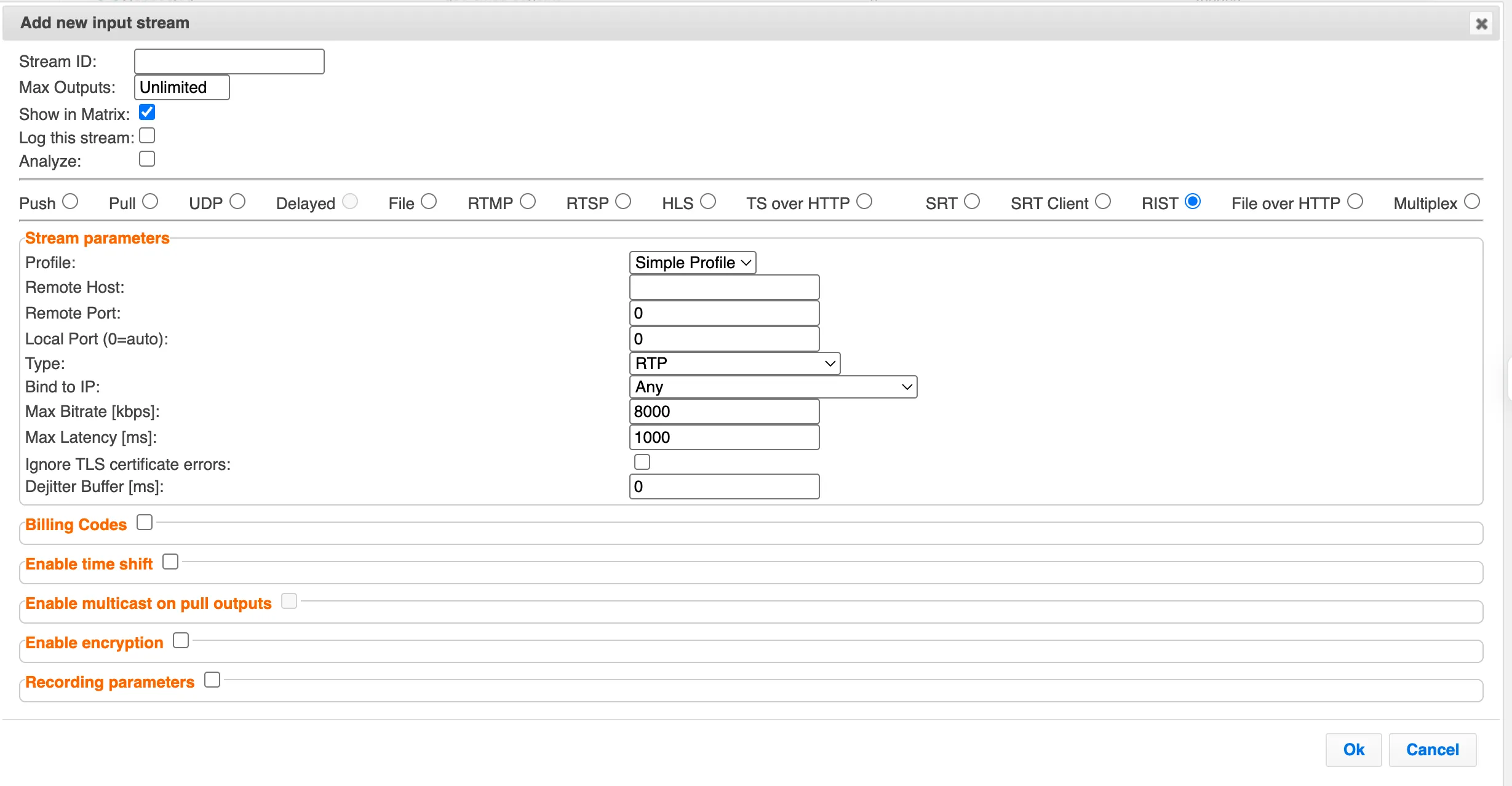
With the Main profile, there are additional options, which differ depending on whether you select the Push or Pull type:
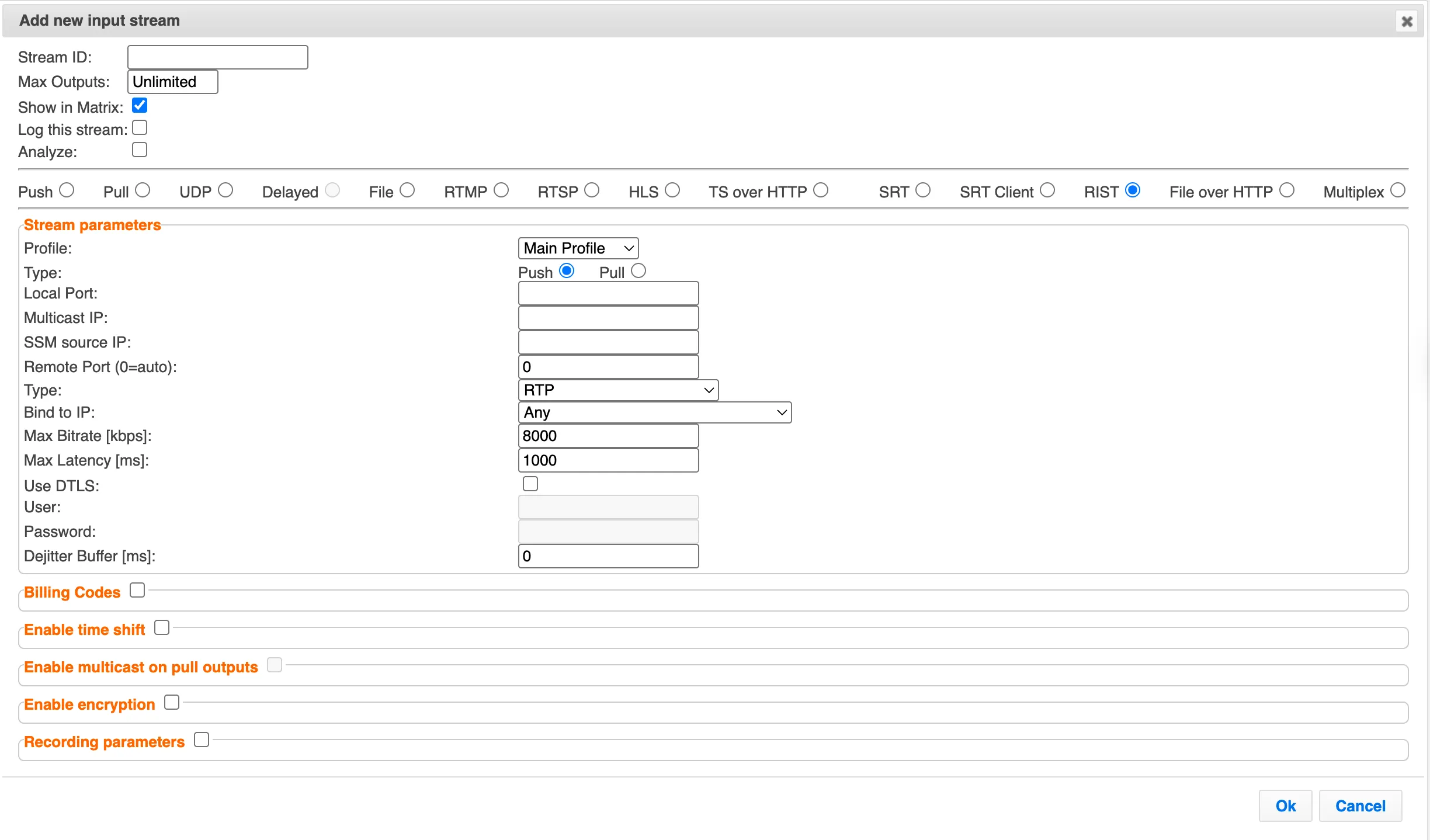
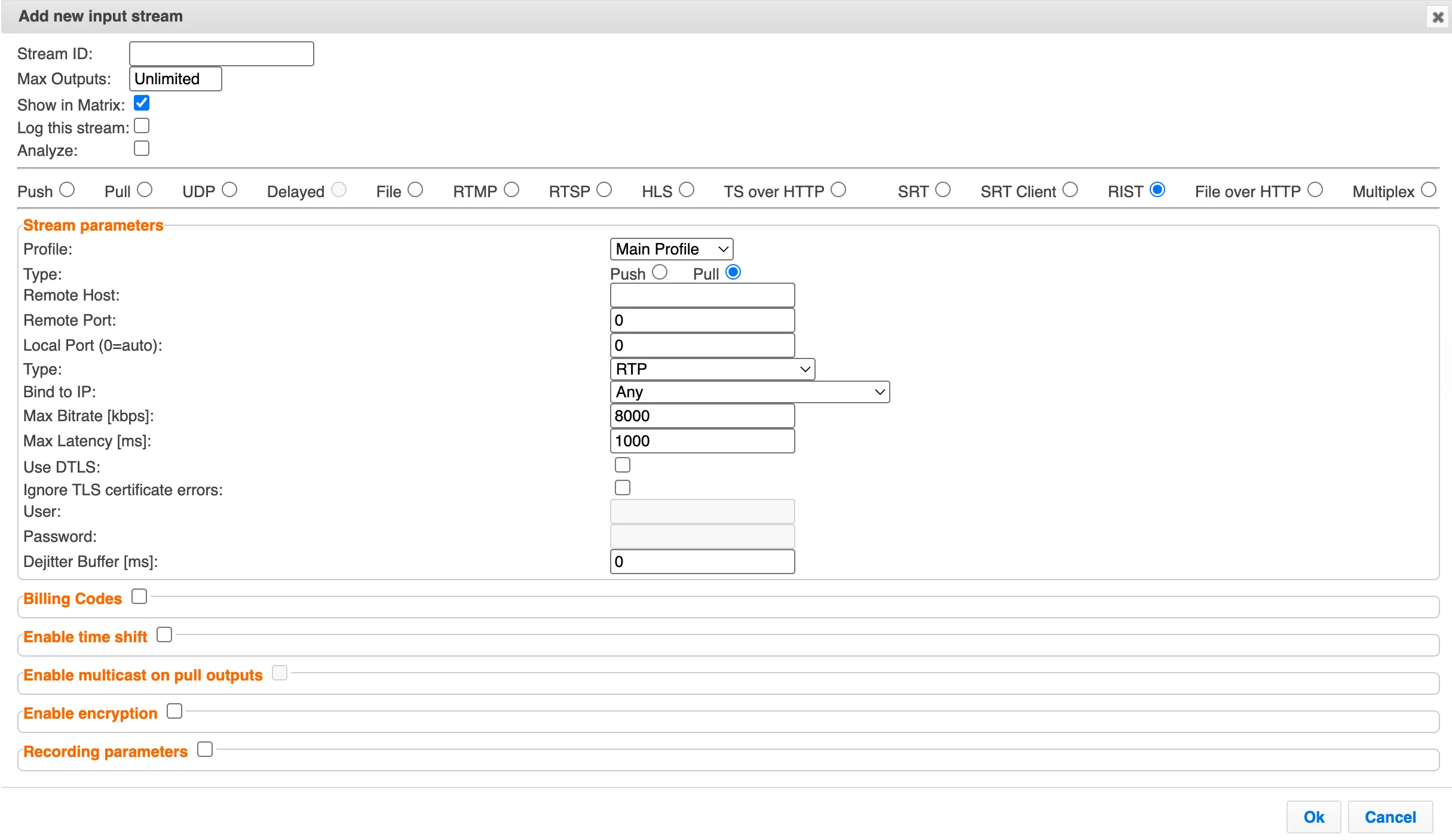
Specify the Stream Parameters (see Input Stream Parameters Table).
If you want to specify Billing Codes to identify and differentiate traffic on a Zixi Broadcaster for billing purposes, select this checkbox (see Input Stream Parameters Table below)
If you want to Enable time shift, select this checkbox (see Input Stream Parameters Table).
If you want to Enable multicast on pull outputs, select this checkbox (see Input Stream Parameters Table).
If you want to Enable encryption select this checkbox (see Input Stream Parameters Table). For more information, see Encrypting an Input Stream in Zixi Broadcaster.
If you want to configure the Recording Parameters, specify them in the respective fields (see Input Stream Parameters Table).
Click OK.
The “Input added” message appears at the top of the screen. The RIST Stream is added to the Zixi Broadcaster and now appears in the list of streams available in the Zixi Broadcaster inputs UI.
Input Stream Parameters Table
Parameter | Description |
|---|---|
Stream parameters |
|
Profile | Select one of the following RIST profiles that matches the input stream:
|
Simple Profile Parameters | |
Local Port | Specify the port to listen on. This port must be open on all firewalls between the Zixi Broadcaster and other devices it is communicating with. |
Remote Host | Specify the remote host address in the source RIST device. |
Remote Port | Specify the remote port in the source RIST device. Default: 0 (any port) |
Type | Select one of the following protocol types from the drop-down list:
|
Bind to IP | Select from the drop-down list the local IP address to be used for this Input, OR select Any to enable any IP to be used. |
Max. bitrate [kbps] | Specify the maximum expected bitrate for memory allocation. Recommended: 2X the actual (average) bitrate, which will prevent buffer overruns (especially with VBR streams). Default: 8000. Note – Overflows will typically occur when the Max Bitrate isn’t sufficient. |
Max Latency [ms] | Specify the maximum latency of the stream in milliseconds. Default: 1000 |
Ignore TLS cerficate errors | Allows Zixi components to continue streaming even when the remote server’s TLS/SSL certificate is invalid, expired, self-signed, or mismatched. |
Dejitter Buffer [ms] | A buffer size used to de-jitter RTP and UDP inputs. For RTP, packet timing is fixed according to packet arrival times and RTP timestamps. For UDP, dejittering is only based on arrival times. Default: 0. Assuming that the timestamps in the RTP are accurate, this feature is helpful when the encoder generates an accurate timestamp on the stream, but the arrival is jittery/bursty. In case of jitter, specify a higher value than the RTP input jitter. |
Main Profile – Push Parameters | |
Local Port | Specify the port to listen on. This port must be open on all firewalls between the Zixi Broadcaster and other devices it is communicating with. |
Remote Host | Specify the remote host address in the source RIST device. |
Remote Port | Specify the remote port in the source RIST device. Default: 0 (any port) |
Type | Select one of the following protocol types from the drop-down list:
|
Bind to IP | Select from the drop-down list the local IP address to be used for this Input, OR select Any to enable any IP to be used. |
Max. bitrate [kbps] | Specify the maximum expected bitrate for memory allocation. Recommended: 2X the actual bitrate, which will prevent buffer overruns (especially with VBR streams). Default: 8000. Note – Overflows will typically occur when the Max Bitrate isn’t sufficient. |
Max Latency [ms] | Specify the maximum latency of the stream in milliseconds. Default: 1000 |
Use DTLS | Select this checkbox to encrypt the stream dynamically using DTLS and specify the User and Password. |
User | Required for IP Multicast distribution. The username/password pair is required both on the send and receiver side. |
Password | Required for IP Multicast distribution. The username/password pair is required both on the send and receiver side. |
Dejitter Buffer [ms] | A buffer size used to de-jitter RTP and UDP inputs. For RTP, packet timing is fixed according to packet arrival times and RTP timestamps. For UDP, dejittering is only based on arrival times. Default: 0. Assuming that the timestamps in the RTP are accurate, this feature is helpful when the encoder generates an accurate timestamp on the stream, but the arrival is jittery/bursty. In case of jitter, specify a higher value than the RTP input jitter. |
Main Profile – Pull Parameters | |
Remote Host | Specify the IP Address of the remote RIST device from which the stream will be pulled. |
Remote Port | Specify the port of the remote RIST device from which the stream will be pulled. Default: 0 (any port) |
Local Port | Specify the local port to which the stream will be pulled. Default: 0 (any port) |
Type | Select one of the following protocol types from the drop-down list:
|
Bind to IP | Select from the drop-down list the local IP address to be used for this Input, OR select Any to enable any IP to be used. |
Max. bitrate [kbps] | Specify the maximum expected bitrate for memory allocation. Recommended: 2X the actual bitrate, which will prevent buffer overruns (especially with VBR streams). Default: 8000. Note – Overflows will typically occur when the Max Bitrate isn’t sufficient. |
Max Latency [ms] | Specify the maximum latency of the stream in milliseconds. Default: 1000. |
Use DTLS | Select this checkbox to encrypt the stream dynamically using DTLS and specify the User and Password. |
Ignore TLS certificate errors | When this option is selected, Zixi Broadcaster will ignore the TLS certificate errors and transmit the stream to its destination. |
User | Required for IP Multicast distribution. The username/password pair is required both on the send and receiver side. |
Required for IP Multicast distribution. The username/password pair is required both on the send and receiver side. | Required for IP Multicast distribution. The username/password pair is required both on the send and receiver side. |
Dejitter Buffer [ms] | A buffer size used to de-jitter RTP and UDP inputs. For RTP, packet timing is fixed according to packet arrival times and RTP timestamps. For UDP, dejittering is only based on arrival times. Default: 0. Assuming that the timestamps in the RTP are accurate, this feature is helpful when the encoder generates an accurate timestamp on the stream, but the arrival is jittery/bursty. In case of jitter, specify a higher value than the RTP input jitter. |
Billing Codes | Billing codes are used to identify and differentiate traffic on a Zixi Broadcaster for billing purposes. When a billing code is added to a Source or Target, Zixi can track the traffic on that Broadcaster input or output separately from other inputs and outputs on the same Broadcaster. Billing codes are created by Zixi personnel on the Zixi Customer Portal for a particular organization. |
Billing Code | Enter the billing code that corresponds to this stream. The relevant billing can be obtained from the organization that received the billing code from Zixi. |
Billing password | Enter the password that corresponds to this billing code. |
Enable time shift | Select this checkbox to record the stream content and broadcast it after a specified delay. To deploy an input stream that uses the current stream's time shift, you need to configure a "Delayed" input stream, see Adding Delayed Streams. |
Maximum delay [hh:mm:ss] (for Time Shift enabled) | Specify the maximum time delay of this input. |
Enable multicast on pull outputs | Select this checkbox to enable the transmission of this stream’s outputs as multicast. A Zixi receiver that will pull the stream will receive it in multicast. By default, Zixi Broadcaster is configured to allow transparent fallback to unicast if it is out of the LAN. Requires enabling Multicast Pull in the Settings. |
Multicast-Only (for multicast enabled) | Selecting this checkbox will force the transmission of this stream only in multicast. |
Enable Encryption | Select this checkbox to encrypt the Input stream. The stream encryption prevents any further processing, such as analysis, transcoding, etc. The encryption works in the following way:
For more information, see Encrypting an Input Stream in Zixi Broadcaster. |
Encryption type (for Encryption enabled) | Specify the type of Encryption (AES 128/192/256). |
Encryption key (for Encryption enabled) | Click Generate to generate an encryption key. The generated encryption key must be sent to the end-user to decipher the received encoded stream. |
Recording parameters | Select this checkbox to customize the recording parameters. |
Destination Type | Select the radio button for the desired storage type and then fill in the relevant parameters.
|
Record to Disk Parameters | |
File Name Template | Specify the file name pattern that Zixi will use to generate when saving the recorded content. A separate file will be generated for each recording up to the time specified in the Max recorded file duration parameter (see above). After this duration, a new file will be generated. The file name pattern can include any string and up to five variables listed below. Only the %T=HH.MM.SS creation time is mandatory. You can change the order of these variables and add text as long as you maintain the legitimate structure of the file in Linux and Windows:
For example, the following pattern %Y_recording%T.ts will generate the following file name 2017_recording15:32:35.ts. |
Max recorded file duration [hours] | Specify the maximum time allotted for recording a video stream. Default: 2 hours |
Keep recorded files for [hours] | Specify the maximum time for storing the recording. Default: 0 hours |
Custom Path | Optionally specify a storage location for the recorded files that is relative to the root folder. This location bypasses the location specified as the root folder in the Settings > General screen. |
Record to S3 Parameters | |
File Name Template | Specify the file name pattern that Zixi will use to generate when saving the recorded content. A separate file will be generated for each recording up to the time specified in the Max recorded file duration parameter (see above). After this duration, a new file will be generated. The file name pattern can include any string and up to five variables listed below. Only the %T=HH.MM.SS creation time is mandatory. You can change the order of these variables and add text as long as you maintain the legitimate structure of the file in Linux and Windows:
For example, the following pattern %Y_recording%T.ts will generate the following file name 2017_recording15:32:35.ts. |
Max recorded file duration [hours] | Specify the maximum time allotted for recording a video stream. Default: 2 hours |
URL | Specify the URL of the S3 bucket. |
Ignore TLS certificate errors | TLS certificate for S3 bucket might be detected as faulty if the bucket name contains dot[s]. When this option is selected, Zixi Broadcaster will ignore the TLS certificate errors and transmit the stream to its destination. |
Access Key | The access key that is used for accessing the S3 bucket. |
Secret Key | The secret key that is used for accessing the S3 bucket. |
Advanced Mode
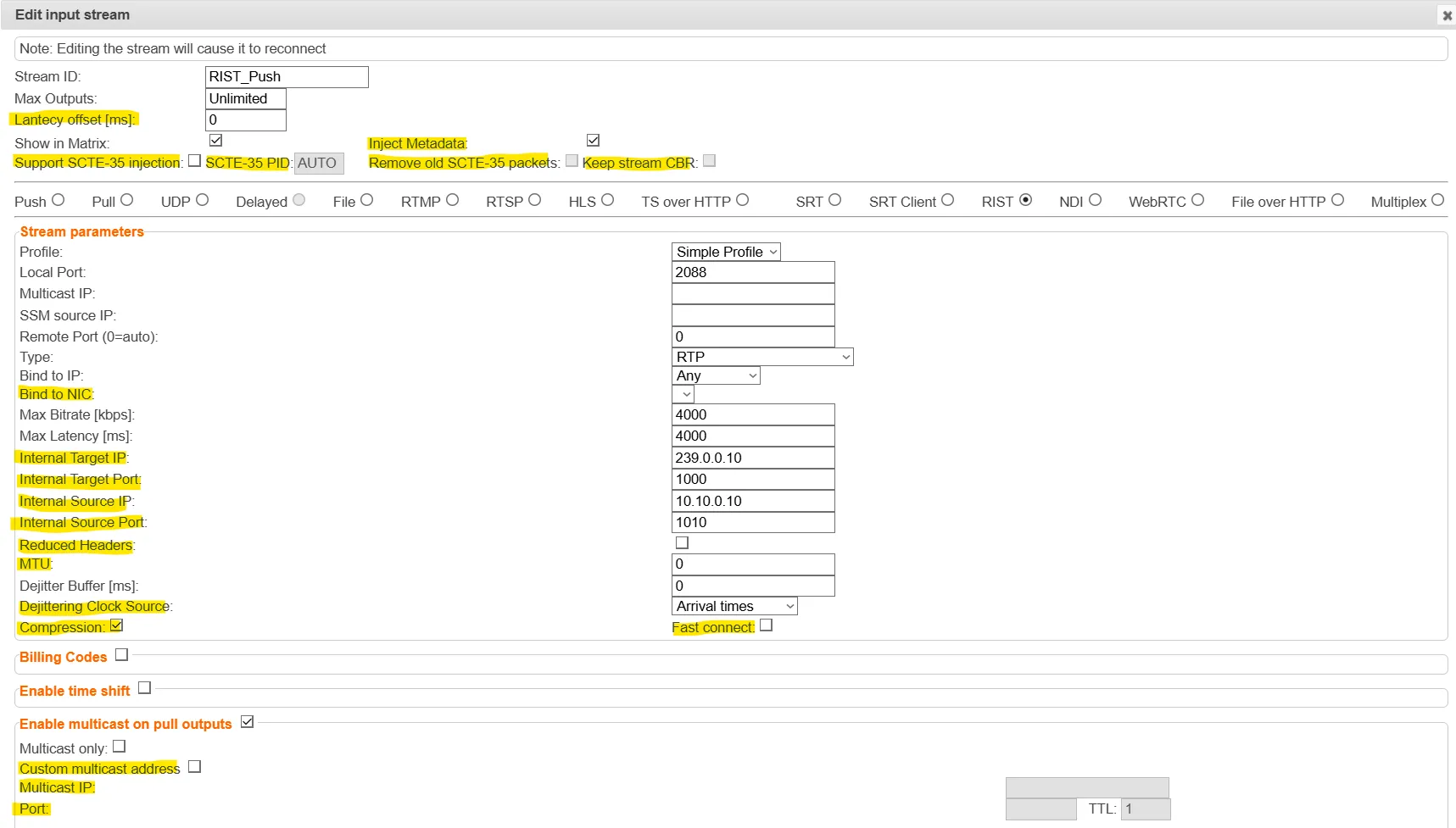
- Latency Offset [ms] - Specify the additional buffering time in milliseconds. Increasing this value can improve stream stability in unstable network conditions, but will increase end-to-end delay. Default: 0 ms
- Support SCTE-35 injection - Select this checkbox if you would like the stream to support SCTE-35 insertion.
- SCTE-35 PID - Enter a PID number for SCTE-35 injection. You can enter a value manually or use the Up/Down arrows that appear when clicking the field. (or leave as Auto to match existing SCTE-35 PID)
- Inject Metadata - allows Zixi create a PID that carries information about what hops a feed has travelled through on the way to its destination, it includes things like CC errors and IAT at each hop. The information is useful for debugging issues with streams.
- Remove old SCTE-35 packets - If SCTE-35 injection is supported, select this checkbox to clear out existing packets.
- Timeout for CBR - Time in MS to wait for a NULL packet to inject SCTE-35 into.