Changing Broadcaster Password in ZEN Master
Changing the admin password
You have local access to UI of Broadcaster - i.e. - you can access locally in IP address with :4444 at end of address...
eg. 147.185.255.14:4444
(or, if the Broadcaster is on the same machine, you can use localhost:4444 or 127.0.0.1:4444)
Once you are on Broadcaster locally, you can change password in the General settings.
You must then update the API password in ZEN Master.
Changing the password will force a restart of Broadcaster service and take streams down for a moment for this reason it's best to time password change to happen during an upgrade if possible.
In the unlikely event that your Broadcaster does not reconnect to Zen Master, that is not indicative of streams being down, its just that the Broadcaster is not connected to Zen Master which is only monitoring the streams. Streams will still deliver, even if a Broadcaster loses connection to Zen Master.
Resetting the admin password if you have forgotten it
For resetting the admin password, you must edit the broadcaster-config.xml located in the Broadcaster folder.
Delete the password lines:
<SSL_PASS> ... <SEC_PASS2> .... It should look something like the screenshot below after deleting the password lines.
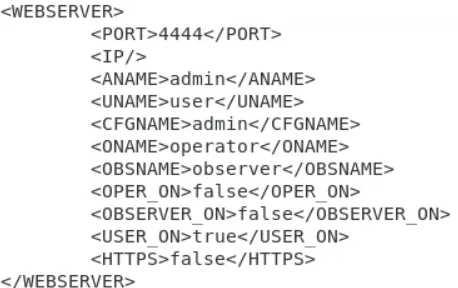
You then need to log off and reset the Broadcaster service. Note: This will affect all traffic going through this Broadcaster Once complete, the admin password will return to the default one (1234).
Note that you should not leave it at 1234 - change it to a more secure password and note it in a secure place where you can find it again.