Viewing Live Events in Table View
To view Live Events in Table view, click the Table button.
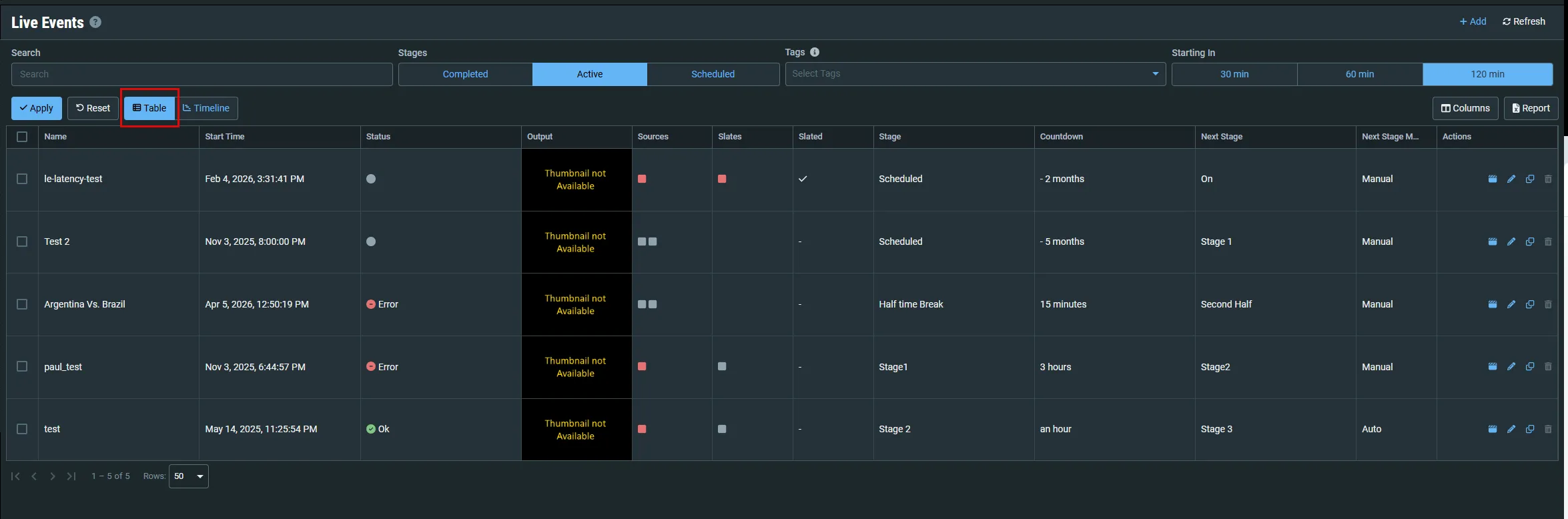
The screen displays a filter at the top (see Using the Live Events Filter) and then a list of Live Events.
Parameter | Description |
|---|---|
Name | The name of the Live Event. |
Start Time | The time the event began, or will begin entering the pre-live state. |
Status | Since the event can control multiple redundant paths simultaneously, the event status is derived from the collective statuses of the channels or sources:
|
Output | A thumbnail preview of the output stream. |
Sources (Active) | The statuses of the Sources that are assigned to this event. Hover over each Source to view the thumbnail preview and additional data about the source. |
Slates (Active) | The statuses of the Slates that are assigned to this event. Hover over each Slate to view the thumbnail preview and additional data about the source. |
Slated (Active) | Indicates if the Slate was used in the event. |
Stage | The current stage of the live event. |
Countdown | A countdown to the next stage or "Manual" if the live event was configured in Manual Staging Mode. |
Next Stage | The upcoming stage in the process. |
Next Stage Mode | Indicates if the transition to the next stage is Manual or Auto. |
Actions |
|