Viewing Existing Cluster Info Pane
When a cluster is selected, the list pane is minimized and detailed info about the selected cluster is shown on the right side of the screen. The right side of the screen includes an Info Pane (at the top), which displays basic information and the various tabs.
Parameter | Description |
|---|---|
DNS Prefix | The first label in the DNS name of the domain. Click the copy icon to copy the details. |
Management Type | The Management type: manual, AWS, Azure or GCP. |
Instance Type | The name of the instance type on which the cluster is running on. Click the copy icon to copy the details. |
Region | The cloud service region. |
Priority | Objects can be labeled as Priority so that they can be quickly found in the list of objects. This is helpful if you want to easily find these objects by sorting and filtering the list.
|
Tags | The Tags that are associated with this cluster. Tags are managed by Administrators via Configuration > Tags and assigned to non-Admin users via Roles. Click to edit. |
Authorization Mode | The method used to verify authorization to access the broadcaster cluster. Possible values are: ZEN, External Server, Global Password, Free for All and Manual. |
Broadcaster Version | The version number of the Broadcaster(s) in the cluster. |
Log SCTE-35 | When enabled, SCTE-35 events are logged, and SCTE-35 notifications are sent. Requires version 13.1.40262 or newer Broadcasters. |
Activation Key | The cluster’s activation key. |
Events Configuration Profile | The Events Configuration Profile that was assigned to this Cluster. Events Profiles are used to customize the way that Events are handled in ZEN Master. Click to view the event configuration. |
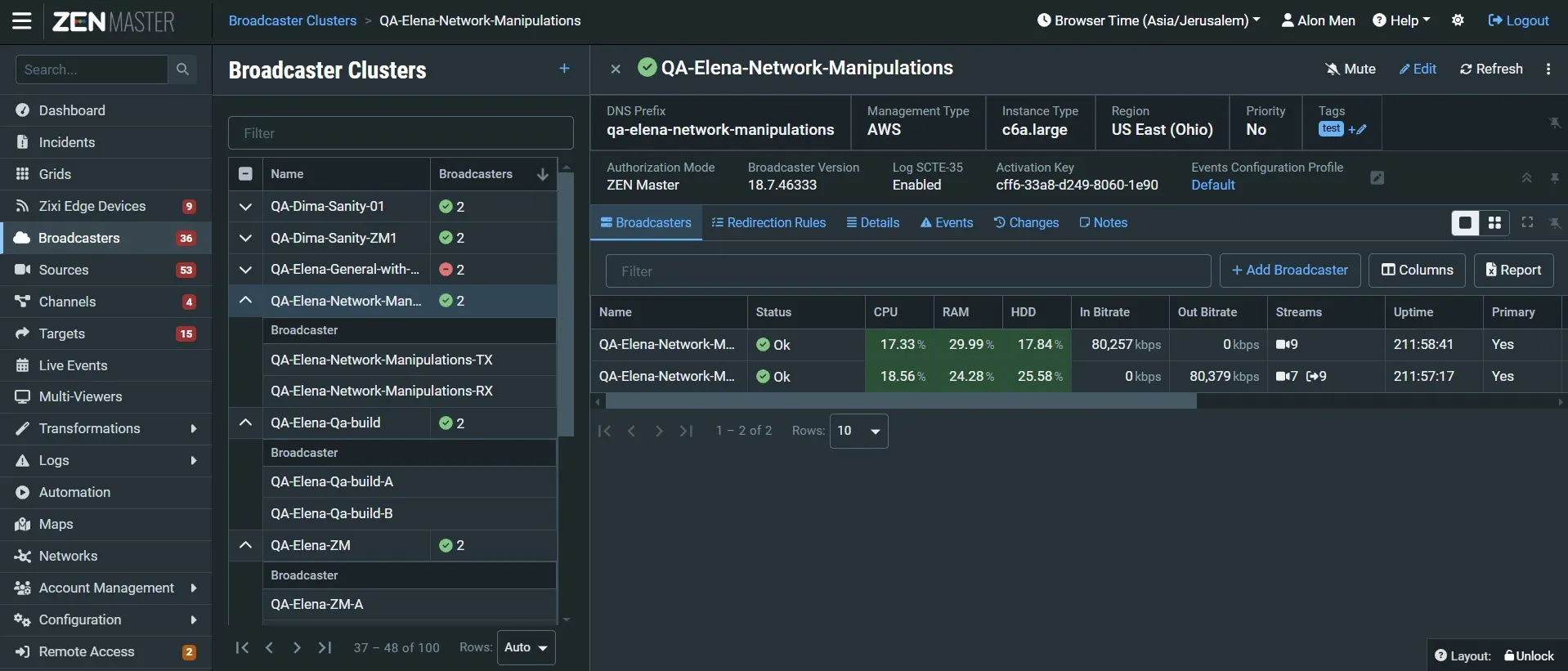
The Info Panel includes the following details: The following tabs are displayed in the right pane:
- Broadcasters – shows a list of the Broadcasters that are related to this cluster and data about the Broadcasters. You can also add or delete Broadcasters in this tab.
- Redirection Rules – shows a list redirection rules, which are routing rules for Pull requests from clusters or CIDR IP Ranges. The rules can be applied to the client end-point Cluster, or IP CIDR Range, from where the pull request is initiated.
- Details – shows configuration details of the cluster.
- Events – shows all events related to this cluster that have been generated by the system, such as connections, errors, warnings and disconnections. To learn about the data that is displayed in the Events tab see Events.
- Changes- displays the history of changes that were made to the object configuration. To learn more about changes tracking, see Change Tracking.
- Notes – free-form text can be added with pertinent information about this Cluster.