Viewing Clusters Details
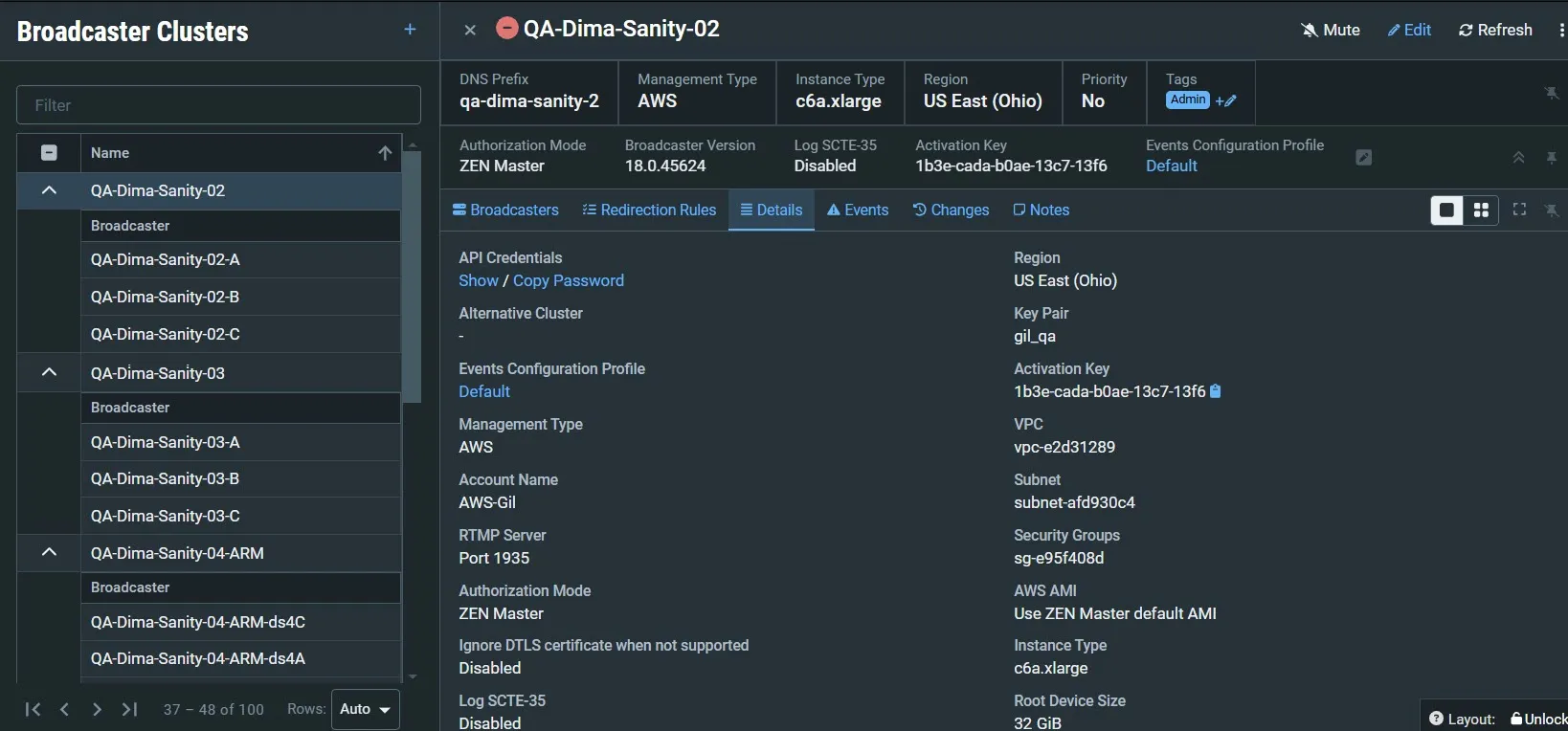
Details Tab |
|
|---|---|
API Credentials | The username and password for accessing the APIs. Click Show to display. Click Copy Password to copy the password. |
Alternative Cluster | Displays the configued path for an altternative cluster (disaster recovery) |
Events Configuration Profile | The Events Profile that is applied to this Broadcaster Cluster. Click the link to view the profile in the Events Profile Rules screen. |
Management Type | The Management type: manual, AWS, Azure or GCP. |
Account Name | The name of the cloud provider account under which the managed cluster is registered. |
RTMP Server | If RTMP Server is enabled, the RTMP server port is displayed. |
Ignore DTLS certificate when not supported | Indicates if Ignore DTLS certificate when not supported checkbox is enabled/disabled. When enabled, it is possible to support resources using older versions of Zixi software (<v12.2) that don't support verification of the ZEN DTLS certificate to connect to this cluster. |
Log SCTE-35 | Indicates if Log SCTE-35 checkbox is enabled/disabled. See Activating SCTE-35 Logging for more details. |
Push Inputs | Indicates if Push Inputs checkbox is enabled/disabled. When enabled, the Broadcaster automatically allows access to Push Inputs. |
Pull Outputs | Indicates if Pull Outputs checkbox is enabled/disabled. When enabled, the Broadcaster automatically allows access to Pull Outputs. |
Deletion Protection | Indicates whether the deletion protection is enabled or disabled. The deletion protection prevents deleting the Cluster. To delete it, you will need to first disable the Deletion Protection. |
Load Balance Pull Targets | The following load balancing methods for Pull outputs:
|
HTTP Streaming Port | The port configured for HTTP streaming. |
Subnet | The identifier/name of the subnet in which the cluster resides |
Security Groups | The identifier/name of the security group to which the cluster pertains |
AWS AMI | The AWS (Amazon Machine Image) that was selected to create the virtual server running the Broadcaster. |
Root Device Size | The size (in GB) of the root volume attached to the EC2 instance. |
DPDK Support | Indicates if DPDK (high-performance networking feature) support is enabled/disabled. When enabled, ZEN Master will apply a second NIC to the launched instance. |
Activation key | The cluster’s activation key. |
Authorization Mode | The method used to verify authorization to access the broadcaster cluster. Possible values are: ZEN, External Server, Global Password, Free for All and Manual. |
Region | The cloud service region. |
Key Pair | The Key Pair used to access the cluster |
VPC | The identifier/name of the Virtual Private Cloud |
Instance Type | The name of the instance type on which the cluster is running on |
Broadcaster Version | The software version of the Broadcaster |