Encoder Bitrate Spike Troubleshooting Guide
1. What Is an Encoder Bitrate Spike?
A bitrate spike is a short-duration burst where the encoder's output bitrate significantly exceeds its configured target or nominal rate. Spikes are distinct from a general bitrate increase — they are transient, typically lasting from one to several seconds, and the instantaneous rate during the spike can be several times higher than the average bitrate.
Spikes are a normal characteristic of many encoding modes. The problem arises when the downstream transport path, multiplexer, or receiving device cannot absorb the burst — at which point the consequences range from packet loss and buffer overflow to complete stream failure.
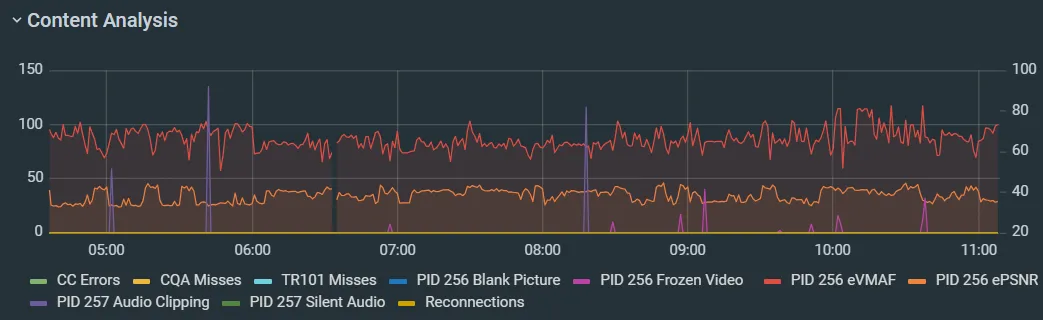
When a customer reports downstream errors, start by establishing a bitrate profile over time in ZEN Master or Zixi Broadcaster to confirm whether spikes are occurring and correlate them with the timing of reported errors.
2. Why Encoders Produce Bitrate Spikes
Understanding the cause of the spike determines the correct fix. The most common sources are:
• VBR and Constrained VBR encoding — VBR allocates bits based on scene complexity. Scene changes, fast motion, and cuts to detailed frames cause large I-frames or high-complexity P-frames that temporarily exceed the average bitrate target by a significant margin. This is the most common cause.
• I-frame size at scene changes and cuts — I-frames are self-contained and significantly larger than P-frames or B-frames. Frequent cuts, graphics overlays, and lower thirds all force I-frames. Sports, news, and live events with heavy graphics are more susceptible than static content.
• CBR with insufficient VBV buffer — True CBR uses a buffer model (VBV/HRD) to constrain output. If the VBV buffer size is set too large relative to the target bitrate, the encoder is permitted to emit large bursts and pay them back over a long window. At the physical output this looks like spikes even though the encoder considers itself CBR.
• Encoder rate control instability — Software encoders or hardware encoders under high CPU/processing load can exhibit rate control instability, producing oscillating spikes at regular intervals, particularly at scene changes.
• GOP structure and keyframe interval — A long GOP accumulates a large debt of predicted frames between I-frames. When the I-frame is finally emitted it can be disproportionately large. Shorter GOPs produce smaller, more frequent I-frames and a flatter bitrate profile.
• Audio encoding — Some audio codecs (AC-3/Dolby Digital and certain AAC implementations) can create brief spikes on loud transients or complex multichannel audio. Usually small relative to video, but proportionally significant on low-bitrate streams.
Step 1 . Establish a Bitrate Profile Over Time
What to check
Before diagnosing the cause or fix, confirm that spikes are actually occurring and characterize their pattern.
How
• In ZEN Master, navigate to the affected source and review the TR101 histogram and bitrate graph over an extended period.
• In Zixi Broadcaster, go to Inputs → [Stream] → Statistics and review the bitrate graph. Look for:
◦ Peak-to-average ratio — if peaks are more than 1.5–2× the average, spikes are likely causing downstream issues.
◦ Whether spikes correlate with visible content events (scene changes, fast motion, graphics).
◦ Whether spikes occur at regular intervals (GOP boundary issue) or randomly (rate control instability).
Compare the bitrate graph against the timestamps of any downstream errors. If spikes and errors align, the spike is the root cause of the downstream symptom.
Root cause confirmed if: Spike peaks exceed 1.5–2× average bitrate and timing aligns with downstream error events.
Step 2. Check Encoder Rate Control Mode and VBV Settings
What to check
Incorrect encoder configuration is the most common cause of spikes that affect downstream infrastructure. Even a correctly configured encoder can develop issues after extended runtime.
How
On the encoder, confirm the following:
• Rate control mode — Is the encoder in CBR, VBR, CVBR, or CQ/CRF mode? VBR with no peak constraint and a loose VBV buffer will spike freely regardless of the average bitrate setting.
• VBV buffer size — For CBR contribution workflows, the VBV buffer should be sized at 1–2 seconds of the target bitrate or less. A large VBV buffer permits the encoder to emit bursts and recover them over a long window, which looks like spikes at the output.
• Peak bitrate limit — For CVBR or limited VBR, confirm a hard peak limit is set. The peak should be no more than 120–130% of the average target, and the VBV buffer must be sized to match the peak, not the average.
• GOP size and keyframe interval — Long GOPs (e.g. 250–300 frames) produce disproportionately large I-frames. For contribution workflows, GOPs of 1–2 seconds are standard. For satellite delivery, check the downstream decoder’s preferred keyframe interval.
• Restart the encoder — If rate control instability is suspected or errors appeared after extended uptime, perform a full encoder restart. Rate control feedback loop corruption can develop over time and is resolved by a clean restart.
Root cause: Encoder in VBR/CVBR mode with no peak constraint, oversized VBV buffer, long GOP, or rate control instability.
Switch to CBR with a VBV buffer of 1 second or less for contribution workflows with a fixed bandwidth envelope. If VBR is required, set a hard peak bitrate limit at no more than 120–130% of the average target. Reduce GOP size to 1–2 seconds for contribution. If issues appeared after extended encoder uptime, restart the encoder and monitor for recurrence.
Step 3. Compare Encoder Output Bitrate vs. Transport Path Capacity
What to check
Confirm that the transport path is sized for the spike peak, not just the average bitrate.
How
• Identify the hard ceiling of the downstream path. For a satellite workflow, this is the modulator’s maximum input rate. For a Zixi contribution link, this is the available bandwidth between the encoder and Broadcaster plus any configured bitrate limits.
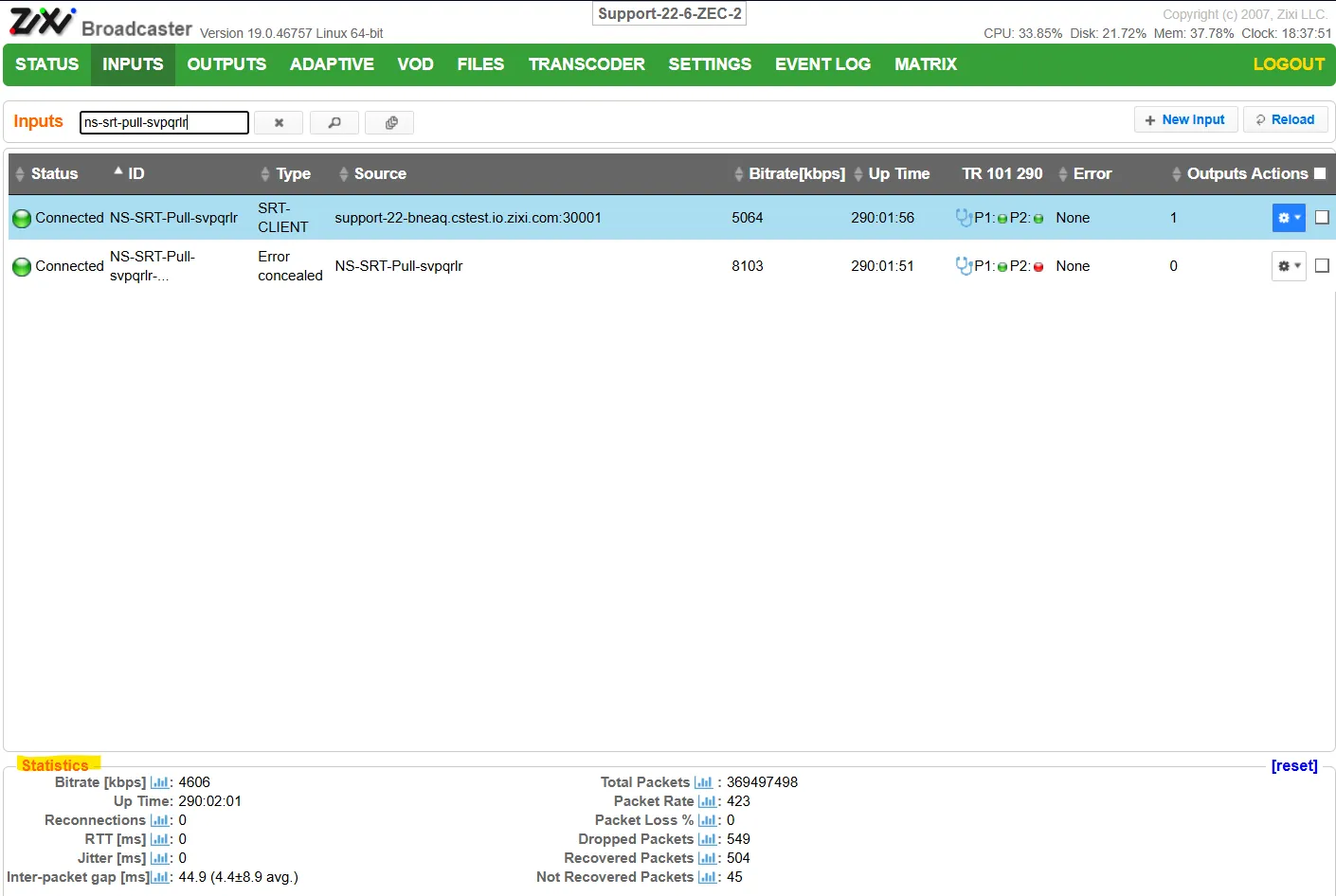
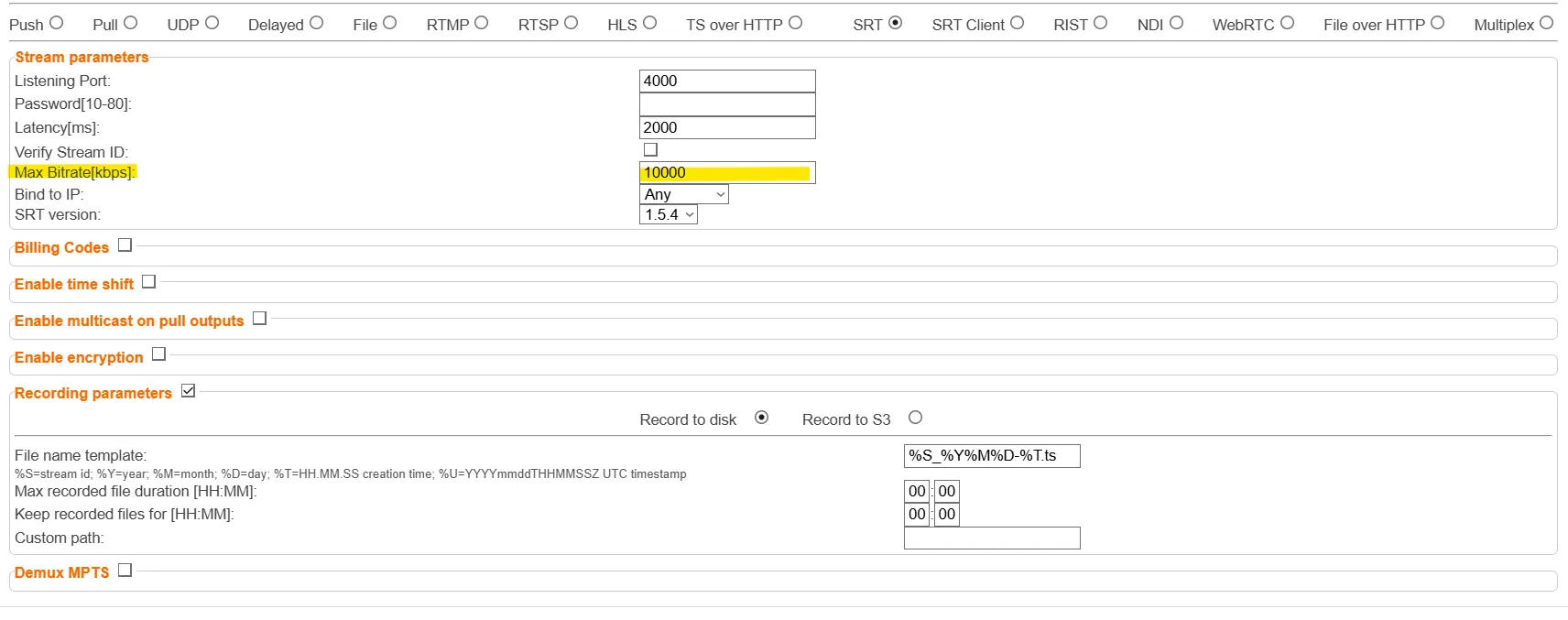
• In Zixi Broadcaster, review Inputs → [Stream] → Statistics and compare the peak bitrate observed in Step 1 against the configured max_bitrate on the input. If the spike peak exceeds max_bitrate, the Broadcaster’s internal ARQ/FEC buffers will be overrun during spikes.
• For satellite workflows, check the modulator’s input buffer alarm log. CC errors, PCR discontinuities, or input overflow alarms that correlate with spike timing confirm the modulator ceiling is being exceeded.
• For MPTS mux workflows, check the per-program allocated bitrate. A spike on one component stream can overflow that stream’s buffer in the mux, causing CC errors that affect all programs in the multiplex.
Root cause: Spike peak exceeds transport path capacity, modulator input ceiling, or Zixi max_bitrate allocation.
Set max_bitrate on the Zixi input and Failover Group to 1.5–2× the highest expected peak bitrate to ensure adequate ARQ/FEC buffer headroom. For satellite workflows, switch the encoder to CBR with a hard peak at or below the modulator’s maximum input rate. For MPTS workflows, confirm per-program allocated bitrate accommodates the encoder peak, not the average.
ZEN Master has notifications on by default to raise an alert when the Max Bitrate is set outside of the recommended range.

Step 4. Correlate Spikes with Content Events
What to check
The pattern of spikes identifies the specific fix required.
How
• Review the bitrate graph alongside the content or event log. Note whether spikes occur at predictable moments.
• Spikes at scene changes, cuts, or lower thirds — I-frame size at cut points is the cause. Fix: tighten VBV buffer, switch to CBR, or reduce GOP size.
• Spikes on fast-motion or high-complexity content — VBR/CVBR peak exceeding transport ceiling. Fix: set a hard peak bitrate limit at or below downstream capacity.
• Spikes at regular fixed intervals regardless of content — GOP boundary I-frame overrun. Fix: shorten GOP interval and tighten VBV buffer.
• Random spikes with no content correlation — Rate control instability. Check encoder CPU load, thermal state, and rate control firmware version. Restart the encoder.
• Spikes only during graphics or lower thirds — Scene complexity on cut. Fix: shorter GOP, tighter VBV, consider CBR.
Root cause: Pattern of spikes identifies encoder rate control mode, VBV/GOP configuration, or encoder process instability as the specific cause.
Step 5. Check for Cascading Downstream Effects
What to check
Confirm that the bitrate spike is the direct cause of the downstream error events and not a coincidental overlap with a separate issue.
How
• Review downstream device error logs (modulator, mux, IRD) and compare error timestamps against the spike timestamps captured in Step 1.
• CC errors, PCR accuracy alarms, or decoder resets that occur at the same time as peak bitrate events confirm the spike is the root cause.
• In Zixi Broadcaster, check ARQ/FEC recovery rate during spike periods. If recovery is failing to keep up during spikes, the spike is exceeding the retransmission buffer capacity.
• For IRDs and decoders, check whether the device logs show input buffer overflow or a decoder reset at the time of the spike.
• For MPTS workflows, check whether CC errors appear across multiple programs in the multiplex or are isolated to one — cross-program errors indicate a mux-level buffer overflow rather than a single-stream issue.
Root cause confirmed if: Downstream error timestamps align with spike timestamps from the bitrate graph.
If cascading effects are confirmed, apply the encoder-side fix identified in Steps 2–4. If the encoder cannot be reconfigured, insert a CBR rate smoother between the encoder and the transport path to absorb spikes before they reach downstream infrastructure. Size the transport path bandwidth to the peak rate, not the average, and increase Zixi latency to provide additional ARQ recovery headroom during spike events.
6. Summary Decision Tree
Downstream errors suspected to be caused by encoder bitrate spikes
Bitrate peaks more than 1.5–2× average in ZEN Master / Broadcaster graph? -> YES -> Spikes confirmed — continue below
Spikes correlate with scene changes, cuts, or graphics? -> YES -> I-frame spike - tighten VBV buffer, switch to CBR, reduce GOP size (Step 2)
Spikes correlate with fast-motion or high-complexity content? -> YES -> VBR/CVBR peak exceeding transport ceiling - set hard peak limit (Step 2)
Spikes occur at regular fixed intervals regardless of content? -> YES -> GOP boundary I-frame overrun - reduce GOP, tighten VBV (Step 2)
Spikes random with no content correlation? -> YES -> Rate control instability - check CPU/thermal, restart encoder (Step 2)
Spike peak exceeds modulator maximum input rate? -> YES -> Switch encoder to CBR at or below modulator ceiling (Step 3)
Spike peak exceeds Zixi max_bitrate on input or Failover Group? -> YES -> Set max_bitrate to 1.5–2× highest expected peak, increase Zixi latency (Step 3)
CC errors or PCR alarms at mux during spike events? -> YES -> MPTS buffer overflow - confirm per-program bitrate covers peak (Step 3)
Encoder in CBR mode but spikes still visible? -> YES -> VBV buffer too large - reduce to 1 second of target bitrate or less (Step 2)
Encoder config cannot be changed? -> Insert CBR rate smoother between encoder and transport path, size transport path bandwidth to peak rate with margin
7. Escalation Checklist
When escalating to Zixi Support, include as much of the following as possible:
Item | Details / Location |
|---|---|
Broadcaster version and OS | Shown in Broadcaster UI header or /etc/zixi/version |
Stream name and connection type | Push/Pull, protocol used (Zixi, SRT, UDP, etc.) |
Bitrate graph over time | ZEN Master TR101 histogram or Broadcaster input statistics screenshot with timestamps |
Encoder rate control mode and settings | CBR/VBR/CVBR, VBV buffer size, peak bitrate limit, GOP size |
Downstream device error log | Modulator, mux, or IRD error log covering the period of errors with timestamps |
Broadcaster log file | /var/zixi/broadcaster/log/ — covering the period of errors |
max_bitrate setting on affected input | From Inputs → [Stream] → Edit |
Network path description | Public internet, dedicated circuit, satellite uplink, AWS region, etc. |
Recent configuration changes | Encoder, network, or Broadcaster changes prior to errors beginning |