Broadcaster V19
Broadcaster V19 requires a CUDA 12.1 (or later CUDA 12.x version - CUDA 13.x versions have not been tested and may or may not work) and the driver version to be 530.41.03 or later on Linux, 531.61 or later on Windows.. If you are upgrading from V16, you will have an older NVIDIA driver and will see an error like this on the Broadcaster Status page:
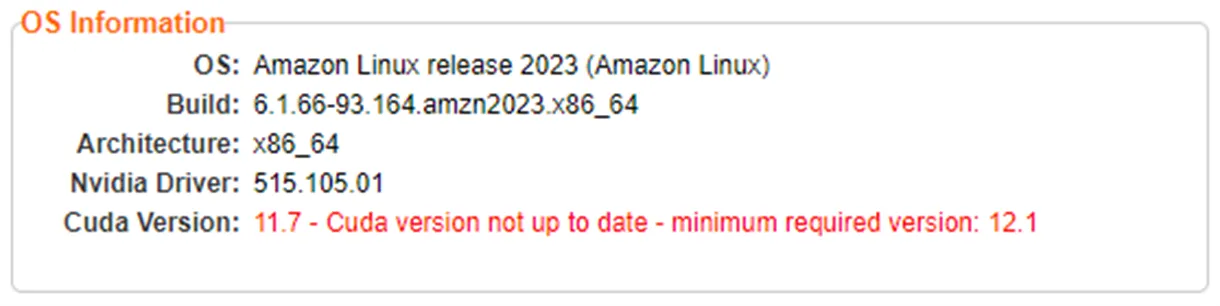
and an error like the following on the Inputs page:

Amazon Linux 2023 (AMI al2023-ami-2023.3.20240108.0-kernel-6.1-x86_64):
Update the OS and install development tools:
dnf -y upgrade
dnf -y groupinstall "Development Tools"
dnf -y install kernel-modules-extraRetrieve and launch the correct installer for the architecture:
- For X86 64-bit machines, install the following NVIDIA Linux driver:
wget http://us.download.nvidia.com/XFree86/Linux-x86_64/535.129.03/NVIDIA-Linux-x86_64-535.129.03.run
chmod 777 NVIDIA-Linux-x86_64-535.129.03.run
./NVIDIA-Linux-x86_64-535.129.03.run- On an ARM based machine with NVIDIA, download the following driver:
wget https://us.download.nvidia.com/XFree86/aarch64/535.129.03/NVIDIA-Linux-aarch64-535.129.03.run
chmod 777 NVIDIA-Linux-aarch64-535.129.03.run
./NVIDIA-Linux-aarch64-535.129.03.run
Rocky Linux 9 Optimized for GCP (x86/64, x86_64 built on 20240111):
Update the OS and install development tools:
dnf -y upgrade
dnf -y groupinstall "Development Tools"
dnf -y install vulkan-loader libglvnd-devel wgetReboot to load the latest kernel from the upgrade.
Retrieve and launch the installer:
wget http://us.download.nvidia.com/XFree86/Linux-x86_64/535.129.03/NVIDIA-Linux-x86_64-535.129.03.run
chmod 777 NVIDIA-Linux-x86_64-535.129.03.run
./NVIDIA-Linux-x86_64-535.129.03.run
Rocky Linux 9.4 requires driver version 550.54.14 or later.
Rocky Linux 9 – Free – x64 Gen2 on Azure (official image from Rocky Enterprise Software Foundation):
Update the OS and install development tools:
dnf -y upgrade
dnf -y groupinstall "Development Tools"
dnf -y install vulkan-loader libglvnd-devel wgetReboot to load the latest kernel from the upgrade.
Retrieve and launch the installer:
wget http://us.download.nvidia.com/XFree86/Linux-x86_64/535.129.03/NVIDIA-Linux-x86_64-535.129.03.run
chmod 777 NVIDIA-Linux-x86_64-535.129.03.run
./NVIDIA-Linux-x86_64-535.129.03.run
Rocky Linux 9.5 requires driver version 550.54.14 or later.
To upgrade to a new version of the NVIDIA driver:
Using the existing installer or any installer version use the --uninstall option.
- For X86 64-bit machines
./NVIDIA-Linux-x86_64-xxx.xxx.xx.run –uninstall- On an ARM based machine with NVIDIA
./NVIDIA-Linux-aarch64-xxx.xxx.xx.run --uninstall- Then reboot to load the kernel with the NVIDIA driver removed
Retrieve and install the new version as described above.