Installation on existing cluster instances or manual Broadcasters
The installation on existing Broadcaster instances or manual broadcasters can be performed in two ways described below.
Make sure that a Zixi Sales Engineer has enabled AgentZ in your organization.
Automated installation on existing cluster instances or manual Broadcasters
Although this option is initiated by the user, the process itself is automated. However, this option will require a restart of the machine, which will cause momentary disruption.
To enable automated installation on existing cluster instances or manual Broadcasters:
On ZEN Master, go to Broadcasters and select and existing Broadcaster Cluster.
Click the Broadcasters tab.
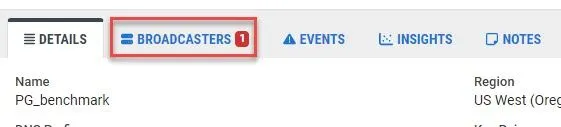
Select an existing Broadcaster from the list.
On the Details tab, verify that AgentZ is not yet installed.
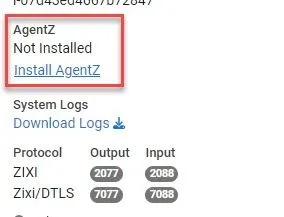
Click on Install AgentZ. The following warning is displayed.
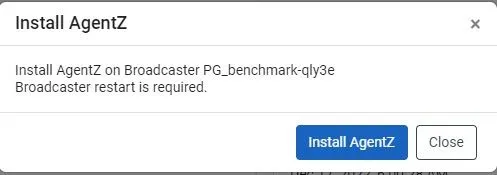
Click Install AgentZ. The installation process begins.
Manual installation on existing cluster instances or manual Broadcasters
This option is available on Linux only and DOES NOT require a restart of the machine.
Before attempting to install AgentZ manually, ensure that:
- The target system has a Zixi Broadcaster installed and active.
- The Broadcaster is actively connected to a ZEN Master environment.
To manually install on existing cluster instances or manual Broadcasters:
On the Zixi Customer Portal, download the AgentZ Linux installer for either Intel, Graviton, and Raspberry Pi.
Once downloaded, copy the .tar file to the Broadcaster machine.
scp -i example_broadcaster_key.pem agent_z-graviton2.tar.xz [email protected]:/home/ec2-userLog in to the Broadcaster machine terminal and unpack the file to the Broadcaster directory.
ssh -i example_broadcaster_key.pem [email protected] [ec2-user@ip-10-10-10-10 ~]
sudo mv agent_z-graviton2.tar.xz /zixi/ [ec2-user@ip-10-10-10-10 ~]
cd /zixi/ [ec2-user@ip-10-10-10-10 zixi]
sudo tar -xvf agent_z-graviton2.tar.xz [ec2-user@ip-10-10-10-10 zixi]
cd zixi_broadcaster-graviton2/You should see the following new files:
- agent_z-1.0.44735
- agent_z_installer.py
- checksum_sha256.txt.asc
- checksum.txt.asc
- compilation.txt
- installAgentz.sh
- preinstall_check.sh
Run the AgentZ installer.
[ec2-user@ip-10-10-10-10 zixi_broadcaster-graviton2]
sudo ./installAgentz.sh
[ec2-user@ip-10-10-10-10 zixi_broadcaster-graviton2]
sudo ./installAgentz.sh
The following output will be displayed:
Infiltrating ...
Using [pidof] as process finder
Installing systemd agentz service...
[Unit]
Description=Agent Z
After=syslog.target auditd.service network.service
[Service]
Type=simple
Restart=always
ExecStart=/zixi/zixi_broadcaster-graviton2/agent_z pidof
StandardError=null
StandardOutput=null
[Install]
WantedBy=multi-user.target
[ec2-user@ip-10-10-10-10 zixi_broadcaster-graviton2]$