Encrypting an SRT Output
2 min
To encrypt the SRT output that will be sent to an SRT client, you must enter a value in the Password field, which serves as a passphrase.
- The passphrase serves both authentication and encryption purposes.
- The passphrase value is used to generate a hash of the password.
- The passphrase is not the AES key itself, but an input to a key derivation process that generates a 128, 192, or 256-bit key length.
- Common SRT clients (e.g., VLC, vMix) only require a passphrase, with AES key management handled internally.
AES key length
The AES key is specified in the output's Encryption Type setting, however this is not necessarily the resulting key strength used. In SRT, the AES key length is established by combining the sender’s and the receiver’s key lengths during handshake according to the following table:
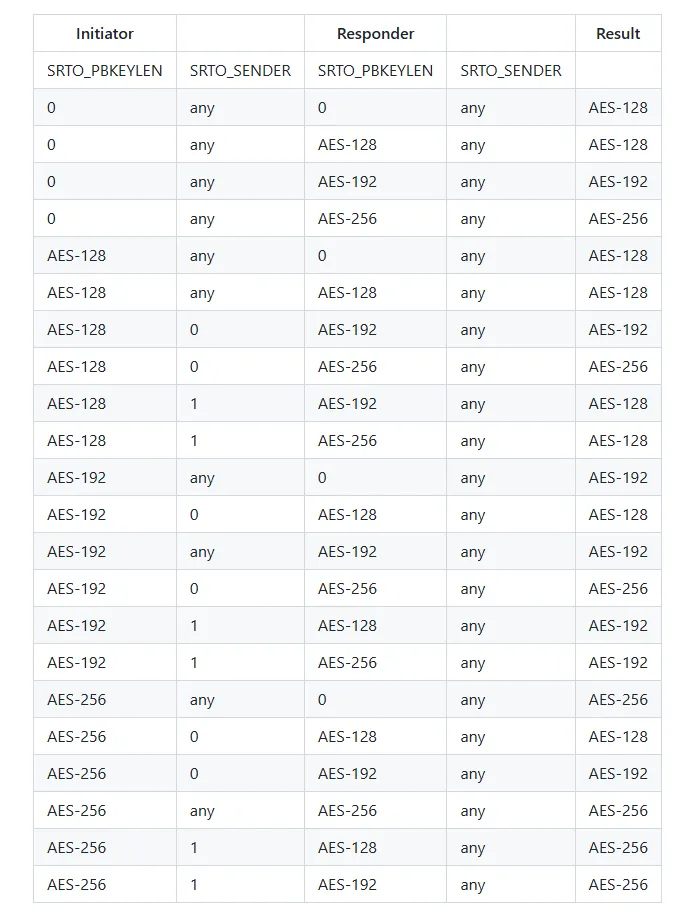
See SRT library for updates and more details - https://github.com/Haivision/srt/blob/master/docs/API/API-socket-options.md#SRTO_PBKEYLEN
For example, if the sender’s generates an AES-128 key length and the receiver an AES-192 key length, according to the table, the result key length will be AES-192.