Actions on a Remote Access Profile
0 min
Click on one of the Remote Access Profile to display information on the right-pane.
On the upper right side of the Info Pane, you will see the following options:
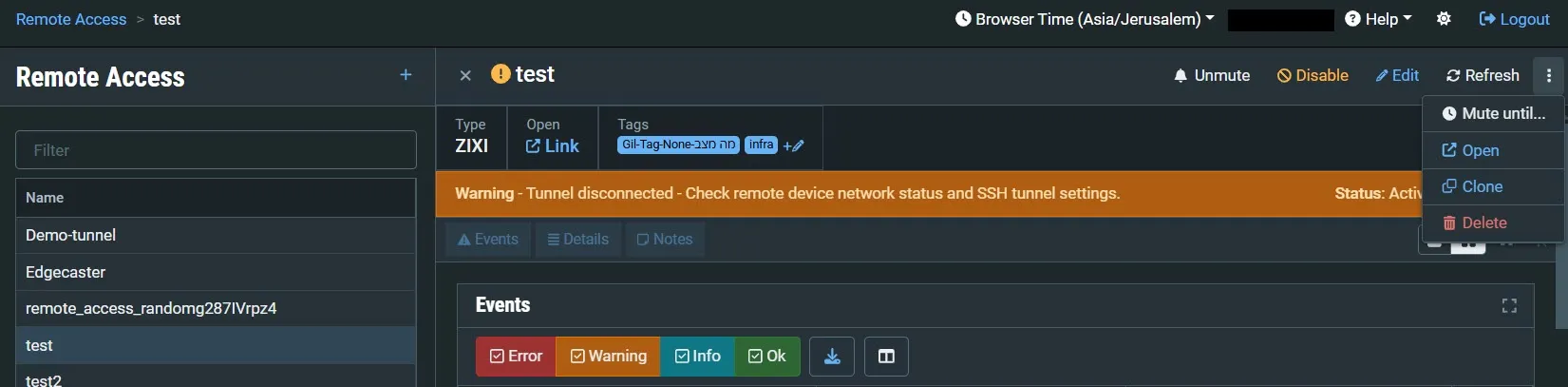
- Mute/ Unmute – disables/activates notification for error/recovery events. Set the date and time when the mute will automatically be cleared by clicking on the down arrow and selecting mute until.
- Disable/Enable – disabling a Remote Access stops all activity for that device without deleting the configuration of the device.
- Edit – enables you to edit the Zixi Receiver configuration.
- Refresh – refreshes the data on the screen.
- Mute until – set a date and time when the mute will automatically be cleared.
- Open – click to access the Remote Access Profile UI.
- Clone – create an additional Remote Access based on the settings of the selected Remote Access.
- Delete – deletes the Remote Access configuration.